Any lens can record video, but some lenses behave much better than others while the camera is rolling. A photo lens may change its framing when focus changes, lose focus when you zoom, or make small clicks and steps when you adjust the aperture. In a still photo none of this matters; in video the viewer sees it all happen. This lesson explains the lens qualities that matter for video, what makes cinema lenses different, and how to choose lenses for video without spending a fortune.
What makes a lens good for video?
How lenses work, focal length and angle of view were explained in how camera lenses work and focal length and angle of view. For video, a lens must also behave smoothly and predictably while you change focus, zoom or aperture during a shot, because every change is visible on screen.
Focus breathing
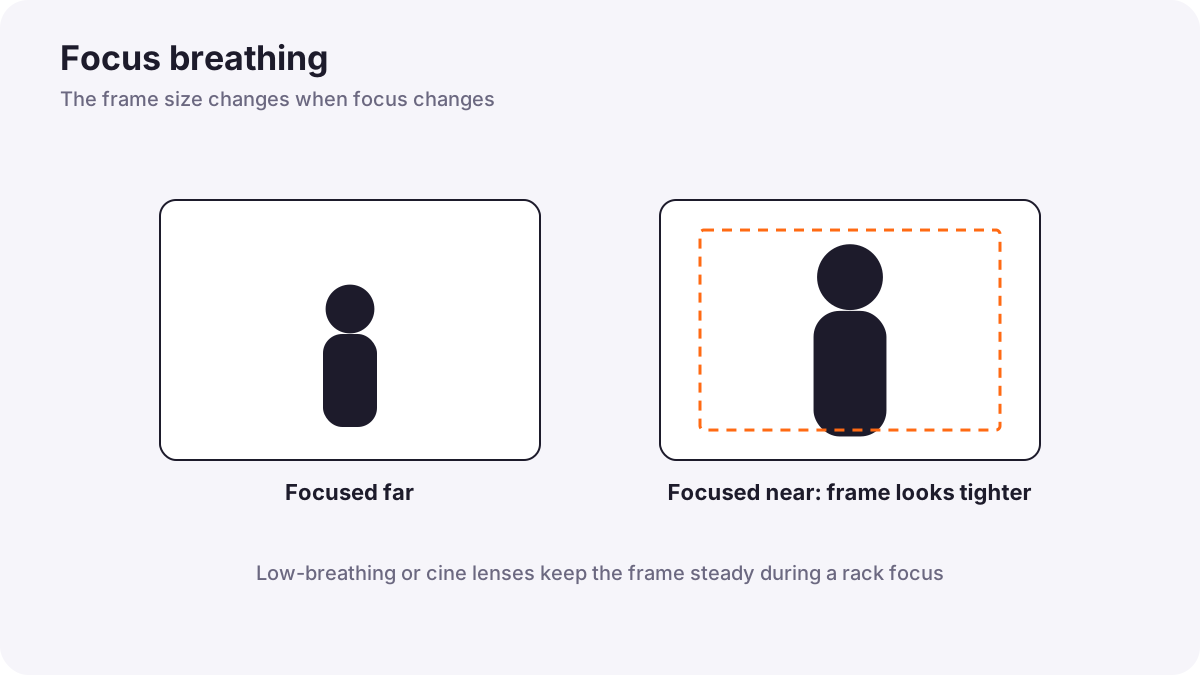
Focus breathing is a small change in the size of the picture when you change focus. As you focus from far to near, the frame may seem to zoom in or out slightly, even though you did not zoom. It happens because lens elements move inside the lens as it focuses.
In photography you rarely notice it. In video, during a rack focus from one person to another, as in focus for video, breathing makes the whole frame pulse, which looks distracting. Lenses designed for video keep breathing very small, and some cameras offer digital breathing correction, which crops the picture slightly to hide it.
Parfocal and varifocal zooms
| Parfocal zoom | Varifocal zoom | |
|---|---|---|
| When you zoom | Focus stays on the subject | Focus shifts and must be corrected |
| Typical use | Cinema and broadcast zooms | Many photo zooms |
| Zooming during a shot | Easy | Difficult without refocusing |
Tip:Most photo zoom lenses are not truly parfocal, which is one reason zooming during a video shot often looks soft. Many modern photo zooms stay close, but test yours before relying on it.
What makes a cine lens different
| Feature | Cine lens | Typical photo lens |
|---|---|---|
| Aperture marking | T-stops: measured light that actually passes through | f-stops: calculated from the opening size |
| Aperture ring | Smooth and clickless for silent changes during a shot | Often set in camera, sometimes with clicks |
| Focus ring | Wide, with a long throw (often 270 degrees or more) and distance marks | Short throw for fast autofocus |
| Gears | Geared rings for follow focus and motors | Usually no gears |
| Focus breathing | Kept very small | Often noticeable |
| Matching sets | Same size, gear position and color look across focal lengths | Each lens is different |
| Autofocus | Usually none | Fast autofocus |
T-stops matter because two lenses at the same f-stop can let through slightly different amounts of light, depending on their glass and coatings. With T-stops, T2.8 on one cine lens gives the same exposure as T2.8 on another, which helps when you change lenses during a scene. F-stops were explained in aperture.
Anamorphic lenses
Anamorphic lenses squeeze a wide view sideways onto the sensor, and the picture is stretched back out in editing or projection. They create a very wide frame, oval out-of-focus highlights and horizontal lens flares, a look seen in many widescreen films. They are specialist lenses; most creators start with ordinary spherical lenses.
Choosing lenses for video on a budget
- Use what you have: modern photo lenses with good autofocus work very well for most solo video.
- Look for low breathing: reviews often test it, and some newer photo lenses are designed for video.
- Check autofocus noise: quiet focus motors stop clicks reaching the built-in microphone.
- Consider a stabilized zoom for handheld events, as in stabilizing video.
- Add focus gears: clip-on gear rings let a photo lens work with a follow focus.
- Rent cine lenses for important projects before buying.
Choosing lenses for different situations was explained in choosing the right lens for different situations.
Common mistakes
- Zooming during a shot with a non-parfocal lens: the subject becomes soft.
- Rack focusing with a lens that breathes strongly: the frame pulses.
- Changing aperture with click stops while recording: brightness jumps in steps.
- Buying expensive cine lenses too early: money is better spent on light and sound.
How cinematographers choose lenses
Cinematographers choose lens sets for their look and their consistency: matched color, size and gear positions, T-stops for exact exposure, low breathing and long focus throws for the focus puller. Many independent filmmakers combine modern photo lenses for autofocus work with rented cine lenses for planned scenes.
Practical examples
A pulsing rack focus
- Situation
- When you rack focus between two people, the frame seems to zoom in and out.
- What to do
- You switch to a lens known for low focus breathing, or turn on the camera's breathing correction.
- Why it works
- Focus breathing changes the frame size as focus moves.
- Result
- A clean rack focus with a steady frame.
A short film on a budget
- Situation
- You need consistent exposure while changing lenses between shots.
- What to do
- You rent a matched set of cine primes with T-stops for the shoot days.
- Why it works
- T-stops and matched color keep shots consistent.
- Result
- Shots that cut together smoothly in brightness and color.
Key points
- In video, every lens change during a shot is visible, so smooth, predictable behavior matters.
- Focus breathing changes the frame size when focus changes; video lenses keep it small.
- Parfocal zooms hold focus while zooming; many photo zooms do not.
- Cine lenses use T-stops, clickless apertures, long geared focus rings and matched sets.
- Modern photo lenses work well for most solo video; rent cine lenses for planned projects.
Frequently asked questions
What is focus breathing?
What does parfocal mean?
What is the difference between T-stop and f-stop?
Do I need cine lenses for video?
Conclusion
Lenses for video should behave smoothly during a shot: low focus breathing, parfocal zooming, smooth aperture changes and precise focus rings. Cine lenses add T-stops, gears and matched sets, but modern photo lenses work well for most creators. You have now completed the lenses course for both photography and video.
Finished reading? Track your progress through Lenses and filters.