Small shakes that you would never notice in a photo become obvious in video, because the viewer watches the frame move over time. Shaky footage feels amateur and can even make viewers uncomfortable. The good news is that steady video comes from a mix of good technique and the right support, not only expensive equipment. This lesson explains handheld technique, tripods with fluid heads, monopods, gimbals and sliders, in-camera and digital stabilization, and how to choose the right method for each shot.
Why stability matters more in video
In photography, shake mainly makes a single picture blurry, as explained in sharpness from capture. In video, shake is visible as the whole picture wobbling, and it continues for the length of the clip. Steady shots let viewers concentrate on the subject and story.
There are two goals: keeping still shots completely still, and keeping moving shots smooth and controlled. Each goal has its own tools. Planned camera moves are explained in camera movement.
Handheld technique
- Use two hands and keep your elbows against your body, as in handling the camera.
- Use a wider lens: shake is less visible at wide focal lengths than at telephoto.
- Add points of contact: a strap pulled tight, a viewfinder against your eye, or leaning on a wall.
- Walk softly: bend your knees, roll from heel to toe and keep your upper body relaxed.
- Breathe slowly and hold the shot for the full length you need.
Remember:Some handheld movement can be a style choice, giving a raw, documentary feeling. Make it deliberate, not accidental.
Support tools
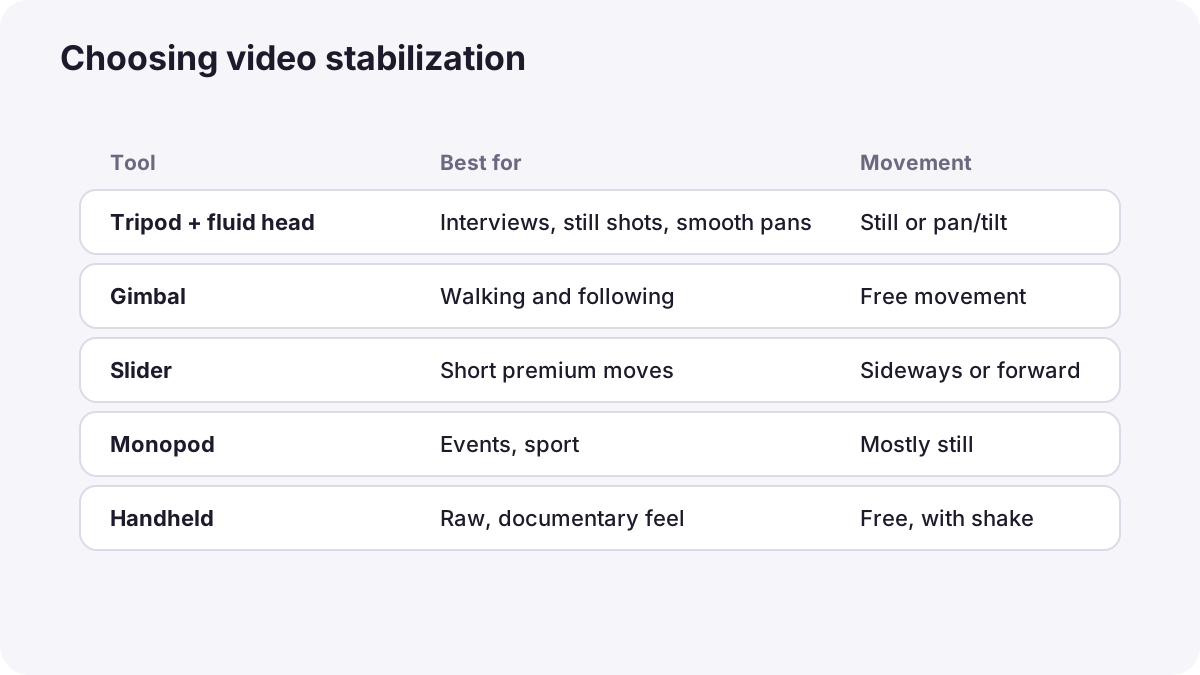
| Tool | What it does | Best for | Limit |
|---|---|---|---|
| Tripod with fluid head | Holds the camera still; the fluid head gives smooth pans and tilts | Interviews, landscapes, static shots, smooth pans | Slower to move between positions |
| Monopod | One leg for support | Events and sport where space is tight | Still allows some sway |
| Gimbal | Motors keep the camera level and steady on three axes | Walking shots, following people, smooth movement | Needs balancing and practice |
| Slider | A rail that lets the camera glide sideways or forward | Short, cinematic moves for products and interviews | Short distance only |
| Shoulder rig | Supports the camera against your shoulder | Long handheld shoots | Bulky |
Tip:Photo tripod heads are made for locking still positions and often move in small jumps. A fluid head contains thick fluid that resists movement evenly, which gives smooth video pans. If you plan to shoot a lot of video, a fluid head is one of the most useful investments.
Using a gimbal
- Balance the camera on the gimbal before turning it on, so the motors do not have to fight its weight.
- Choose a mode: follow modes let the gimbal move with you smoothly; lock mode keeps the camera pointing in one direction.
- Walk smoothly anyway: a gimbal removes rotation, not the up-and-down bounce of your steps.
- Use a wide lens and keep moves slow and purposeful.
In-camera and digital stabilization
- Lens and in-body stabilization: move parts of the lens or sensor to cancel small shakes, as in sharpness from capture.
- Digital or electronic stabilization: the camera crops the frame slightly and shifts it to cancel shake. It works well but makes the picture a little narrower and can blur fast movements.
- Stabilization in editing: editing software can analyze and steady a clip after recording, also by cropping. Some cameras record motion data that special software can use for very accurate correction.
Warning:Stabilization cannot fix everything. Very shaky footage, fast pans or motion blur from a slow shutter often show strange wobbling or warping when stabilized later. It is always better to get steady footage while recording.
On a tripod, turn off lens or body stabilization if your camera's manual recommends it, because some systems can create small drifts when the camera is perfectly still.
Choosing the right method
| Shot | Best choice |
|---|---|
| Interview or talking head | Tripod |
| Smooth pan across a landscape | Tripod with fluid head |
| Following someone walking | Gimbal, or careful handheld with stabilization |
| Product shot with gentle movement | Slider or gimbal |
| Fast event coverage | Monopod or handheld with stabilization |
| Raw documentary feeling | Deliberate handheld |
Common mistakes
- Using a telephoto lens handheld: every tiny shake is magnified.
- Not balancing the gimbal: motors struggle, vibrate or stop working.
- Fast, jerky pans on a photo tripod head: movement jumps instead of flowing.
- Relying on stabilization in editing: heavy correction crops and warps the image.
- Too much movement: steady still shots are often more powerful than constant motion.
How professionals keep video steady
Professional crews choose stabilization for the story: tripods for calm and controlled scenes, gimbals or dollies for smooth movement, and handheld when energy or intimacy is wanted. They balance and rehearse every move, use fluid heads for pans and tilts, and treat stabilization in editing as a last resort for small problems.
Practical examples
A wedding walk
- Situation
- You need to follow a couple walking through a garden.
- What to do
- You use a balanced gimbal with a wide lens and walk slowly with bent knees.
- Why it works
- The gimbal removes rotation and soft steps reduce bounce.
- Result
- A smooth, floating shot that feels cinematic.
A shaky interview
- Situation
- Your handheld interview footage wobbles constantly.
- What to do
- You put the camera on a tripod and lock the frame.
- Why it works
- Interviews need a still frame so viewers focus on the person.
- Result
- A calm, professional interview.
Key points
- Shake is far more visible in video than in photos, because the frame moves over time.
- Good handheld technique: two hands, elbows in, wide lens, soft heel-to-toe steps.
- Tripods with fluid heads give still frames and smooth pans; gimbals and sliders give smooth movement.
- Lens, in-body and digital stabilization help, but digital methods crop and can warp fast motion.
- Choose stabilization for the story, and capture steady footage rather than fixing it later.
Frequently asked questions
How do I make my videos less shaky?
Do I need a gimbal for video?
What is a fluid head?
Does digital stabilization reduce quality?
Conclusion
Steady video comes from technique first, then the right support: tripods and fluid heads for still shots and smooth pans, gimbals and sliders for movement, and stabilization as a helper rather than a fix. You have now completed the focus and motion course for both photography and video.
Finished reading? Track your progress through Focus and depth of field.