A timelapse squeezes minutes or hours into a few seconds: clouds race across the sky, cities light up as night falls, flowers open and stars wheel overhead. A hyperlapse adds movement, carrying the viewer through a place while time speeds up. Both are made from many still photos or video frames taken at regular intervals and played back as video. This lesson explains how timelapse works, how to calculate the interval and number of frames, which settings to lock, how to handle day-to-night changes and flicker, and how to shoot a hyperlapse.
What timelapse and hyperlapse are
A timelapse is a video made from frames captured at regular intervals, such as one photo every 3 seconds, and played back at a normal frame rate. Because far fewer frames are recorded than in normal video, time appears much faster. It is the opposite of slow motion, explained in frame rates and slow motion.
A hyperlapse is a timelapse in which the camera also moves a small distance between each frame, creating a smooth journey through a scene.
The timelapse calculation
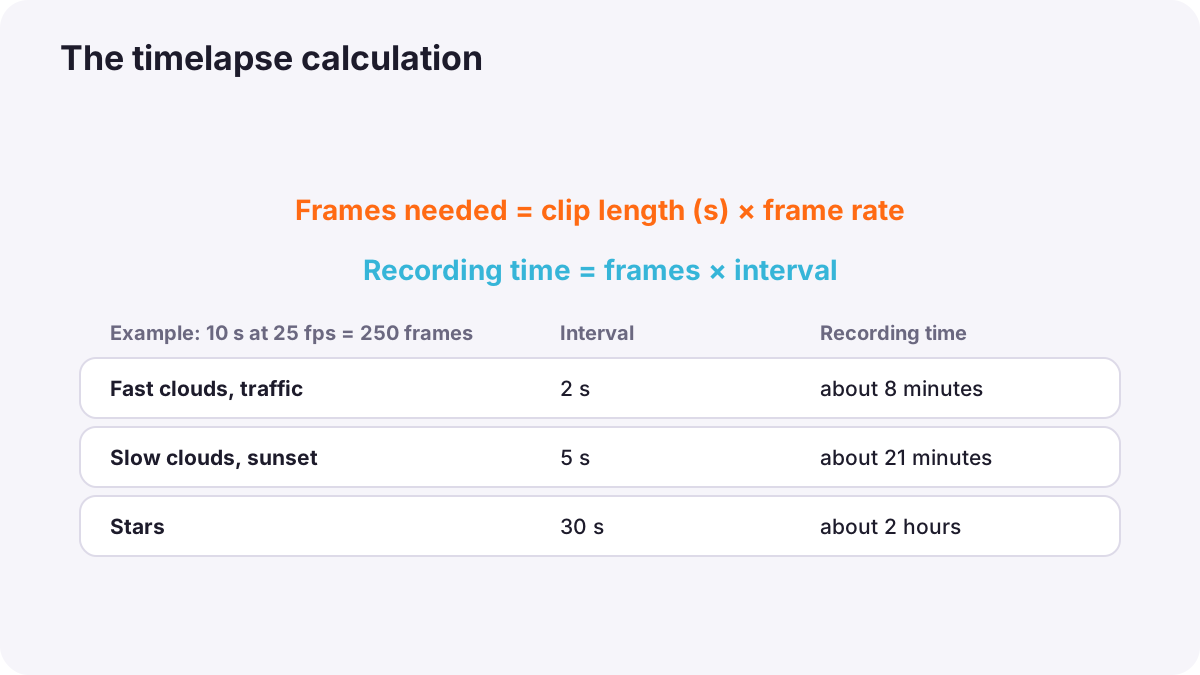
Tip:Frames needed = final clip length in seconds × playback frame rate
Tip:Recording time = frames needed × interval
| Interval | Recording time | Speed-up |
|---|---|---|
| 1 second | About 4 minutes | 25 times faster |
| 3 seconds | About 12.5 minutes | 75 times faster |
| 5 seconds | About 21 minutes | 125 times faster |
| 30 seconds | About 2 hours | 750 times faster |
Choosing the interval
| Subject | Typical interval |
|---|---|
| Fast-moving clouds, busy crowds | 1 to 2 seconds |
| City traffic | 1 to 3 seconds |
| Slow clouds, sunsets, shadows | 3 to 10 seconds |
| Day-to-night transitions | 5 to 15 seconds |
| Stars and the night sky | Back-to-back exposures of about 15 to 30 seconds |
| Plants growing, construction | Minutes to hours |
Faster subjects need shorter intervals to look smooth; slower subjects need longer intervals to show visible change. Test a short sequence first and adjust.
Settings to lock
- Manual exposure: automatic exposure changes cause flicker between frames, unless you are deliberately shooting a day-to-night sequence.
- Manual focus: so focus cannot hunt between frames.
- Fixed white balance: so colors do not jump.
- Sturdy tripod: any movement ruins the sequence, as in sharpness from capture.
- Intervalometer or built-in interval mode: takes frames automatically, as in star trails.
- Power and storage: long timelapses need full batteries or external power and plenty of card space.
Tip:For smooth motion blur, use a shutter speed close to half the interval, for example 1 to 2 seconds for a 3-second interval. This usually needs an ND filter in daylight, as in neutral-density filters. Very short shutter speeds make movement look jerky.
Photos or video for timelapse
- RAW photos: maximum quality and editing flexibility, high resolution for cropping, but many files to process.
- In-camera timelapse video: the camera creates the video file directly, quick but with less flexibility.
Day-to-night and flicker
A day-to-night timelapse is difficult because the light drops by many stops. Photographers change exposure gradually during the sequence, often by small steps in shutter speed or ISO, or use a camera's smooth automatic transition mode. Sudden jumps in brightness cause flicker.
Flicker can also come from small variations in the aperture mechanism. Some photographers hold the aperture lever slightly or use a manual-aperture lens to avoid it. Editing software can reduce remaining flicker with a deflicker tool.
Shooting a hyperlapse
- Choose a clear path and a fixed point to keep in the same place in every frame, such as the top of a tower.
- Move a short, equal step between frames, for example one footstep or a mark on the ground.
- Aim at the fixed point using a grid on the screen.
- Take the frame, then move again.
- Stabilize in editing to remove small differences between frames.
Remember:Many phones and gimbals offer automatic hyperlapse modes that stabilize the result for you.
Common mistakes
- Automatic exposure or white balance: flickering brightness and color.
- Too short a sequence: a 3-second clip after an hour of shooting.
- A loose tripod: the frame shifts during the sequence.
- Very fast shutter speeds: jerky motion.
- Batteries running out: the sequence stops before the best light.
How timelapse specialists work
Timelapse specialists plan the subject, light and duration, calculate frames and intervals in advance, and shoot RAW on solid tripods with external power. They use ND filters for natural motion blur, motorized sliders or heads for slow moving timelapses, gradual exposure changes for day-to-night sequences, and deflicker and stabilization in editing.
Practical examples
Clouds over a hill
- Situation
- You want a 10-second clip of clouds at 25 fps.
- What to do
- You need 250 frames; with a 3-second interval, you shoot for about 13 minutes with manual exposure and an ND filter.
- Why it works
- A 3-second interval suits moderate cloud movement, and the ND filter allows smooth blur.
- Result
- Smooth, flowing clouds.
A city hyperlapse
- Situation
- You want to move along a street toward a famous building.
- What to do
- You take one step between frames, keep the building's top on a grid point, and stabilize later.
- Why it works
- Equal steps and a fixed target create a smooth journey.
- Result
- A dramatic moving timelapse toward the building.
Key points
- A timelapse records frames at intervals and plays them back fast; a hyperlapse adds camera movement.
- Frames needed = clip length × frame rate; recording time = frames × interval.
- Shorter intervals suit fast subjects; longer intervals suit slow change.
- Lock exposure, focus and white balance, use a sturdy tripod, and a shutter near half the interval.
- Change exposure gradually for day-to-night, and deflicker and stabilize in editing.
Frequently asked questions
How many photos do I need for a timelapse?
What interval should I use for a timelapse?
Why does my timelapse flicker?
What is a hyperlapse?
Conclusion
Timelapse and hyperlapse compress time into seconds. Calculate frames and intervals, lock your settings, use natural motion blur, and change exposure gently for day-to-night scenes. Next, you will learn how to film video in low light and at night.
Finished reading? Track your progress through Long exposure and night.