The frame rate decides how many pictures your camera records every second, and it changes how movement feels. At 24 frames per second, motion looks like a film. At 60 frames per second, it looks smooth and live, like sport on television. Record at a high frame rate and play it back slower, and you get slow motion. This lesson explains the common frame rates, why they look different, how slow motion really works, and how to choose the right frame rate for your project.
What is a frame rate?
The frame rate is the number of separate pictures, called frames, that a video records or shows each second. It is written as fps (frames per second). The idea of frames was introduced in photography and videography.
There are two frame rates to think about: the recording frame rate, which the camera captures, and the playback frame rate, also called the project or timeline frame rate, at which the video is shown. When they are the same, motion looks real-time. When you record faster than you play back, motion becomes slow.
Common frame rates and their feel
| Frame rate | Feel | Typical uses |
|---|---|---|
| 24 fps (23.976) | Cinematic, with natural motion blur | Films, music videos, short films |
| 25 fps | Very similar to 24, slightly smoother | Television and online video in regions with 50 Hz power |
| 30 fps (29.97) | Clean, everyday look | Television and online video in regions with 60 Hz power |
| 50 or 60 fps | Very smooth, live look | Sport, gaming, fast action; can also be slowed down |
| 100 to 120 fps | Used for slow motion | Slow-motion moments, action, sport |
| 240 fps and above | Extreme slow motion | Water splashes, sports technique, special effects |
Remember:Numbers like 23.976 and 29.97 come from old television standards. Modern cameras often show them as 24 and 30. Choose one family and keep it the same through the whole project.
Why higher frame rates look different
At higher frame rates, each frame shows a shorter slice of time and less motion blur, especially when you follow the 180-degree shutter rule from exposure for video. Movement therefore looks smoother and more real, which audiences connect with live television and video games rather than cinema.
Remember:Famous films have tried high frame rates. Peter Jackson shot the Hobbit trilogy at 48 fps, and Ang Lee filmed Gemini Man at 120 fps. Audiences had mixed reactions: many said the extra smoothness made the films look less like traditional cinema. This shows how strongly 24 fps is tied to the feeling of a film.
How slow motion works
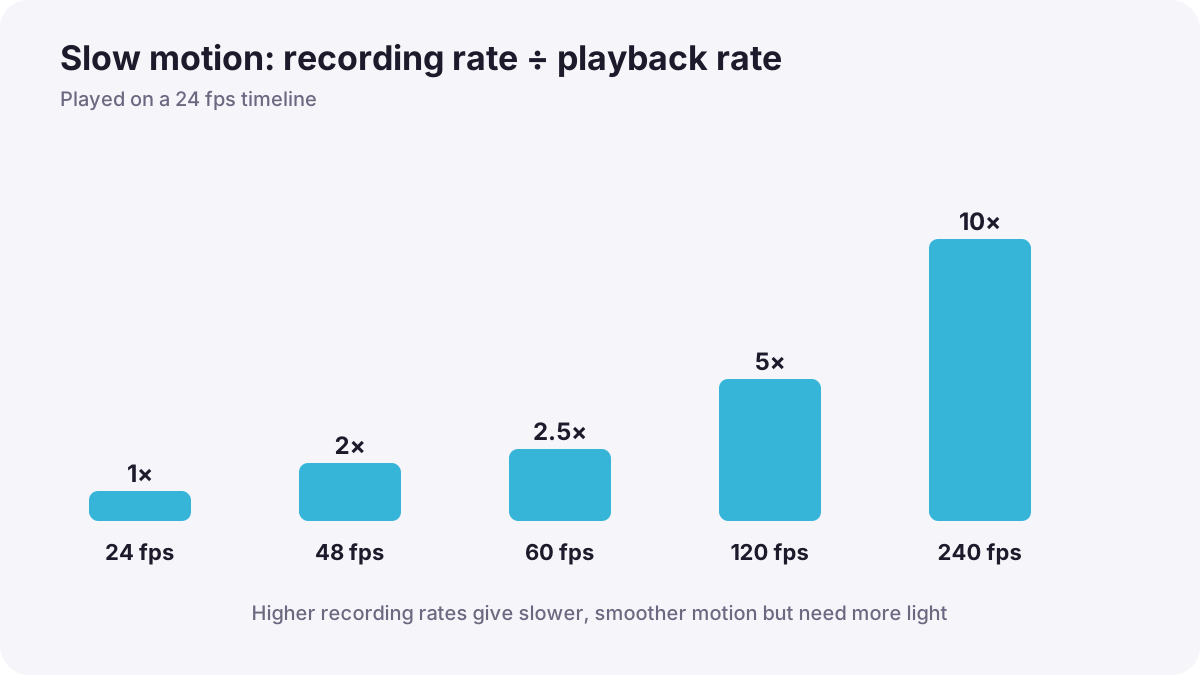
To make true slow motion, you record at a high frame rate and play it back at your normal project frame rate. Every recorded frame is shown, but over a longer time, so movement slows down smoothly.
Tip:Slow-down = recording frame rate ÷ playback frame rate
| Recorded at | Played at | Result |
|---|---|---|
| 48 fps | 24 fps | 2 times slower (50% speed) |
| 60 fps | 24 fps | 2.5 times slower (40% speed) |
| 120 fps | 24 fps | 5 times slower (20% speed) |
| 240 fps | 24 fps | 10 times slower (10% speed) |
Many cameras have a slow-motion or high-frame-rate mode that records at 120 fps but saves the file already slowed down to 24, 25 or 30 fps. In other cases you slow the clip down in your editing software, as in editing software and the timeline.
What high frame rates cost you
- More light needed: with the 180-degree rule, 120 fps needs about 1/250 s, so the image is darker.
- Lower resolution or quality: some cameras reduce resolution or crop the sensor at very high frame rates.
- Bigger files: more frames each second means more data.
- No live sound: slow-motion clips usually have no usable sound.
- Flicker: artificial lights may flicker more at high frame rates, as in continuous lighting for video.
Editing software can create fake slow motion from normal footage by inventing in-between frames, called frame interpolation. It can work for gentle movement but often creates strange warping around fast or complex motion. Recording at a high frame rate gives cleaner results.
Choosing your frame rate
- Decide the project frame rate first: 24 for a film look, 25 or 30 for most online and television work.
- Match local lighting: use 25/50 where the power supply is 50 Hz and 30/60 where it is 60 Hz to reduce flicker.
- Plan slow-motion shots: record them at 50, 60 or 120 fps or more.
- Keep the shutter at about double the recording frame rate for natural blur in each frame.
- Use the same project frame rate on every camera so clips match in editing.
Common mistakes
- Mixing frame rates in one project: clips stutter or play at the wrong speed.
- Playing 60 fps at normal speed in a 24 fps project: motion looks slightly jerky because frames are dropped.
- Using slow motion everywhere: it loses its power and makes videos drag.
- Forgetting the extra light: high-frame-rate clips come out dark and noisy.
How professionals use frame rates
Professionals choose the project frame rate before shooting and never change it. They record slow-motion moments at planned high frame rates, add light to keep exposure clean, and use slow motion for emotional or important moments rather than everywhere. Wedding filmmakers, for example, often slow down a first dance or a confetti moment to give it weight.
Practical examples
A splash of water
- Situation
- You want a dramatic slow-motion shot of water splashing.
- What to do
- You record at 120 fps with a shutter of about 1/250 s in bright light and play it in a 24 fps project.
- Why it works
- Recording at 120 fps and playing at 24 fps slows it five times without jerky motion.
- Result
- A smooth, detailed splash that lasts five times longer on screen.
Clips that stutter
- Situation
- Your edit stutters because some clips are 30 fps and others are 25 fps.
- What to do
- On the next shoot, you set every camera to the same project frame rate.
- Why it works
- Matching frame rates prevents frames being dropped or repeated.
- Result
- Smooth playback across all clips.
Key points
- Frame rate is the number of frames recorded or shown each second (fps).
- 24 fps looks cinematic; 25 and 30 fps suit everyday video; 50 and 60 fps look smooth and live.
- Slow motion = record at a high frame rate and play back at the normal project frame rate.
- Slow-down equals recording frame rate divided by playback frame rate, such as 120 ÷ 24 = 5 times slower.
- High frame rates need more light and storage; keep one project frame rate for all cameras.
Frequently asked questions
Is 24 fps or 30 fps better?
How do I make slow motion video?
Why does high frame rate look like a soap opera?
Can I make slow motion from normal footage?
Conclusion
The frame rate shapes how motion feels: 24 fps for cinema, 25 or 30 for everyday video, and high frame rates for smooth action and slow motion. Choose one project frame rate, plan slow-motion shots, and remember the extra light they need. Next, you will learn how to keep focus where it belongs while recording video.
Finished reading? Track your progress through Focus and depth of field.