Flash lights a photo for a tiny moment, but video needs light that stays on for every frame. That light is called continuous lighting, and today it is mostly LED. LED lights come in many shapes, from small on-camera panels to powerful studio lights, and they are not all equal: some make skin look natural on camera, while others add strange color tints or flicker. This lesson explains the types of continuous lights, how to judge their color quality, which modifiers to use, and how to avoid flicker.
What is continuous lighting?
Continuous lighting is light that stays on all the time, so the camera can record it in every frame of a video. Flash only fires for a fraction of a second, which is why it cannot be used for video, as explained in understanding flash. With continuous light, what you see is what the camera records, which makes it easier to learn and adjust.
The same lighting ideas you learned for photography, such as light direction, size, softness and lighting roles, work exactly the same with continuous lights, as in single-light, two-light and multi-light setups.
Types of continuous lights
| Type | What it is | Best for |
|---|---|---|
| LED panel | A flat panel of many small LEDs | Soft, even light for interviews and small rooms |
| COB light | One powerful LED chip, used with reflectors and softboxes | Strong key lights, like a studio light |
| LED tube | A light shaped like a long tube | Background color, effects, hidden lights |
| Small on-camera LED | A small light on top of the camera | Fill light for vlogs and events |
| Fresnel | A light with a special lens that focuses the beam | Controlled, hard light that can be spotted or flooded |
| Practical light | A visible lamp in the scene | Atmosphere and background, as in creative lighting techniques |
Bi-color and RGB lights
- Daylight-only: fixed at about 5600 K, often the brightest for the price.
- Bi-color: adjustable from warm (about 2700 to 3200 K) to cool daylight (about 5600 to 6500 K), so you can match the existing light in a room.
- RGB or full color: can make almost any color for creative effects. Lights that add dedicated white LEDs, often called RGBWW, usually produce better skin tones than RGB alone.
Color temperature was explained in color temperature and the appearance of light.
Judging color quality
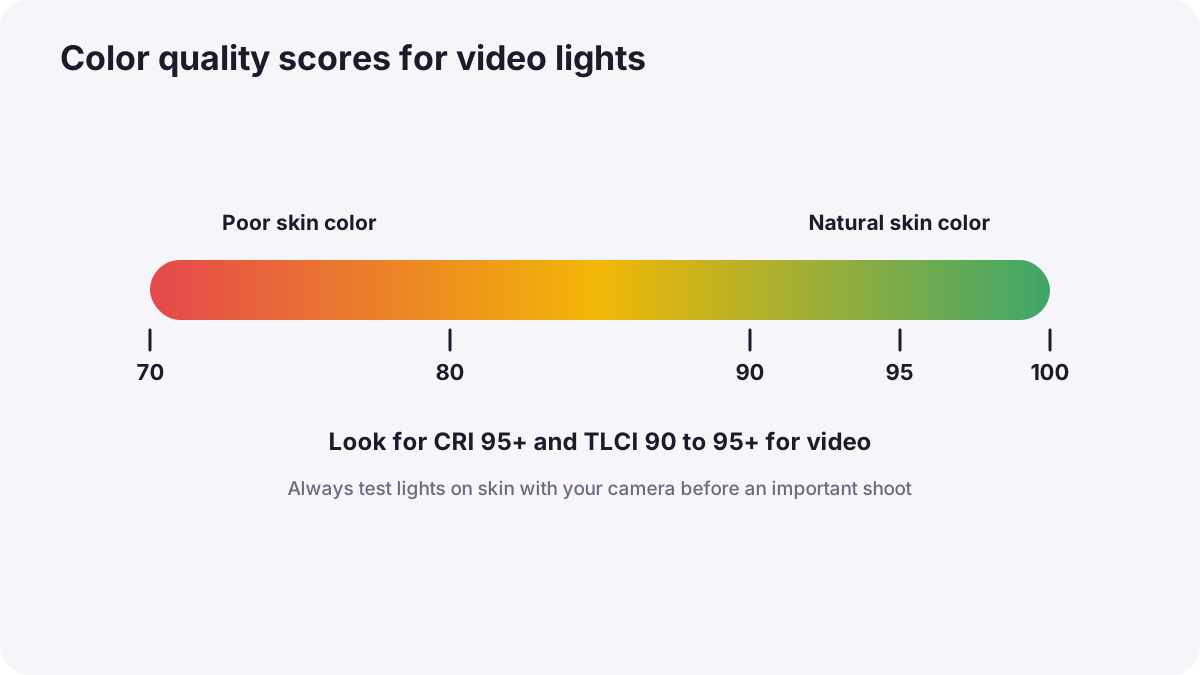
Cheap LEDs can make skin look green, gray or magenta on camera, even if they look fine to your eyes. Several scores help you compare lights:
| Score | What it measures | Good value |
|---|---|---|
| CRI (Ra) | How natural colors look to the human eye | 95 or higher, as in mixed lighting and difficult color |
| TLCI | How a television camera sees colors under the light | 90 or higher; broadcast studios commonly require at least 90 |
| TM-30 (Rf and Rg) | A modern method using many more color samples | High Rf (fidelity) close to 100 |
Tip:No single number tells the whole story, but a light with high CRI and high TLCI rarely causes serious color problems on camera. Always test new lights with skin tones before an important job.
Modifiers and control
Continuous lights use the same modifiers as studio flash, explained in studio lights and common modifiers: softboxes and diffusion for soft light, grids to control spill, and reflectors to bounce light. Video crews also use flags, black panels that block light from places it should not go, and dimmers to set exact brightness without moving the light.
Flicker
Some lights turn on and off very quickly to control brightness, a method called PWM (pulse-width modulation), or follow the rhythm of the electricity supply. Your eyes do not notice, but the camera may record bands, pulsing or rolling lines, especially at high frame rates or fast shutter speeds.
- Choose lights described as flicker-free at the frame rates and dimming levels you use.
- Match shutter speed to the power frequency for room lights, as in exposure for video.
- Test before recording: film a few seconds at your settings and watch for bands.
- Use the camera's anti-flicker or fine shutter setting if your camera offers it.
Power and practical limits
- Brightness: continuous lights are much less powerful than flash, so they often need to be close to the subject.
- Heat and noise: powerful lights may have cooling fans; choose quiet modes when recording sound.
- Batteries: many LEDs run on batteries for location work; carry spares.
- Safety: secure stands with weights and tape cables down, as in photography safety.
Common mistakes
- Buying lights only by brightness: poor color quality causes problems that are hard to fix.
- Mixing different color temperatures: faces look orange on one side and blue on the other.
- Not testing for flicker: bands appear in the final video.
- Hard, bare LEDs straight on faces: harsh shadows and shiny skin.
How video crews light
Professional gaffers, the people in charge of lighting on set, choose lights with high color scores, shape them with large soft modifiers and flags, match color temperatures with existing light, and dim lights instead of moving them when they can. They test every new light on camera for color and flicker before a production.
Practical examples
A home office video
- Situation
- Your face looks green under a cheap LED light.
- What to do
- You replace it with a light rated CRI 95 and TLCI 95, placed in a softbox.
- Why it works
- Higher color scores render skin naturally on camera.
- Result
- Natural skin tones without color correction.
A café interview
- Situation
- Warm café lamps clash with your daylight LED.
- What to do
- You set your bi-color light to about 3200 K to match the room.
- Why it works
- Matching color temperature keeps all light the same color.
- Result
- Even, warm light that looks like the real atmosphere.
Key points
- Video needs continuous light that stays on for every frame; LED is the most common type.
- LED panels, COB lights, tubes, Fresnels and practical lights each have their own uses.
- Bi-color lights adjust color temperature; RGB lights add creative colors.
- Check CRI and TLCI (90 to 95 or higher) and test skin tones on camera.
- Avoid flicker with flicker-free lights, suitable shutter speeds and a test recording.
Frequently asked questions
What lights are best for video?
What is TLCI?
Why do my lights flicker on video?
Can I use flash for video?
Conclusion
Continuous lighting gives every video frame steady light. Choose LEDs with high color quality, match color temperatures, shape light with soft modifiers and flags, and always test for flicker. Next, you will use these lights in the most common video setup of all: interview lighting.
Finished reading? Track your progress through Flash and studio lighting.