In photography you can choose almost any shutter speed you like. In video, the shutter speed changes how movement looks across every frame, so filmmakers usually tie it to the frame rate. The most famous guideline is the 180-degree shutter rule: set your shutter speed to about double your frame rate. This lesson explains why the rule exists, what shutter angle means, how to keep correct brightness when the shutter speed is fixed, and when great cinematographers break the rule on purpose.
The 180-degree shutter rule
The 180-degree shutter rule says that your shutter speed should be about twice your frame rate. At 24 frames per second you use about 1/48 of a second, which most cameras show as 1/50. At 30 frames per second you use 1/60. At 60 frames per second you use 1/120 or 1/125.
With this setting, each frame captures a small, natural amount of motion blur. When the frames play one after another, movement looks smooth and similar to how our eyes see motion. This is the look audiences are used to from cinema.
Shutter speed itself was explained in shutter speed, and frame rates were introduced in photography and videography.
Where the name comes from: shutter angle
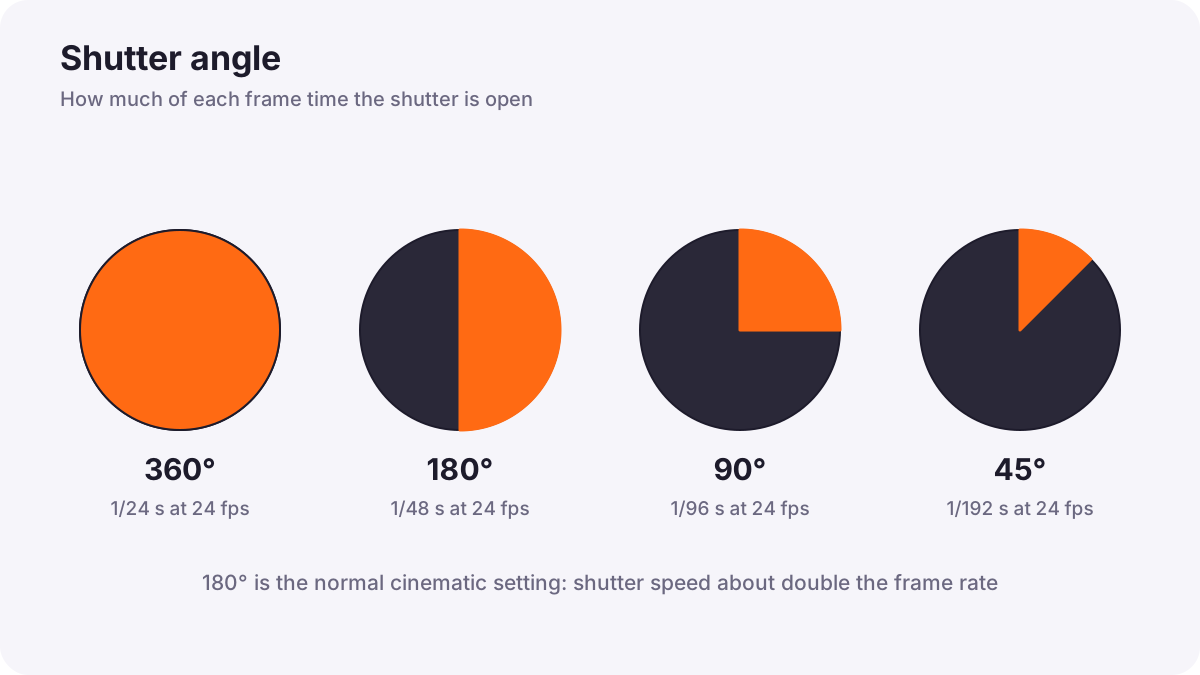
Film cameras use a spinning metal disc in front of the film, called a rotary shutter. Part of the disc is open and part is closed. The disc turns once for every frame. When the open part passes in front of the film, light exposes that frame; when the closed part passes, the film moves on to the next frame.
The size of the open part is measured in degrees of the circle. This is the shutter angle. A 180-degree shutter is open for half of each turn, so each frame is exposed for half of the frame time. At 24 fps, each frame lasts 1/24 of a second, so half of that is 1/48 of a second.
| Shutter angle | Open for | Shutter speed at 24 fps | Look of motion |
|---|---|---|---|
| 360° | The whole frame time | 1/24 s | Very smeared, dreamy |
| 180° | Half the frame time | 1/48 s (about 1/50) | Natural, cinematic |
| 90° | A quarter | 1/96 s (about 1/100) | Crisper, slightly jumpy |
| 45° | An eighth | 1/192 s (about 1/200) | Sharp, staccato, tense |
Tip:To convert: shutter speed = 1 ÷ (frame rate × 360 ÷ shutter angle). Many cinema cameras let you set the shutter angle directly, so when you change the frame rate the shutter speed changes automatically.
What changes when you break the rule
- Faster shutter speeds (smaller angles): each frame is sharper, with less blur. Fast action looks crisp but slightly jerky, like a flip book.
- Slower shutter speeds (larger angles): each frame has more blur. Movement looks smeared and dreamlike, and handheld shake becomes more visible.
Remember:Famous films break the rule deliberately. For the battle scenes in Saving Private Ryan, cinematographer Janusz Kamiński shot much of the footage with 45- and 90-degree shutters. The sharp, jittery motion made explosions and flying debris look harsh and frightening. Breaking the rule is a creative choice, not a mistake, when it supports the story.
Controlling brightness when the shutter is fixed
Because the shutter speed is fixed by the frame rate, you control brightness with the other tools:
| Tool | What it does | Side effect |
|---|---|---|
| Aperture | Lets more or less light through the lens | Changes depth of field, as in aperture |
| ISO | Brightens or darkens the signal | More ISO adds noise, as in ISO |
| ND filter | Reduces light like sunglasses for the lens | Lets you keep a wide aperture in bright light, as in neutral density filters |
| Lighting | Adds or removes light on the scene | Needs time and equipment |
Outdoors in bright sun, a 1/50 s shutter with a wide aperture is far too bright. This is why video creators use ND filters much more often than photographers. A variable ND filter lets you change the strength quickly, as in graduated and variable ND filters.
Flicker from artificial lights
Many lights flicker very fast, following the frequency of the electricity supply, which is 50 or 60 times per second depending on the region. Your eyes do not notice, but video can show dark bands or pulsing brightness. Choosing a shutter speed that matches the power frequency usually removes it: for example 1/50 or 1/100 where the supply is 50 Hz, and 1/60 or 1/120 where it is 60 Hz. Lighting flicker is explained in continuous lighting for video.
A simple video exposure method
- Choose your frame rate for the project.
- Set the shutter speed to about double the frame rate, or set a 180-degree shutter angle.
- Choose the aperture for the depth of field you want.
- Add an ND filter if the image is still too bright.
- Set ISO to fine-tune brightness, keeping it as low as the light allows.
- Check exposure with zebras or a waveform, as in video exposure tools.
Common mistakes
- Leaving the camera on automatic shutter speed: bright scenes jump to very fast speeds and motion looks jerky.
- Using a slow shutter to brighten dark scenes: movement becomes smeared and shaky.
- No ND filter outdoors: you are forced to close the aperture or use a fast shutter.
- Ignoring flicker: indoor clips show bands that are hard to fix later.
How cinematographers use shutter angle
Most professional productions keep a 180-degree shutter as their normal setting and change it only for a clear creative reason, such as tense action or a dream sequence. They carry ND filters for every lens, think in shutter angles so frame-rate changes do not upset the look, and test for flicker before recording under artificial light.
Practical examples
A sunny beach walk
- Situation
- At 25 fps and 1/50 s, your beach footage is far too bright even at f/8.
- What to do
- You add a strong ND filter and open the aperture to f/2.8 for a softer background.
- Why it works
- The ND filter reduces light without changing the shutter speed.
- Result
- Natural motion, correct brightness and a pleasing shallow depth of field.
A tense chase scene
- Situation
- A short film needs an anxious, chaotic chase.
- What to do
- You use a 90-degree shutter (1/100 s at 25 fps) for the chase only.
- Why it works
- Less motion blur makes movement crisp and jittery, adding tension.
- Result
- The chase feels sharper and more urgent than the calm scenes around it.
Key points
- The 180-degree rule: shutter speed about double the frame rate, such as 1/50 s at 24 or 25 fps.
- Shutter angle describes how much of each frame time the shutter is open; 180 degrees is half.
- Smaller angles give crisp, jumpy motion; larger angles give smeared, dreamy motion.
- With a fixed shutter, control brightness with aperture, ISO, ND filters and lighting.
- Match shutter speed to the power frequency to avoid flicker from artificial lights.
Frequently asked questions
What is the 180-degree shutter rule?
What shutter speed should I use for 24 fps?
What is shutter angle?
Why do video makers use ND filters?
Conclusion
In video, shutter speed shapes how motion looks, so it is usually set to double the frame rate. Control brightness with aperture, ISO, ND filters and light, and break the rule only for a creative reason. Next, you will learn the professional tools that show exactly how bright your video is: zebras, waveform and false color.
Finished reading? Track your progress through Exposure and metering.