A still camera frames a moment. A moving camera can lead the viewer into a scene, reveal a surprise, follow a character or make a moment feel calm, tense or exciting. Each type of camera movement has its own name and its own effect on the audience. This lesson explains the main camera movements, from simple pans and tilts to dolly, tracking and crane shots, the famous dolly zoom, and the most important principle of all: every movement should have a reason.
What is camera movement?
Camera movement is any change in the camera's direction or position during a shot. Some movements turn the camera on the spot; others move the whole camera through space. Keeping these moves steady was explained in stabilizing video.
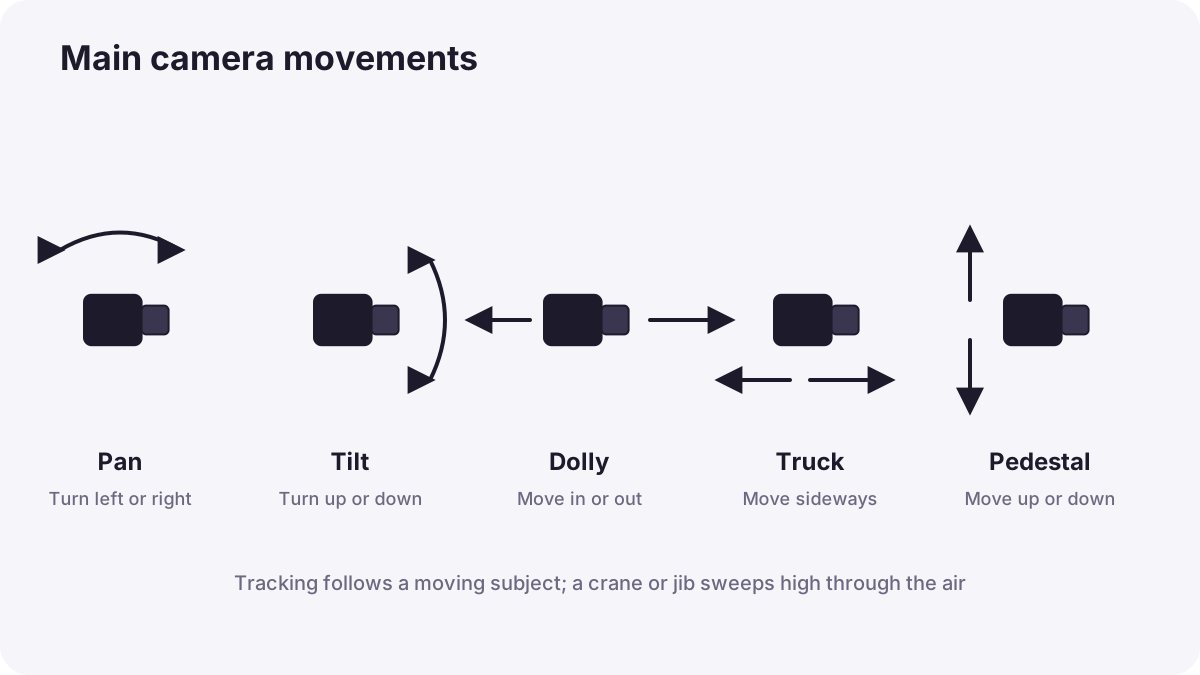
Movements that turn the camera
| Movement | What happens | Common effect |
|---|---|---|
| Pan | The camera turns left or right on a fixed point | Reveals a wide scene or follows a subject sideways |
| Tilt | The camera turns up or down on a fixed point | Reveals height, such as a tall building or a person from feet to face |
| Roll | The camera rotates around the lens axis | Disorientation; used rarely |
Remember:A whip pan is a very fast pan that blurs the picture. It can be used as an energetic transition between two shots.
Movements that move the camera
| Movement | What happens | Common effect |
|---|---|---|
| Dolly in or out (push in, pull out) | The camera moves toward or away from the subject | Push in builds focus and tension; pull out reveals context or loneliness |
| Truck (crab) | The camera moves sideways | Shows depth as foreground and background move at different speeds |
| Pedestal (boom) | The camera rises or lowers straight up or down | Reveals a scene over an object, or changes power |
| Crane or jib | The camera sweeps high through the air | Grand openings and endings |
| Tracking shot | The camera follows a moving subject | Keeps the viewer with the character |
| Arc | The camera circles around the subject | Adds drama and shows the subject from several sides |
| Handheld | The camera is held by the operator | Raw, urgent, documentary feeling |
Zoom is not a dolly
Zooming changes the focal length, so the picture is enlarged but the perspective stays the same. Dollying moves the camera, so the relationship between foreground and background changes, which feels more natural and three-dimensional. Perspective was explained in perspective, camera position and subject distance.
Remember:The dolly zoom combines both: the camera moves toward the subject while zooming out, or away while zooming in, so the subject stays the same size but the background seems to stretch or shrink. It became famous in Alfred Hitchcock's Vertigo (1958), where it shows the character's fear of heights, and is often called the Vertigo effect. It creates a strong feeling of shock or dizziness, so use it rarely.
Smooth tools for movement
Film sets use dollies on tracks for smooth pushes and trucks, cranes and jibs for high sweeping moves, and camera stabilizer vests such as the Steadicam, invented by Garrett Brown in the 1970s, for smooth movement while walking. Its famous early use includes the training run up the steps in Rocky (1976). Solo creators achieve similar results with gimbals and sliders, as in stabilizing video.
Motivated movement
A motivated movement has a clear reason in the story or the scene. The camera moves because something is happening, not just because it can.
- Follow: a person stands up and walks, so the camera follows.
- Reveal: the camera pans to show what the character has just noticed.
- Emphasize: a slow push in as someone hears important news.
- Connect: a pan from one person to another shows their relationship.
Tip:If a shot moves for no reason, viewers notice the camera instead of the story. When in doubt, keep the camera still.
Making a clean movement
- Plan the start and end frames before recording.
- Hold the start frame for 2 to 3 seconds.
- Move at a steady speed: slow moves feel calm; fast moves feel urgent.
- Hold the end frame for 2 to 3 seconds before stopping.
- Rehearse with the subject, and record more than one take.
Common mistakes
- Moving all the time: viewers feel restless and tired.
- Uneven speed: movements that speed up and slow down look accidental.
- No still frames at start and end: the editor has nowhere clean to cut.
- Zooming instead of moving: shots look flat and amateur.
- Panning too fast: the picture judders and becomes hard to watch.
How filmmakers use movement
Directors and cinematographers plan each movement to support the story. Calm scenes often use still frames and slow moves; action scenes use tracking and handheld. Many famous scenes rely on a single slow push in at the key emotional moment. Professionals rehearse every move and always film a still version of important shots as a backup.
Practical examples
Revealing a view
- Situation
- A traveller reaches a viewpoint over a valley.
- What to do
- You film over the traveller's shoulder, then pedestal up and push forward slowly to reveal the valley.
- Why it works
- A motivated reveal shares the traveller's discovery with the viewer.
- Result
- A memorable moment that feels earned.
A tense phone call
- Situation
- A character hears bad news on the phone.
- What to do
- You use a very slow push in from a medium shot to a close-up during the call.
- Why it works
- The push in draws the viewer into the character's emotion.
- Result
- The moment feels heavier and more personal.
Key points
- Pan and tilt turn the camera; dolly, truck, pedestal, crane, tracking and arc move it.
- A zoom enlarges the picture; a dolly changes perspective and feels more natural.
- The dolly zoom (Vertigo effect) keeps the subject the same size while the background warps.
- Steadicam, dollies, cranes, gimbals and sliders create smooth movement.
- Every movement should be motivated; plan, hold start and end frames and move evenly.
Frequently asked questions
What is the difference between a pan and a tilt?
What is a dolly shot?
What is the dolly zoom?
What is motivated camera movement?
Conclusion
Camera movement adds energy and meaning when it is planned and motivated: pans and tilts turn the view, dollies and tracking shots move through it, and special moves like the dolly zoom create strong feelings. Next, you will learn how to keep shots consistent so they cut together smoothly.
Finished reading? Track your progress through Composition.