Filmmakers use a shared language of shots. When a director asks for a medium close-up or an over-the-shoulder, the whole crew knows exactly what is meant. These shot sizes and angles are not just names; each one makes the audience feel closer to or further from a character, and changing between them is how a scene is told. This lesson explains the standard shot sizes, the most useful types of framing, camera angles for video, and how to frame people with the right headroom and look room.
What is a shot size?
A shot size describes how much of the subject and its surroundings appear in the frame, usually measured by how much of a person's body is visible. Wider shots show place and context; closer shots show emotion and detail. In photography, distance as a storytelling choice was introduced in perspective and viewpoint as composition tools; video uses a standard set of names so a whole crew can plan shots together.
The standard shot sizes
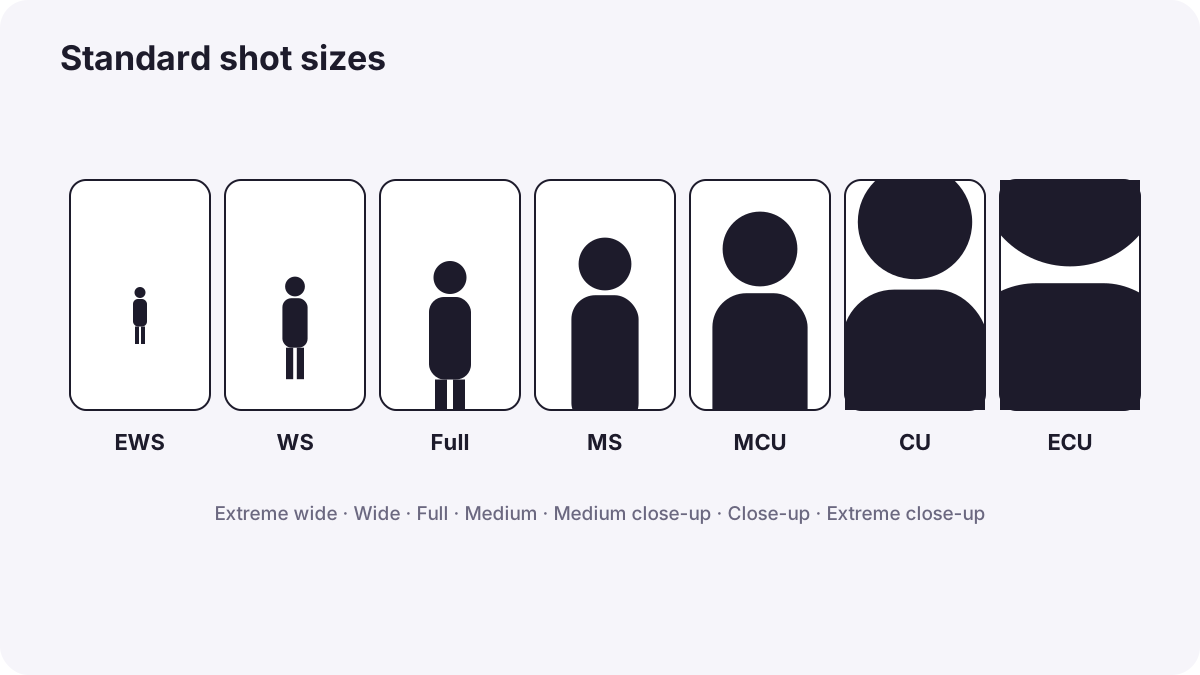
| Shot | What is visible | What it does |
|---|---|---|
| Extreme wide shot (EWS) | A huge landscape or city; people are tiny | Shows scale, isolation or location |
| Wide shot (WS) or long shot | The whole person and their surroundings | Shows where we are and what is happening |
| Full shot | The person from head to feet | Shows body language and movement |
| Medium wide shot | From about the knees up | Combines body language with some surroundings |
| Medium shot (MS) | From about the waist up | Natural, conversational view |
| Medium close-up (MCU) | From about the chest up | Common for interviews and dialogue |
| Close-up (CU) | The face fills most of the frame | Shows emotion and reactions |
| Extreme close-up (ECU) | A part of the face, such as the eyes, or a small detail | Creates intensity or highlights a detail |
| Insert shot | A close detail of an object, such as hands, a phone or a letter | Shows important information |
Tip:A wide shot at the start of a scene is often called an establishing shot, because it establishes where the scene takes place.
Types of framing with people
| Framing | Description | Use |
|---|---|---|
| Single | One person in the frame | Focus on one character |
| Two-shot | Two people in the same frame | Shows their relationship |
| Over-the-shoulder (OTS) | Seen past one person's shoulder toward another | Conversations; connects speaker and listener |
| Point of view (POV) | What a character sees | Puts the viewer in the character's place |
| Group shot | Several people together | Meetings, families, teams |
Point of view was introduced in perspective and viewpoint as composition tools. Over-the-shoulder shots are usually filmed in pairs, one from each side, so the editor can cut between the two people.
Camera angles in video
Camera angles work the same way as in photography: eye level feels neutral, a low angle makes a subject look powerful, and a high angle makes it look smaller or weaker, as explained in perspective and viewpoint as composition tools. Video adds two angles you will see often:
- Dutch angle (tilted frame): the camera is tilted so the horizon slopes, suggesting unease, confusion or danger. Use it rarely, or it loses its effect.
- Bird's-eye view (overhead): looking straight down, often used for cooking, crafts and to show patterns or movement from above.
Headroom and look room
- Headroom: the space between the top of the head and the top of the frame. Too much makes the person look small and sinking; too little feels cramped. In close-ups it is normal to cut a little off the top of the head.
- Look room (nose room): extra space in the direction the person is looking. Without it, the frame feels uncomfortable, as if the person is about to bump into the edge. It is the same idea as lead room in rule of thirds, centering and alternative composition approaches.
- Eye line: in medium and close shots, eyes usually sit around the upper third of the frame.
Covering a simple scene
- Start with a wide or establishing shot so viewers know where they are.
- Move to medium shots to follow the action and conversation.
- Add close-ups for emotion and important reactions.
- Add inserts for important details, like a ring or a message.
- Film over-the-shoulder pairs for any conversation.
Planning shots for a whole scene is called coverage, explained in coverage: shooting a scene for the edit.
Common mistakes
- Only wide shots: viewers never feel close to anyone.
- Too much headroom: people look small and lost.
- No look room: the person seems pushed against the frame edge.
- Two shots that are almost the same size: cutting between them feels like a mistake, as in continuity and the axis of action.
- Overusing Dutch angles: the effect becomes distracting.
How filmmakers use shot sizes
Directors and cinematographers plan shot sizes to control how close the audience feels to each character. A scene often moves gradually closer as tension rises, saving the tightest close-up for the most important moment. Shot lists name each shot by size and framing, so everyone on set knows what to film.
Practical examples
A coffee-shop conversation
- Situation
- Two friends talk at a table.
- What to do
- You film a wide shot of the café, a two-shot of the table, over-the-shoulder shots from both sides, and close-ups for reactions.
- Why it works
- Different sizes let the editor show place, relationship and emotion.
- Result
- A natural scene that is easy to edit.
An interview that felt distant
- Situation
- Your interview was filmed only as a medium wide shot.
- What to do
- On the next interview, you add a second angle as a medium close-up.
- Why it works
- A closer shot shows emotion and gives the editor a way to cut.
- Result
- A more engaging interview.
Key points
- Shot sizes describe how much of a person is visible, from extreme wide to extreme close-up.
- Wide shots show place; medium shots show action and conversation; close-ups show emotion.
- Common framings include singles, two-shots, over-the-shoulder, POV and inserts.
- Dutch and overhead angles add to the eye-level, high and low angles used in photography.
- Leave sensible headroom and look room, and cover scenes with a mix of shot sizes.
Frequently asked questions
What are the main shot sizes in film?
What is an establishing shot?
What is an over-the-shoulder shot?
What is look room?
Conclusion
Shot sizes and angles are the vocabulary of video: wide shots show place, medium shots show action, close-ups show emotion, and framings like over-the-shoulder connect people. Next, you will learn how moving the camera adds energy and meaning to shots.
Finished reading? Track your progress through Composition.