When shots are edited together, viewers should feel they are watching one continuous moment, not a pile of separate clips. That smooth feeling is called continuity. It depends on simple rules about where you place the camera, which way people look and move, and what stays the same between shots. This lesson explains the axis of action (often called the 180-degree rule in film), screen direction, eyeline match, the 30-degree rule, matching action, and how to avoid the continuity errors that confuse viewers.
What is continuity?
Continuity means that shots edited together feel like one smooth, believable flow of time and space. The viewer always knows where people are, which way they face and what is happening, even though the camera changed position many times. Continuity is planned during filming and completed during editing, as in continuity editing and match cuts.
The axis of action (180-degree rule in film)
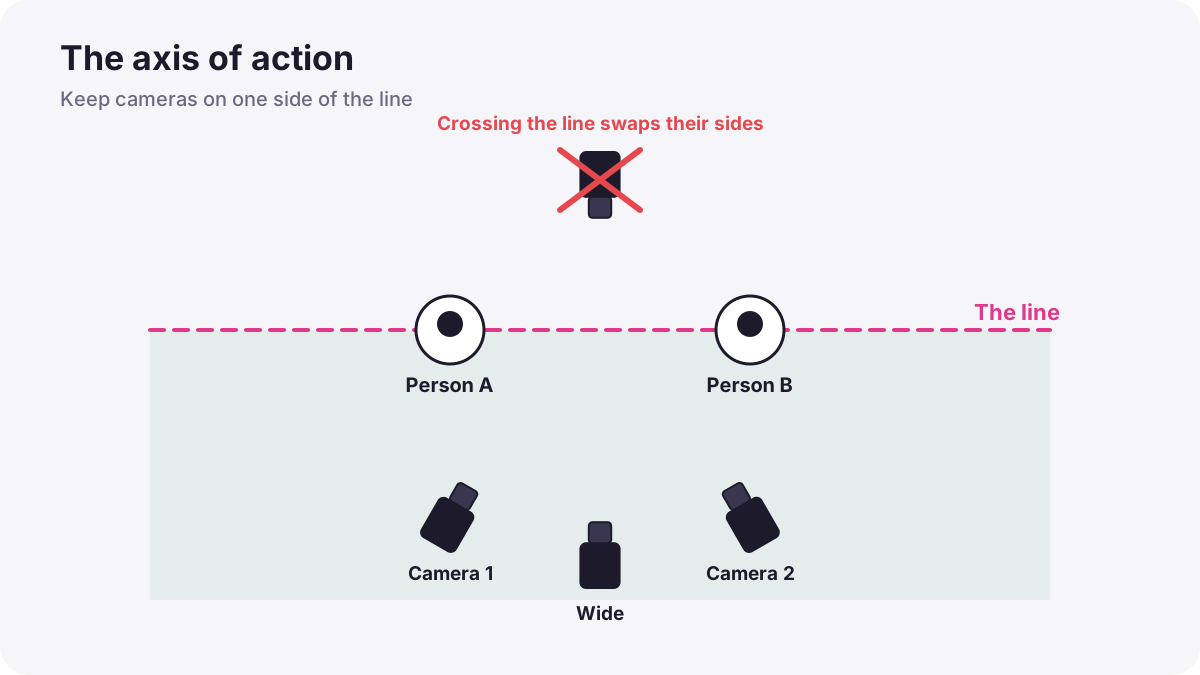
Imagine a straight line running between two people in a conversation, or along the direction a person is moving. This is the axis of action, also called the line. If you keep the camera on one side of this line for every shot, the person on the left always stays on the left, and the person on the right stays on the right.
If the camera crosses the line, the two people suddenly swap sides on screen, and viewers feel confused, as if someone moved. This is why it is called the 180-degree rule: the camera may move anywhere within a half circle (180 degrees) on one side of the line.
Warning:This film rule is about camera position. It is different from the 180-degree shutter rule, which is about shutter speed, explained in exposure for video.
Crossing the line correctly
Sometimes you need to move to the other side. You can cross the line without confusion if the viewer sees the change:
- Move the camera across in one shot, so viewers see the camera travel to the new side.
- Let the characters move, so they create a new line.
- Use a neutral shot, filmed straight along the line, between the two sides.
- Cut to a wide shot that re-establishes where everyone is.
Some directors cross the line on purpose to make the viewer feel unsettled, for example when a character becomes confused or a relationship breaks down.
Screen direction and eyeline match
- Screen direction: if a person walks left to right in one shot, they should keep moving left to right in the next shot, or it looks as if they turned around.
- Eyeline match: when a person looks at something off-screen, the next shot shows what they see, and their eyes must point toward it. In conversations, each person looks slightly to the side of the lens toward the other person's position.
The 30-degree rule and jump cuts
When you cut between two shots of the same subject, change the camera angle by at least about 30 degrees, or change the shot size clearly, for example from a medium shot to a close-up. If two shots are almost the same, the cut looks like a sudden jump, called a jump cut.
Remember:Jump cuts are sometimes used on purpose, for energy or to show time passing, and they became famous in French New Wave films such as Jean-Luc Godard's Breathless (1960). Today they are common in online videos to remove pauses. Use them deliberately, not by accident.
Continuity of action and details
| Type | What to keep the same | Example of an error |
|---|---|---|
| Action | Movements repeated the same way in every angle | A hand lifts a cup in the wide shot but not in the close-up |
| Props | Position and amount of objects | A glass is full, then half-empty, then full |
| Costume and hair | Clothes, jewellery, hair | A jacket is open in one shot and closed in the next |
| Light and weather | Direction and color of light | Sunny wide shot, cloudy close-up |
| Sound | Background sound level | Traffic noise appears and disappears |
Tip:A match on action cuts in the middle of a movement, such as a person opening a door, from one angle to another. Because the eye follows the movement, the cut feels invisible.
A simple continuity routine
- Draw the line between the people or along the movement before you film.
- Keep every camera position on one side of the line.
- Ask performers to repeat actions the same way in every take and angle.
- Take reference photos of props, costume and positions before each new setup.
- Change angle or size clearly between shots of the same subject.
Common mistakes
- Crossing the line by accident: people seem to swap places.
- Changing screen direction: a car or person appears to turn around.
- Wrong eyelines: two people in a conversation seem to look away from each other.
- Nearly identical shots: accidental jump cuts.
- Props and costumes changing: viewers notice and lose trust in the scene.
How film crews keep continuity
On professional sets, a script supervisor watches continuity: actions, props, costumes, eyelines and screen direction for every take, and takes notes and photos. Directors and cinematographers plan camera positions around the line before filming. Small crews and solo creators can do the same with a quick sketch of the line and phone reference photos.
Practical examples
A two-person interview
- Situation
- You film a host and a guest from two angles.
- What to do
- You draw a line between them and place both cameras on the same side.
- Why it works
- Staying on one side keeps the host on the left and the guest on the right in every shot.
- Result
- The conversation cuts together naturally.
A runner changing direction
- Situation
- A runner goes left to right in one shot and right to left in the next.
- What to do
- You re-film the second shot from the same side of the runner's path.
- Why it works
- Keeping screen direction shows continuous movement in one direction.
- Result
- The run looks like one journey instead of a turn.
Key points
- Continuity makes edited shots feel like one smooth, believable moment.
- The axis of action (180-degree rule in film): keep the camera on one side of the line between people.
- Keep screen direction and eyelines consistent between shots.
- Change angle by about 30 degrees or change shot size to avoid accidental jump cuts.
- Repeat actions, track props and costumes, and cut on action for invisible edits.
Frequently asked questions
What is the 180-degree rule in film?
Is the 180-degree rule the same as the shutter rule?
What is a jump cut?
What is a match on action?
Conclusion
Continuity keeps edited video believable: stay on one side of the axis of action, keep screen direction and eyelines consistent, change angles clearly and match actions and details. You have now completed the composition course for both photography and video.
Finished reading? Track your progress through Composition.