Coverage means filming a scene from enough angles and shot sizes that the editor can build it in many ways: controlling pace, choosing the best performances, cutting out mistakes and shaping emotion. Too little coverage leaves the editor stuck; too much wastes time and exhausts performers. Planning smart coverage is one of the most practical skills a director and camera team can learn. This lesson explains the standard coverage pattern, the order of shooting, how to overlap action, how much coverage you need, and when a single long take is the better choice.
What coverage is
Coverage is the set of shots filmed for a scene so it can be edited smoothly. It relies on the shot sizes and framings from shot sizes and camera angles for video and the continuity rules from continuity and the axis of action, and it supports the editing techniques from continuity editing and match cuts.
The standard coverage pattern
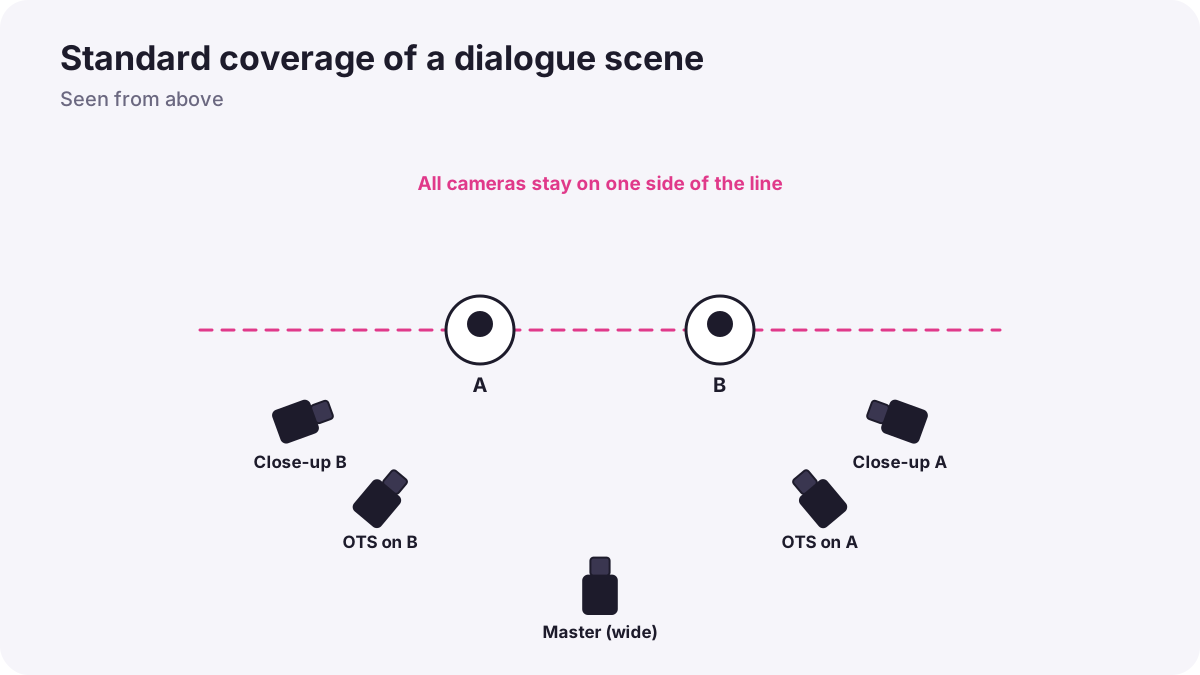
| Shot | What it gives the editor |
|---|---|
| Master shot | A wide shot of the whole scene from start to end, showing where everyone is |
| Medium two-shot | The relationship between two people |
| Over-the-shoulder pair | Each person's lines with the other in frame |
| Close-up singles | Emotion and key lines for each person |
| Reactions | Listeners' faces, as in visual storytelling in film |
| Inserts and cutaways | Hands, objects and details, as in B-roll and cutaways |
Tip:The master shot is your safety net: if every other shot fails, the scene can still be told. Many editors return to it to reset the space after close-ups.
Order of shooting
- Rehearse and block the scene, as in blocking actors and camera.
- Film the master shot first, to set the actions and continuity everyone must match.
- Move closer step by step: medium shots, over-the-shoulders, then close-ups.
- Film one side completely, then turn around and light and film the other side, saving setup time.
- Collect inserts and reactions at the end of each setup.
Overlapping action
Record each angle with the action starting before and ending after the part you need. If a character stands up at the end of the wide shot, film the close-up starting before they stand. This overlap gives the editor room to cut on action, as in continuity editing and match cuts, and to choose the best moment.
How much coverage
- Important scenes: more angles and takes for emotional peaks.
- Simple scenes: a master plus a few key shots may be enough.
- Know the edit: a storyboard and shot list show exactly which shots matter, as in storyboards and shot planning.
- Protect performances: close-ups use performers' energy; schedule them when they are fresh.
- Time limits: if time runs short, get the shots the scene cannot work without.
The long take
Sometimes a director films a scene in one continuous shot, called a long take or 'oner', with camera and performers moving together. It creates immersion and tension, but there is no coverage to fix mistakes, so it needs careful planning and rehearsal. A famous example is 1917 (2019), directed by Sam Mendes and photographed by Roger Deakins, designed to look like one continuous shot.
Warning:A long take is a deliberate creative choice. For most beginner projects, standard coverage is safer.
Common mistakes
- No master shot: the editor cannot show the space.
- Only one angle: mistakes and pacing cannot be fixed.
- No reactions or inserts: scenes feel flat and cuts have nowhere to hide.
- Cutting action short: no overlap to cut on.
- Too many unnecessary angles: time and energy wasted.
How productions plan coverage
Directors and cinematographers plan coverage in pre-production with storyboards, floor plans and shot lists, film masters first, move from wide to tight, shoot one direction at a time, overlap action, and collect reactions and inserts. A script supervisor tracks what has been covered so nothing essential is missed.
Practical examples
A dinner conversation
- Situation
- Two friends talk over dinner in a 2-minute scene.
- What to do
- You film a master, a two-shot, over-the-shoulder shots from both sides, close-ups, reactions and inserts of food and hands.
- Why it works
- This coverage lets the editor control pace and emotion.
- Result
- A natural, well-paced scene.
No time left
- Situation
- The location must be cleared in 20 minutes with close-ups still to film.
- What to do
- You film only the two close-ups needed for the emotional peak.
- Why it works
- Protect the shots the story cannot work without.
- Result
- The key moment is covered.
Key points
- Coverage is the set of shots filmed so a scene can be edited smoothly.
- Standard coverage: master, two-shot, over-the-shoulders, close-ups, reactions and inserts.
- Film the master first, move from wide to tight, and shoot one direction at a time.
- Overlap action in every angle so the editor can cut on movement.
- Plan coverage to the story; long takes are a deliberate choice with no safety net.
Frequently asked questions
What is coverage in filmmaking?
What is a master shot?
Why overlap action between shots?
What is a oner?
Conclusion
Good coverage gives the editor choices: a master, closer angles, reactions and inserts, filmed in an efficient order with overlapping action. Next, you will learn how to work with a small crew.
Finished reading? Track your progress through Directing and filmmaking.