Color in video follows the same science as color in photography, but it is delivered differently. Video has its own display standards, such as Rec.709 for ordinary screens and Rec.2020 for HDR, and many cameras record flat log footage that must be converted before it looks right. The tool that converts it is often a LUT. This lesson explains video color standards, why log footage looks the way it does, what LUTs are and what they are not, and how to keep color consistent across several cameras.
Color in video
Everything about light and color from earlier lessons still applies: color temperature, white balance and color harmony, as in white balance settings and custom white balance. In photography, color spaces such as sRGB and Adobe RGB describe the range of colors a file can hold, as explained in color spaces and profiles. Video uses its own standards, designed for televisions, computer screens, phones and cinema projectors.
Video display standards
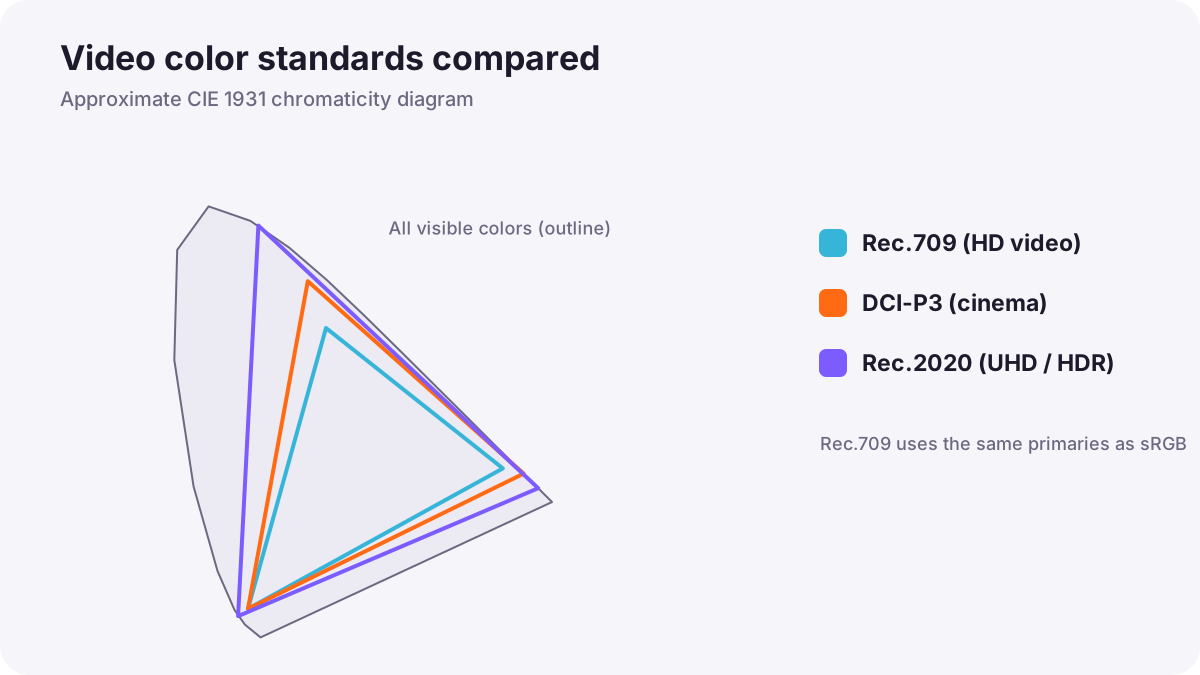
| Standard | What it is | Used for |
|---|---|---|
| Rec.709 (BT.709) | The international standard for high-definition video, with a similar range of colors to sRGB | Most ordinary (SDR) video online and on television |
| Rec.2020 (BT.2020) | A much wider range of colors | Ultra HD and HDR video |
| DCI-P3 | A wide color range made for digital cinema | Cinema projection; many modern phones and monitors |
| BT.2100 | The HDR standard combining Rec.2020 colors with HLG or PQ brightness | HDR video, as in exposing log and HDR video |
Remember:Each standard defines two things: which colors are possible (the color gamut) and how brightness is coded (the gamma or transfer curve). If footage made for one standard is shown as another, it looks too flat, too contrasty or oddly colored.
Why log footage looks flat
A log profile records brightness on a special curve that keeps detail in bright and dark areas, as explained in picture styles and camera customization. Many log formats also record a wider color range than Rec.709. When you look at log footage on an ordinary screen without converting it, it appears gray, washed out and low in saturation. Nothing is wrong: it simply needs to be translated into the display standard you will deliver in.
What a LUT is
A LUT (look-up table) is a small file that changes every input color into a specific output color. Think of it as a translation dictionary for color. LUTs are used in cameras, monitors and editing software.
| Technical (conversion) LUT | Creative (look) LUT | |
|---|---|---|
| Purpose | Converts footage from one standard to another, such as a log format to Rec.709 | Adds a style, such as warm, cool or film-like |
| Made by | Usually the camera manufacturer | Colorists, filmmakers and software makers |
| Works when | Used with the exact log format it was made for | Applied after exposure and white balance are corrected |
Warning:A LUT is not a magic fix. It expects correctly exposed footage with correct white balance. If exposure is wrong, a LUT makes the problem more obvious, not less. Using LUTs in grading is explained in using LUTs correctly.
Display LUTs for monitoring while recording were explained in exposing log and HDR video.
Keeping color consistent between cameras
- Use the same white balance setting on every camera, preferably a fixed Kelvin value.
- Use the same picture profile and color standard on all cameras.
- Film a color chart at the start of each scene so the colorist has a reference.
- Match exposure with the waveform, as in video exposure tools.
- Expect small differences between brands and correct them in grading, as in matching shots and cameras.
Viewing color correctly
To judge video color, use a calibrated screen, as in monitor calibration and consistent viewing, set for the standard you are delivering, usually Rec.709 for ordinary online video. Phone screens and televisions often add extra saturation or contrast, so always check your finished video on a few different devices.
Common mistakes
- Delivering log footage without converting it: the video looks gray and dull.
- Using the wrong conversion LUT: colors look strange and contrast is wrong.
- Using a creative LUT to fix bad exposure: problems become worse.
- Mixing picture profiles between cameras: shots do not match.
- Judging color on an uncalibrated phone: the video looks different everywhere else.
How professionals manage video color
Professional productions decide the recording format and the delivery standard before filming. Cinematographers record log with matched settings on every camera and film color charts; colorists convert footage with accurate technical transforms, then add creative looks, and check the result on calibrated reference monitors in the delivery standard.
Practical examples
Flat footage from a new camera
- Situation
- Your first log footage looks gray in the editing app.
- What to do
- You apply the camera maker's conversion LUT for that exact log format to Rec.709.
- Why it works
- The technical LUT translates log into the normal display standard.
- Result
- Normal contrast and color, ready for grading.
Two cameras that look different
- Situation
- Your main and second camera show different skin colors.
- What to do
- On the next shoot you set the same Kelvin white balance and profile, and film a color chart.
- Why it works
- Matched settings and a chart make the cameras much easier to match.
- Result
- Shots that cut together with consistent color.
Key points
- Video uses its own color standards: Rec.709 for ordinary video, Rec.2020 and BT.2100 for HDR, DCI-P3 for cinema.
- Each standard defines the range of colors and how brightness is coded.
- Log footage looks flat until it is converted to the delivery standard.
- A LUT translates colors; technical LUTs convert formats, creative LUTs add looks.
- Match white balance, profiles and exposure, and film a color chart for consistent cameras.
Frequently asked questions
What is Rec.709?
What is a LUT in video?
Why does my log footage look washed out?
Can a LUT fix bad exposure?
Conclusion
Video color follows the same science as photography but is delivered in standards like Rec.709 and Rec.2020. Log footage needs conversion, LUTs translate colors, and consistent settings keep cameras matched. You have now completed the color course for both photography and video.
Finished reading? Track your progress through Color and white balance.