LUTs are among the most popular and most misunderstood tools in video color. Many creators download a LUT, drop it on their footage and are disappointed: skin turns orange, shadows go muddy, and every clip looks different. The problem is rarely the LUT itself; it is how and where it is used. Used correctly, LUTs convert footage accurately and apply consistent looks quickly. This lesson explains the two kinds of LUT, where to place them in a grade, why correction must come first, how to control their strength, and how to make your own.
Two kinds of LUT
A LUT is a table that changes each input color into a specific output color, as introduced in color for video. Display LUTs for monitoring on set were explained in exposing log and HDR video.
| Technical (conversion) LUT | Creative (look) LUT | |
|---|---|---|
| Purpose | Convert a log format to a display standard | Add a style or mood |
| Input it expects | One exact camera log format | Usually correctly exposed, balanced footage in a known standard |
| Position in the grade | After technical corrections, before the look | After correction and matching |
Why LUTs often look bad
- Wrong input: a LUT made for one camera's log format is used on another camera or on normal footage.
- Uncorrected footage: exposure or white balance errors are exaggerated by the LUT.
- Wrong position: the LUT is placed before corrections that it should come after, or the other way round.
- Too strong: the look is applied at full strength to every shot.
- Stacked LUTs: two conversions or looks multiply each other's effects.
Warning:A LUT is not a fix. It expects footage that is already correctly exposed and balanced. Correct first, then add the LUT.
Where to place LUTs
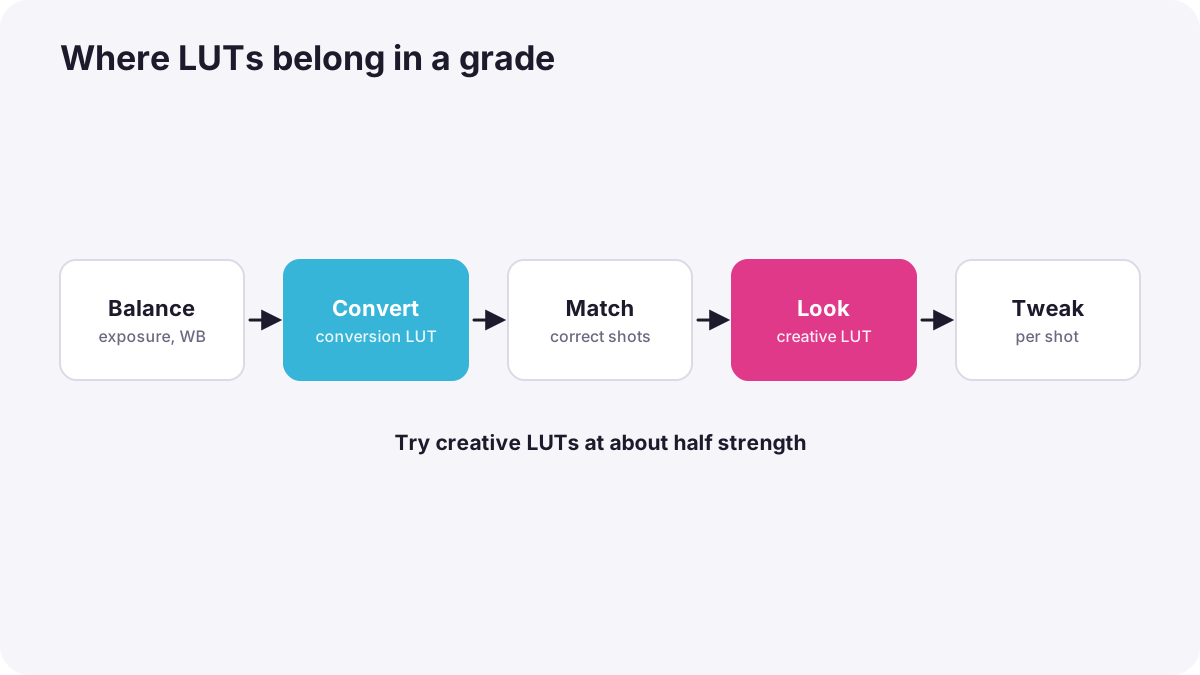
- Exposure and white balance corrections on the original footage.
- Conversion: a technical LUT or a color-space transform, as in working with log footage and color-space transforms.
- Primary corrections and matching in the display space, as in primary correction.
- Creative look LUT, often on a layer or adjustment applied to the whole timeline.
- Final small adjustments per shot if needed.
Controlling strength
- Reduce the mix: many programs let you blend a creative LUT at 30 to 70 percent instead of full strength.
- Protect skin: check faces on the vectorscope after applying a look, as in video scopes.
- Adjust per scene: night and day scenes may need different strengths of the same look.
Tip:Try a creative LUT at half strength first. Most looks feel more natural and premium when used gently.
Making your own LUTs
Most grading software can export a grade as a LUT. Colorists often build a look on a reference shot, export it as a LUT, and give it to the camera team as a display LUT so everyone sees the intended look on set. Remember that a LUT can only store simple color changes; it cannot store masks, tracking or noise reduction.
Licences and sources
Conversion LUTs from camera makers are usually free. Creative LUT packs are sold or shared under licences; check that commercial use is allowed, as in licensing and usage rights.
Common mistakes
- Using a LUT made for a different camera or profile.
- Applying a look before correcting exposure and balance.
- Stacking two conversion LUTs.
- Leaving every LUT at 100 percent.
- Expecting a LUT to match different cameras automatically.
How colorists use LUTs
Colorists use technical LUTs or color-space transforms for precise conversion, build their own creative looks rather than relying on generic packs, apply looks after correction and matching, control their strength and protect skin tones. They often supply show LUTs to the camera team so the look is consistent from set to final grade.
Practical examples
Orange skin
- Situation
- A downloaded cinematic LUT makes skin bright orange.
- What to do
- You first balance white and exposure, then apply the LUT at 50 percent.
- Why it works
- LUTs exaggerate uncorrected footage; reducing strength keeps skin natural.
- Result
- A pleasant look with believable skin.
A consistent look on set
- Situation
- A director wants the crew to see the film's look while shooting.
- What to do
- You build the look in grading, export it as a LUT and load it into the camera monitors as a display LUT.
- Why it works
- Everyone sees the intended look, while the camera still records log.
- Result
- Better lighting and framing decisions on set.
Key points
- Technical LUTs convert a specific log format; creative LUTs add a look.
- LUTs look bad when used on the wrong footage, before correction, too strongly or stacked.
- Correct exposure and balance first, convert, correct and match, then add the look.
- Blend creative LUTs at reduced strength and check skin on the vectorscope.
- You can export your own looks as LUTs, but they cannot store masks or tracking.
Frequently asked questions
Why does my LUT look bad?
Should I apply a LUT before or after correction?
Can I make my own LUT?
Can a LUT match two cameras?
Conclusion
LUTs work when they are used in the right place: correct and convert first, then apply looks gently and check skin. Next, you will learn how to match shots and cameras so a scene looks consistent.
Finished reading? Track your progress through Color grading.