Log video looks flat, gray and washed out straight from the camera. That is on purpose: it keeps as much detail as possible in the brightest and darkest parts of the picture, ready for color grading later. HDR video goes one step further and is made to be shown on bright modern screens. Both can look wonderful, but both need careful exposure, because a log or HDR clip that is too dark often turns noisy when you grade it. This lesson explains how to expose log and HDR video safely.
What log and HDR video are
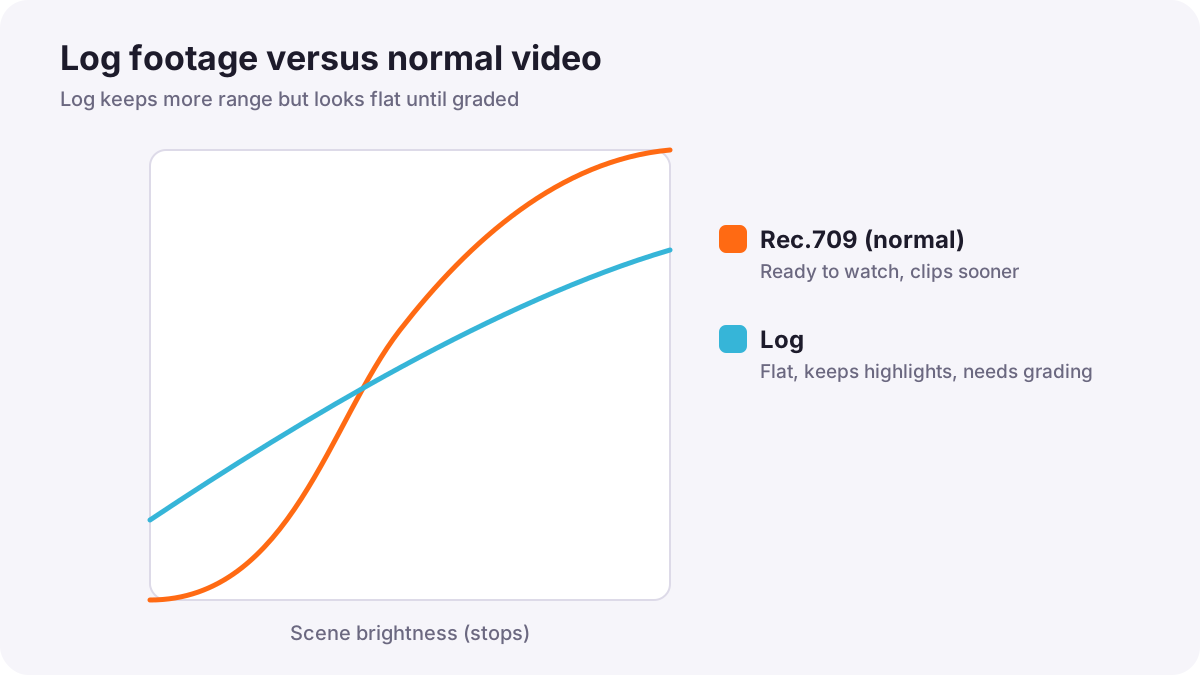
A log profile records brightness on a curve that squeezes a very wide range of light into the file, so very little detail is lost in bright skies or dark shadows. It looks flat until you convert and grade it. Log profiles were introduced in picture styles and camera customization.
HDR (high dynamic range) video is made to be shown on screens that can display much brighter highlights and richer colors than ordinary screens. Ordinary video is called SDR (standard dynamic range) and usually follows the Rec.709 standard. Dynamic range itself is explained in backlight, silhouettes, high-key and low-key exposure.
Rules for exposing log
- Use the camera's log ISO range: many cameras set a higher minimum ISO when log is on, because that is where the sensor gives its widest dynamic range. Check your camera's manual.
- Never underexpose log: shadows in log hold little information; brightening them later reveals noise and blotchy color.
- Protect highlights: use zebras or the waveform to make sure skies and faces are not clipped.
- Use your camera maker's guidance: many manufacturers publish the brightness level where middle gray and skin should sit in their log format, and these levels differ between brands.
- Record in 10-bit if possible: log stretched in grading can show banding in 8-bit, as in bit depth, chroma subsampling and RAW video.
Tip:Many experienced shooters expose log a little brighter than the camera's meter suggests, often around one stop, then bring it down in grading for cleaner shadows. Go too far and you clip highlights. Test your own camera before an important job.
Seeing a normal image while recording log
Because log looks flat, it is hard to judge on the screen. Most cameras and monitors offer a view assist or monitoring LUT. A LUT (look-up table) is a small file that converts the flat log picture into a normal-looking picture on the screen only. The recorded file stays in log.
- Display LUT or view assist: makes the screen look normal so you can judge faces and color.
- Exposure tools: on many cameras, zebras and waveforms read the log signal, not the LUT view; learn which one your camera uses.
- Baking in a LUT: some cameras can record with the LUT applied; this removes grading flexibility, so do it only if you will not grade.
Using LUTs in editing is explained in using LUTs correctly.
HLG and PQ: the two HDR systems
| HLG (Hybrid Log-Gamma) | PQ (Perceptual Quantizer) | |
|---|---|---|
| Designed for | Broadcast and quick delivery | Streaming, films and high-end delivery |
| On ordinary screens | Still looks acceptable on many SDR screens | Needs an HDR screen or a separate SDR version |
| Grading | Can be used with little or no grading | Usually graded and mastered carefully |
| Related formats | Used in some live and broadcast HDR | HDR10, HDR10+ and Dolby Vision are based on PQ |
Both are part of the international HDR standard known as BT.2100. If you are new to HDR, HLG is the simpler starting point; PQ gives the most control for professional delivery. Grading for HDR is explained in grading for HDR and SDR delivery.
Exposing HDR video
- Protect highlights: HDR shows highlight detail, so clipped skies and lights look obvious.
- Keep faces natural: faces should not become as bright as the sky just because the screen can show more.
- Use HDR view assist: when recording HDR on an ordinary screen, the camera can show an approximate view.
- Check on a real HDR screen before delivering an HDR project.
A simple log workflow
- Choose log and 10-bit recording if your camera offers it.
- Set the shutter for your frame rate, as in exposure for video.
- Set ISO inside the camera's log range.
- Turn on a display LUT to see a normal image.
- Expose with zebras or a waveform to protect highlights and keep shadows clean.
- Record a short test and check it after grading before the real recording.
Common mistakes
- Exposing log by eye on a flat screen: footage ends up too dark and noisy.
- Using log for every shot: simple projects with no grading look better in a normal profile.
- Recording 8-bit log and grading heavily: banding appears in skies and walls.
- Recording PQ HDR without an HDR screen to check: results are unpredictable.
How professionals expose log and HDR
Cinematographers test each camera's log format before a project, follow the manufacturer's exposure guidance, monitor through display LUTs, and measure with waveforms rather than trusting the screen. They record 10-bit or RAW, protect highlights and keep shadows clean, and plan in advance whether the final delivery will be SDR, HDR or both.
Practical examples
A sunset in log
- Situation
- Your log sunset looks dark on the screen, and the grade shows noisy shadows.
- What to do
- On the next shoot you turn on a display LUT and expose a little brighter, checking that the sun's surroundings do not clip.
- Why it works
- Log needs enough light in the shadows to grade cleanly.
- Result
- A rich sunset with smooth shadows after grading.
A quick HDR event video
- Situation
- A client wants an HDR video quickly, with little time for grading.
- What to do
- You record in HLG and use the camera's HDR view assist.
- Why it works
- HLG works with little grading and still looks acceptable on many ordinary screens.
- Result
- Fast delivery that looks good on both HDR and many SDR screens.
Key points
- Log keeps a wide range of brightness but looks flat until it is graded.
- Use the camera's log ISO range, never underexpose log, and protect highlights.
- Monitor through a display LUT or view assist; the recorded file stays in log.
- HLG suits broadcast and quick delivery; PQ (HDR10, Dolby Vision) suits carefully graded delivery.
- Record 10-bit for log and HDR whenever possible, and test before important work.
Frequently asked questions
How should I expose log footage?
Why does log footage look washed out?
What is the difference between HLG and PQ?
Should beginners shoot in log?
Conclusion
Log and HDR keep more detail in bright and dark areas but demand careful exposure: use the right ISO, avoid underexposure, protect highlights, monitor through a LUT and record 10-bit. You have now completed the exposure course for both photography and video.
Finished reading? Track your progress through Exposure and metering.