Artificial intelligence now appears in almost every stage of video work. Editing software can turn speech into text and let you cut a video by editing words, reframe horizontal footage for vertical screens, remove background noise and track objects automatically. Generative tools can even create short video clips from a written description. These tools save time, but they also raise questions about quality, honesty and consent. This lesson explains the main kinds of AI in video, what they do well, where they fail, and how to use them responsibly.
Assistive and generative AI in video
The difference between assistive AI, which helps edit what you filmed, and generative AI, which creates new content, was explained for photos in AI-assisted image editing. The same idea applies to video. AI-assisted workflows were introduced in AI-assisted photography workflows.
Assistive AI tools for video
| Feature | What it does | Watch out for |
|---|---|---|
| Transcription | Turns speech into text and captions | Names and technical words are often wrong |
| Text-based editing | Cut a video by deleting words in the transcript | Cuts can be abrupt; check rhythm and sound |
| Auto reframing | Follows the subject when changing aspect ratio, such as 16:9 to 9:16 | May follow the wrong person or crop badly |
| Audio cleanup | Reduces noise, echo and hum in voices | Too much makes voices sound robotic |
| Object tracking and masking | Follows objects for effects, blur or color changes | Struggles with fast or complex movement |
| Scene detection and search | Finds cuts, faces or objects in long footage | Useful for organizing, not judging quality |
| Upscaling and interpolation | Increases resolution or creates in-between frames | Can invent false detail and warp motion |
Captions were explained in publishing video online, and frame interpolation in frame rates and slow motion.
Generative AI video
Text-to-video and image-to-video tools create new moving images from a written prompt or a still picture. They improved very quickly between 2024 and 2026 and are now used for concept tests, mood pieces, background clips and visual effects. The leading tools and their terms change often, and some services have been withdrawn, so check current options and licences before relying on any of them.
- Short clips: most tools generate clips of seconds rather than minutes.
- Consistency problems: characters, objects and places can change between shots.
- Physics and detail errors: hands, text, reflections and movement can look wrong.
- Licensing: terms for commercial use differ between services and plans.
- Labels: many tools attach visible or invisible markers, such as Content Credentials or watermarks, as in image authenticity and provenance.
AI voices, dubbing and faces
AI can clone voices, translate speech into other languages with matching lip movements, and change or replace faces. These tools can help with accessibility and translation, but they can also create convincing fakes. Never copy a real person's voice or face without clear, informed permission, and never use these tools to deceive. Synthetic media and evidence were explained in synthetic media and photographic evidence, and consent in filming people and places.
Using AI responsibly
- Be honest: tell clients and viewers when important content is generated or heavily altered, especially in news and documentary work.
- Check rights: make sure you may use generated material commercially, and remember that purely AI-generated content may not be protected by copyright in some countries, as in ownership and authorship.
- Protect people: get consent before altering anyone's face or voice.
- Check the result: review AI captions, cuts and enhancements with your own eyes and ears.
- Keep originals: archive the original footage alongside AI-processed versions.
A balanced AI workflow
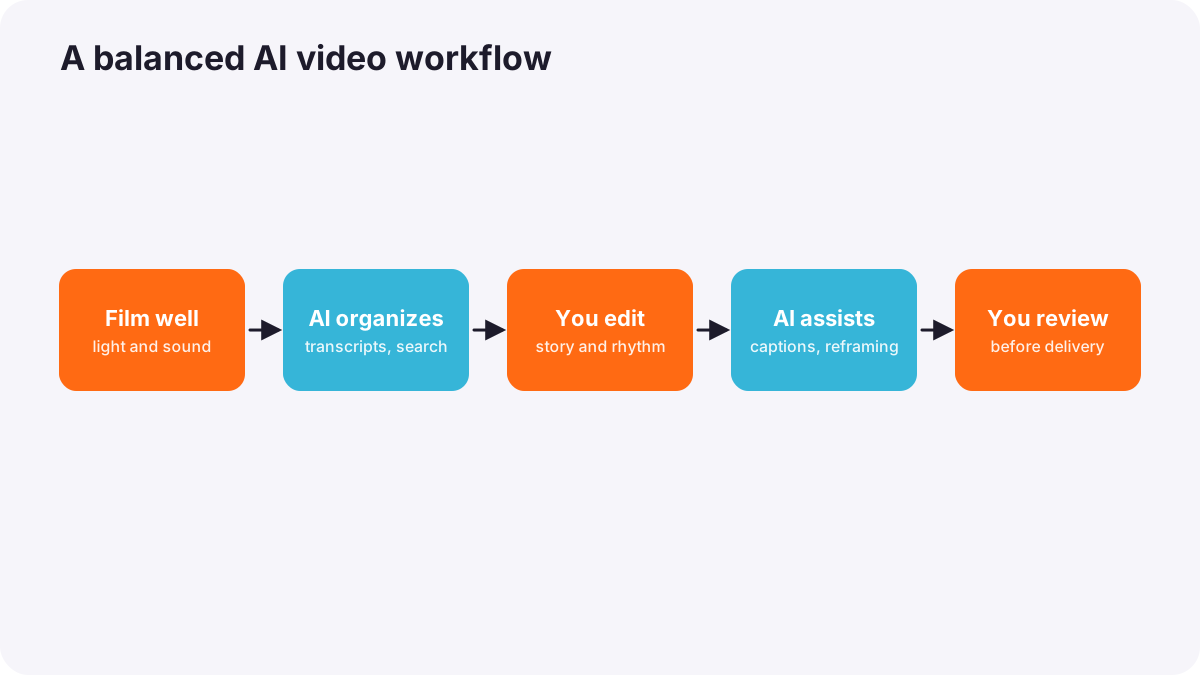
- Film real footage with good light and sound; AI cannot fully fix poor recording.
- Use AI to organize: transcription, scene search and rough selection.
- Edit with human judgment: story, rhythm and emotion, as in what video editing is.
- Use AI for repetitive tasks: captions, reframing and gentle audio cleanup.
- Use generative clips only where suitable and clearly allowed by the licence.
- Review everything before delivery.
Tip:AI can speed up the work, but the skills that make video good, seeing light, framing, recording clear sound and telling a story, remain human skills, as in future-facing photography workflows.
Common mistakes
- Publishing unchecked AI captions: errors in names and facts.
- Over-processing audio: voices sound artificial.
- Using generated clips in documentaries without saying so: viewers are misled.
- Ignoring licences: generated material is used outside its allowed terms.
- Cloning voices or faces without permission: serious ethical and legal problems.
How professionals use AI in video
Professional editors and studios use AI mainly to save time on transcription, organization, captions, reframing and cleanup, while keeping creative decisions human. They test generative tools for concepts and specific effects, check licences carefully, disclose generated content where it matters, protect people's likeness, and keep up with fast-changing tools and rules.
Practical examples
A long interview edit
- Situation
- You must cut a 90-minute interview into a 3-minute story.
- What to do
- You transcribe it with AI, select key sentences in the transcript, then refine every cut by listening and watching.
- Why it works
- AI speeds up finding moments; human judgment keeps the rhythm and meaning.
- Result
- A strong edit in a fraction of the usual time.
A client asks for a cloned voice
- Situation
- A client wants a famous voice for an advert using AI.
- What to do
- You explain that it needs the person's clear permission and offer a licensed voice actor instead.
- Why it works
- Copying someone's voice without consent is unethical and may be illegal.
- Result
- A legal, professional voiceover.
Key points
- Assistive AI edits what you filmed; generative AI creates new video content.
- Useful assistive tools: transcription, text-based editing, reframing, audio cleanup, tracking and search.
- Generative video makes short clips with consistency and detail limits; tools and licences change often.
- Never clone voices or faces without consent, and disclose generated content where it matters.
- Use AI for repetitive tasks and keep story, light, sound and judgment human.
Frequently asked questions
Can AI edit my videos for me?
Can I use AI-generated video in client work?
What are the limits of AI video generation?
Is it legal to clone someone's voice with AI?
Conclusion
AI is a powerful assistant for video: it speeds up transcription, editing tasks, captions, reframing and cleanup, and can generate short clips. Use it honestly, check its results and licences, protect people's likeness, and keep the creative core of filmmaking human. You have now completed the technology course for both photography and video.
Finished reading? Track your progress through AI and new technology.