Creative video techniques add surprise, energy and personality to a film: a skateboarder suddenly slowing to a crawl at the top of a jump, a scene changing as the camera whips past a wall, or objects building themselves frame by frame. Many of these effects are planned while filming, not added later with complicated software. This lesson explains speed ramps, in-camera transitions, match cuts, reverse motion and stop motion, how to film each one, and how to use them so they support your story instead of distracting from it.
Creative techniques with a purpose
Creative photography is about intentional experimentation, as in creative photography and intentional experimentation. In video, creative techniques play with time, movement and transitions. They work best when they express something: energy, surprise, a change of place or the passing of time.
Speed ramps
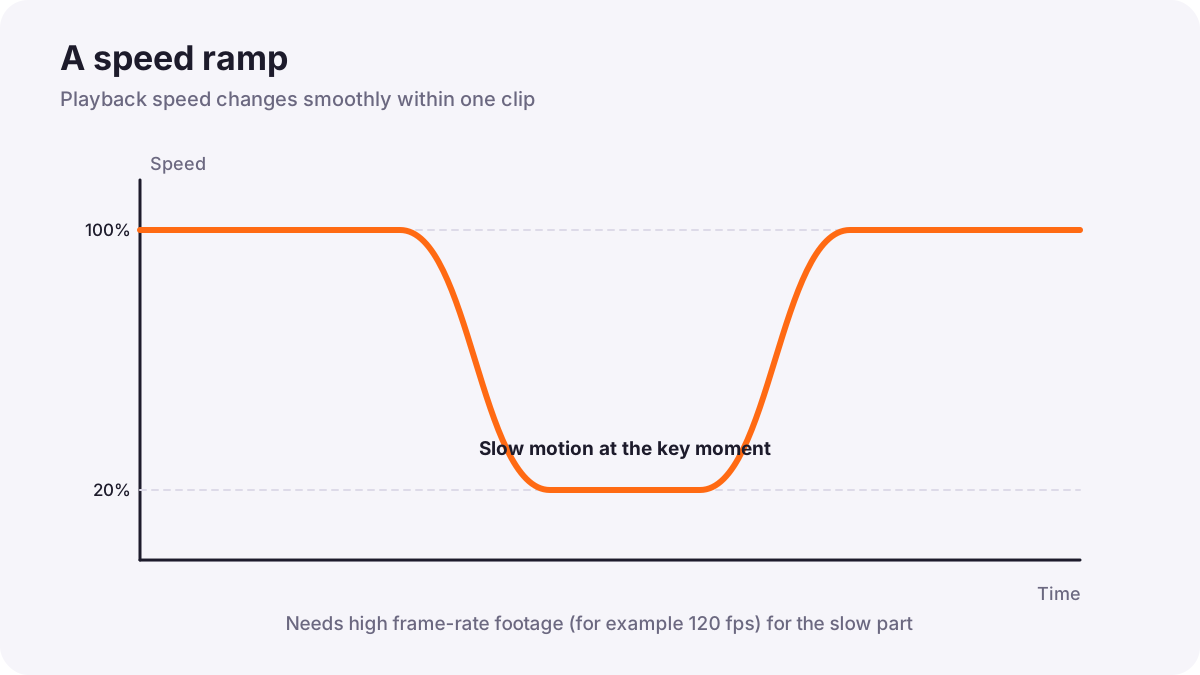
A speed ramp changes the speed of a clip smoothly while it plays, for example from normal speed into slow motion and back again. It draws attention to a key moment such as a jump, a splash or a dancer's spin.
- Record at a high frame rate, such as 60 or 120 fps, so the slow part stays smooth, as in frame rates and slow motion.
- Use enough light for the faster shutter speed.
- Film the whole action with some time before and after the peak.
- In editing, speed up the build-up, slow the key moment, then speed up again, often timed to the music.
In-camera transitions
An in-camera transition hides a cut inside a movement or an object, so one shot flows into the next. The trick is to end the first shot and start the second with the same movement or framing.
| Transition | How to film it |
|---|---|
| Whip pan | End shot 1 with a fast pan; start shot 2 with a fast pan in the same direction; cut in the blur |
| Object wipe (mask) | Move the camera past a wall, tree or person until the frame is covered; start shot 2 from behind another object |
| Push into darkness | Move toward a dark surface or a jacket until the frame is black; start shot 2 moving out of darkness |
| Spin or roll | Rotate the camera at the end of shot 1 and the start of shot 2 |
| Focus transition | Defocus to a blur at the end of shot 1 and come into focus at the start of shot 2 |
Tip:Keep the speed and direction of movement the same in both shots, and film several versions. Camera movement was explained in camera movement.
Match cuts
A match cut joins two shots that share a similar shape, movement or composition, so the eye connects them. A famous example comes from Stanley Kubrick's 2001: A Space Odyssey (1968), where a bone thrown into the air cuts to a spacecraft of a similar shape, jumping across millions of years. Match cuts are planned while filming by matching position and framing. Editing them is explained in continuity editing and match cuts.
Reverse motion and stop motion
- Reverse motion: play a clip backward, so water jumps back into a glass or a person unthrows a ball. Plan actions that look surprising in reverse.
- Stop motion: take a photo, move an object slightly, take another photo, and repeat; played in sequence, objects seem to move by themselves. Use a tripod, fixed exposure and manual focus, like a timelapse, as in timelapse and hyperlapse.
- Freeze frame: hold a single frame on screen to mark a key moment.
Planning creative effects
- Decide what the effect expresses: energy, surprise, change or time.
- Plan it in the storyboard, as in storyboards and shot planning.
- Choose settings: high frame rate for speed ramps, fixed exposure for stop motion.
- Rehearse movements so both halves of a transition match.
- Film extra takes and test the edit before leaving the location if possible.
Common mistakes
- Using effects in every shot: the video feels busy and tiring.
- Speed ramps from normal frame rates: the slow part stutters.
- Mismatched transition movements: the cut is visible and jerky.
- Effects with no reason: viewers notice the trick, not the story.
- Stop motion with automatic exposure: brightness flickers.
How creators use effects
Music video directors, commercial filmmakers and online creators plan effects as part of the story, often around key beats in the music. They record speed-ramp moments at high frame rates, rehearse transitions for matching movement, and use effects sparingly so each one feels special.
Practical examples
A skateboard jump
- Situation
- You want a jump to feel dramatic in a short video.
- What to do
- You record at 120 fps and ramp from normal speed into slow motion at the top of the jump, then back.
- Why it works
- High frame rate keeps the slow part smooth; the ramp highlights the peak.
- Result
- A striking moment timed to the music.
Changing locations
- Situation
- A travel video needs to move from a market to a beach.
- What to do
- You end the market shot with a fast whip pan right and start the beach shot with a matching whip pan right.
- Why it works
- Matching movement hides the cut in the blur.
- Result
- A seamless jump between places.
Key points
- Creative video techniques should express energy, surprise, change or time.
- Speed ramps change clip speed smoothly and need high frame-rate recording.
- In-camera transitions hide cuts inside matching movements, objects or focus changes.
- Match cuts join shots with similar shapes or movement, as in Kubrick's 2001.
- Reverse motion and stop motion play with time; plan, rehearse and use effects sparingly.
Frequently asked questions
What is a speed ramp?
How do I do a whip pan transition?
What frame rate do I need for speed ramps?
What is a match cut?
Conclusion
Speed ramps, in-camera transitions, match cuts, reverse and stop motion bring energy and surprise when they are planned and purposeful. You have now completed the creative photography course for both photography and video.
Finished reading? Track your progress through Creative and fine art.