Every time one shot changes to another, the editor makes a choice: cut instantly, blend slowly, fade to black, or jump with a shock. Each choice tells the viewer something: that time has passed, that two events are happening at once, or that the mood has suddenly changed. Beginners often use flashy transitions everywhere; experienced editors use simple cuts most of the time and save other transitions for moments when they mean something. This lesson explains the main types of cuts and transitions and when to use each.
Cuts and transitions
A cut is an instant change from one shot to the next. A transition, in editing software, usually means a gradual change, such as a dissolve or a fade. Both are tools for joining shots, and the way shots are joined creates meaning, as explained in visual storytelling in film. Editing tools were introduced in editing software and the timeline.
Types of cuts
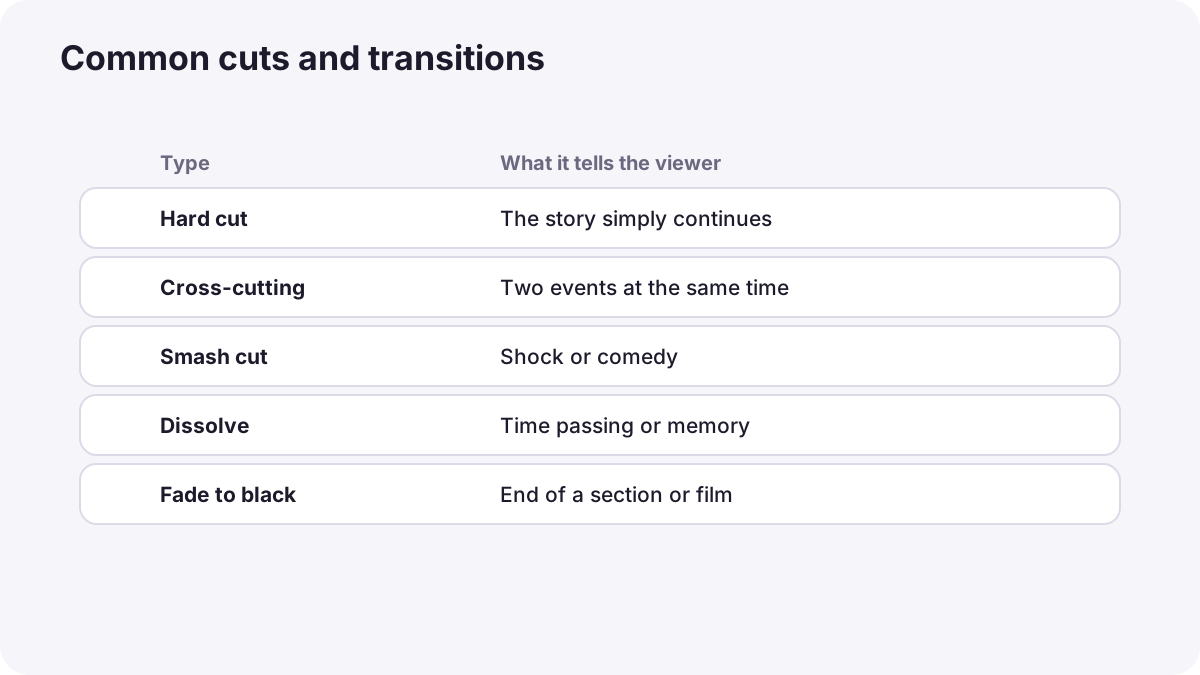
| Cut | What it is | What it tells the viewer |
|---|---|---|
| Hard (straight) cut | An instant change between shots | Nothing unusual; the story simply continues |
| Cutaway | A cut to something related, then back | Shows context or a reaction, as in B-roll and cutaways |
| Cross-cutting (parallel editing) | Switching between two events happening at the same time | Connection, comparison or suspense |
| Smash cut | A sudden cut to a very different scene or sound | Shock, surprise or comedy |
| Jump cut | A cut between similar shots of the same subject | Time skips or energy, as in continuity and the axis of action |
| Match cut | A cut between shots with matching shapes or movement | A link between two things or times, as in creative video techniques |
Remember:A famous example of cross-cutting is the baptism scene in The Godfather (1972), which cuts between a peaceful church ceremony and violent events happening at the same time. The contrast gives the scene its power.
Gradual transitions
| Transition | What it is | Typical meaning |
|---|---|---|
| Dissolve (cross-dissolve) | One shot slowly blends into the next | Time passing, memory, gentle change |
| Fade to or from black | The picture goes to black, or appears from black | Beginning or end of a section, the end of a day, a pause |
| Fade to white | The picture goes to white | Dreams, memories, a dramatic change |
| Wipe | One shot pushes or slides the other off the screen | A playful or stylized change of place, used in some classic adventure films |
| Dip to color | A quick fade through a color | Light, stylized change, often in online videos |
Using transitions with purpose
- Use hard cuts most of the time: they are invisible and keep the story moving.
- Use dissolves for time or emotion, not to hide weak cuts.
- Use fades to mark big sections, such as the start and end of a film.
- Avoid decorative effects such as spinning cubes or page turns unless the style truly needs them.
- Keep a consistent style: the same kinds of transitions throughout a video.
Tip:If you feel the need for a fancy transition between two shots, try a well-timed hard cut first. Most of the time, the cut is stronger.
Sound and transitions
Sound changes how a cut feels. Starting the next scene's sound slightly before the picture, called a sound bridge as in music, sound effects and the soundtrack, makes cuts feel smooth. A sudden loud sound on a cut increases shock. Split edits that separate sound and picture cuts are explained in editing dialogue and interviews.
Common mistakes
- A different flashy transition on every cut: the video looks amateur.
- Dissolves within a continuous moment: viewers think time has passed.
- Fading to black too often: the video keeps stopping.
- Using transitions to hide bad edits: the problem is still visible.
- Ignoring sound at the cut: transitions feel abrupt.
How editors choose cuts and transitions
Professional editors use hard cuts for nearly everything, choosing cutaways and cross-cutting to build meaning and suspense, dissolves and fades only where time or mood truly changes, and smash cuts for deliberate shocks. They shape every cut with sound and keep the style consistent throughout the film.
Practical examples
Showing time passing
- Situation
- A craftsperson works on a chair for a whole day.
- What to do
- You use a few slow dissolves between stages of the work.
- Why it works
- Dissolves tell viewers that time is passing.
- Result
- The day is shown in 30 seconds without confusion.
Building suspense
- Situation
- A runner races to catch a train while it prepares to leave.
- What to do
- You cross-cut between the runner and the train doors.
- Why it works
- Cross-cutting connects events happening at the same time and builds tension.
- Result
- An exciting race against time.
Key points
- A cut changes shots instantly; transitions such as dissolves and fades change gradually.
- Hard cuts are invisible and should be used most of the time.
- Cutaways, cross-cutting, smash cuts, jump cuts and match cuts each create specific meaning.
- Dissolves suggest time or memory; fades mark beginnings, endings and pauses.
- Use transitions with purpose, keep the style consistent, and shape cuts with sound.
Frequently asked questions
What are the main types of cuts in film?
When should I use a dissolve?
What is cross-cutting?
Should I use lots of transitions?
Conclusion
Cuts and transitions are a language: hard cuts keep the story flowing, special cuts create connection, contrast or shock, and gradual transitions mark time and mood. Use them with purpose. Next, you will learn how to control pacing and rhythm in an edit.
Finished reading? Track your progress through Video editing.