Every platform gives creators numbers: views, likes, followers, watch time and much more. Some numbers explain why a post worked; others just feel good. This lesson shows which numbers matter, what each one tells you, how to read a retention graph, and how to run simple tests so every post teaches you something.
The numbers that matter
| Metric | What it tells you |
|---|---|
| Click-through rate (CTR) | How appealing your title and thumbnail or cover are |
| Retention / average view duration | Whether the content kept people watching |
| Watch time | Total time people spent; important for longer videos |
| Saves and shares | Whether people found it valuable enough to keep or pass on |
| Comments | Whether it started a conversation |
| Follows from a post | Whether it turned viewers into an audience |
| Traffic sources | Where viewers found you: search, recommendations, profile |
Remember:Views alone do not tell you why something worked. Combine them with retention and saves to understand quality.
Reading a retention graph
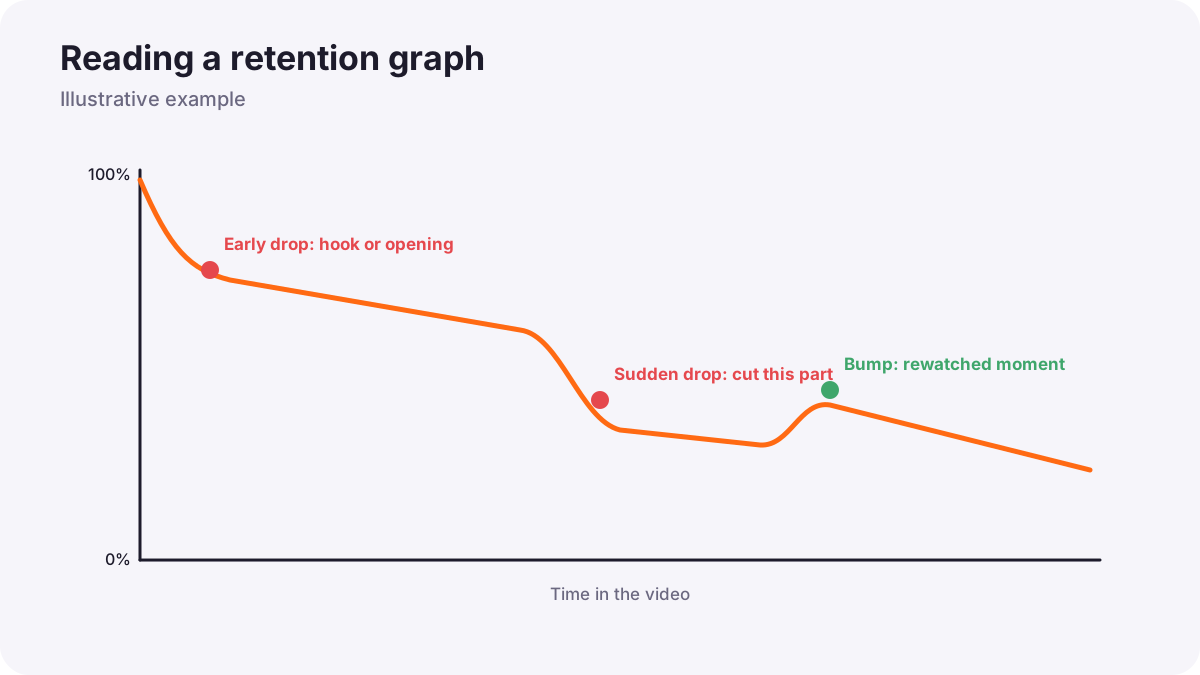
- A big drop at the start: the hook did not match the packaging, or the opening was slow.
- A steady slope: normal; viewers leave gradually.
- A sudden drop in the middle: a boring or confusing section to cut next time.
- A rise: people rewatched or skipped to that part; it may be your most interesting moment.
Test one change at a time
- Choose one question, such as: do result-first hooks keep viewers longer?
- Change only one thing across several posts.
- Compare results fairly: similar topics, posting times and lengths.
- Keep what works, then test the next idea.
Remember:This is the same fair-test method from designing photographic experiments, applied to content.
Keep numbers in perspective
Numbers swing from post to post. Look at trends over several weeks, compare a post with your own average rather than other creators, and remember that a smaller, engaged audience can be more valuable than a large, passive one.
Common mistakes
- Judging by likes alone: missing why posts work.
- Changing everything at once: you cannot tell what helped.
- Checking numbers every hour: stress without useful information.
- Comparing yourself to huge creators: unfair and discouraging.
How professional creators use data
Professional creators review analytics weekly, study retention graphs for every important video, run small tests, and combine numbers with comments and their own judgment. They use data to make better content, not to chase numbers.
Practical examples
A steep start drop
- Situation
- Half your viewers leave in the first five seconds.
- What to do
- You test three videos with the result shown in the first second.
- Why it works
- The graph shows the opening is the problem.
- Result
- Retention improves, and reach grows.
High views, few follows
- Situation
- A trend video went viral but brought few followers.
- What to do
- You focus next on series content in your niche.
- Why it works
- Follows show which content builds an audience.
- Result
- Fewer viral spikes but steadier growth.
Key points
- CTR, retention, watch time, saves, shares, comments and follows explain why posts work.
- Retention graphs show weak openings and boring sections.
- Test one change at a time and compare fairly.
- Look at trends over weeks and compare with your own average.
Frequently asked questions
What is a good click-through rate?
What does a retention graph show?
How often should I check analytics?
Which metric matters most?
Conclusion
Analytics turn every post into a lesson when you read them calmly and test one idea at a time. Next, you will build a community and collaborate with other creators.
Finished reading? Track your progress through Content creation.