Many people now search social platforms the way they search the web, typing questions like "phone portrait tips" into YouTube, TikTok or Instagram. Captions, on-screen text, spoken words and keywords help platforms understand your content and show it to the right people. This lesson explains how to write captions that people read, how keywords and hashtags work today, and how to set up your profile so new visitors follow.
A simple caption structure
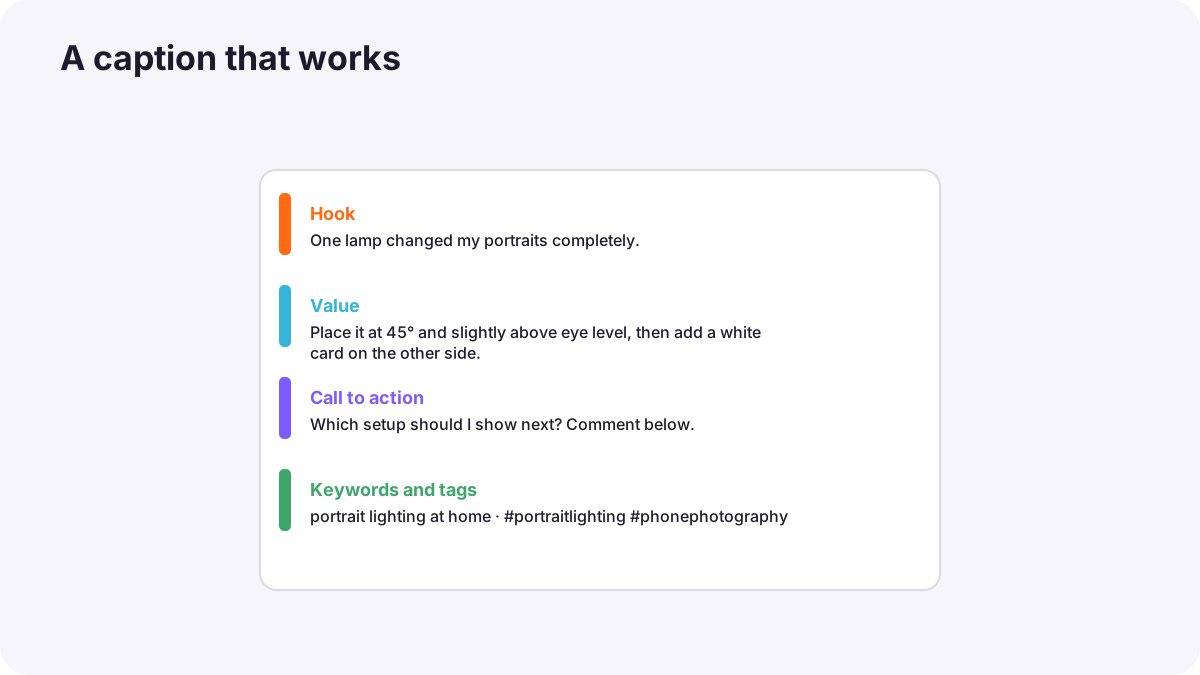
- First line hook: the first words show before "more", so make them count.
- Value: the tip, story or extra detail the post does not show.
- Call to action: a question for comments, or save, share or follow.
- Keywords and a few relevant hashtags at the end.
Keywords for social search
Platforms read your captions, on-screen text, spoken words, titles and video descriptions to understand what a post is about. Use the plain words your audience would search for, such as "how to edit photos on your phone", naturally in the caption, in text on screen and in what you say. This is the social version of photography SEO fundamentals and video SEO.
Tip:Say your main keyword out loud early in videos, because many platforms create automatic transcripts.
Hashtags today
- Use a few relevant hashtags rather than many unrelated ones.
- Mix specific and broader tags that describe the post accurately.
- Avoid misleading or banned tags; they can reduce reach.
- Remember hashtags help categorize, but good content and keywords matter more.
On-screen text and subtitles
Many viewers watch without sound. Add subtitles to spoken videos and short text titles to explain what is happening. Captions also make content accessible to people who are deaf or hard of hearing, as explained in publishing video online.
Optimize your profile
| Element | Good practice |
|---|---|
| Name and handle | Easy to spell; include your topic if possible |
| Profile photo | Clear face or simple logo |
| Bio | Your content promise in one or two lines |
| Link | One page with your portfolio or contact |
| Pinned posts | Your best or most useful posts |
Common mistakes
- Captions that only say "New post!": no value and no keywords.
- Thirty unrelated hashtags: looks like spam.
- No subtitles on talking videos: silent viewers scroll away.
- Unchecked automatic captions: embarrassing errors.
How creators get found
Professional creators research the words their audience uses, include them naturally in captions, text and speech, add accurate subtitles, use a few relevant hashtags and keep a clear, updated profile that turns visitors into followers.
Practical examples
A searchable tip
- Situation
- Your editing tips get few views from search.
- What to do
- You add "how to edit photos on your phone" to the caption, on-screen title and first spoken sentence.
- Why it works
- Platforms match content to the words people search.
- Result
- Steady views from search over months.
A confusing profile
- Situation
- Visitors watch your videos but rarely follow.
- What to do
- You rewrite your bio as one clear content promise and pin three best videos.
- Why it works
- New visitors decide quickly whether your profile fits them.
- Result
- More visitors become followers.
Key points
- Write captions with a first-line hook, value, a call to action and keywords.
- Use the words your audience searches for in captions, on-screen text and speech.
- Use a few relevant, accurate hashtags.
- Add checked subtitles and short on-screen text.
- Keep a clear profile with your content promise and pinned best posts.
Frequently asked questions
Do hashtags still work?
How long should captions be?
What is social media SEO?
Should I add subtitles?
Conclusion
Captions, keywords and a clear profile help the right people find and follow you. Next, you will read your analytics and test ideas to improve.
Finished reading? Track your progress through Content creation.