Many people now watch most of their videos on phones held upright, scrolling quickly through short clips. Short-form vertical video is made for that habit: tall 9:16 frames, a fast start, clear captions and a single idea delivered in seconds or a minute or two. It looks simple, but successful short videos follow careful rules about framing, timing and sound. This lesson explains how to frame for vertical screens, keep important things inside the safe area, grab attention in the first seconds, film well on a phone, and plan a series of short videos.
What short-form vertical video is
Short-form vertical video means videos usually from a few seconds to a few minutes long, filmed or edited in a tall 9:16 frame (1080 × 1920 pixels is common) and watched full-screen on phones. Popular platforms offer their own short-video formats, and their rules and recommended lengths change often, so check each platform's current guidance before publishing.
Aspect ratio was explained in image size, resolution and aspect ratio, and a social media strategy in social media and digital presence.
Framing for a vertical screen
- Fill the height: people, tall objects, hands at work and faces work well vertically.
- Keep subjects near the center: the frame is narrow, so there is little room at the sides.
- Use closer shot sizes: medium close-ups and close-ups read better on a small screen than wide shots, as in shot sizes and camera angles for video.
- Look for vertical lines: doorways, stairs, trees and buildings suit the frame.
Safe zones
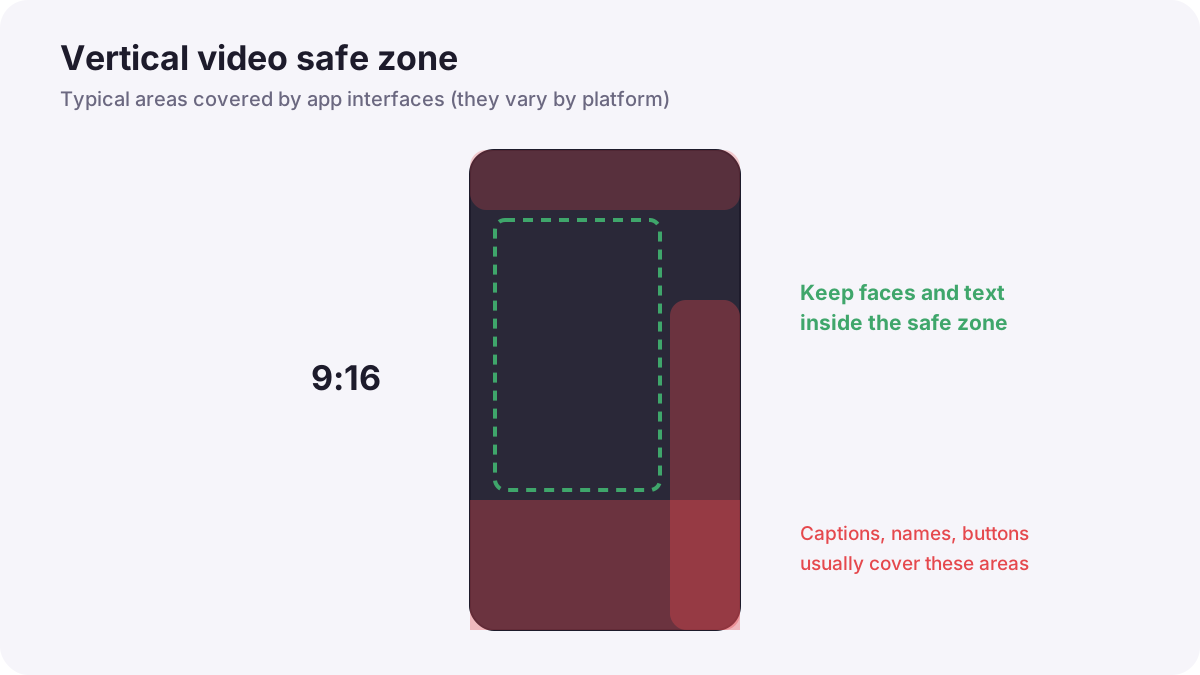
Social apps place buttons, captions, profile names and descriptions over the edges of the video, especially at the bottom and right side. Keep faces, text and important action inside the middle area of the frame, the safe zone explained in social media image preparation, so nothing is hidden. Most platforms and editing apps show safe-zone guides.
Tip:Place your own text in the upper middle of the frame, away from the bottom where app captions and buttons appear.
The first seconds
Viewers decide almost instantly whether to keep watching. The opening, often called the hook, should show or say immediately why the video is worth watching.
- Start with the most interesting moment or the result, then show how you got there.
- Ask a question the video will answer.
- Show movement or change in the very first frame.
- Avoid slow introductions, logos and long greetings at the start.
Filming on a phone
- Use the main (1x) lens for the best quality, as in mobile and computational photography.
- Lock focus and exposure by pressing and holding on the subject, so they do not change while filming.
- Clean the lens before every shoot.
- Light the face: face a window or use a small LED, as in continuous lighting for video.
- Use a small microphone: clear voice matters more than perfect picture, as in microphone types and pickup patterns.
- Keep it steady: use a small tripod or a phone gimbal, as in stabilizing video.
Remember:If you need both horizontal and vertical versions, you can film in 4K horizontal and crop a vertical version later, but keep the subject in the center during filming. For important vertical content, filming vertically gives the best framing.
Captions, sound and pacing
- Captions: many people watch with the sound off; on-screen captions make the video understandable and more accessible, as in publishing video online.
- Sound: only use music you have the right to use; platforms often offer licensed music libraries, as in music licensing for video.
- Pacing: short shots, usually a few seconds each, with no empty pauses.
- One idea per video: a single tip, story or result is clearer than many.
- End with purpose: a clear final moment or a simple call to action.
Planning a simple series
- Choose a theme you can make many videos about, such as one camera tip per video.
- Write a short plan for each video: hook, three main moments, ending.
- Film several videos in one session to save time.
- Edit with a consistent style: same caption style, colors and opening.
- Review results and improve the next videos.
Common mistakes
- Slow starts: viewers scroll away before the good part.
- Text hidden under app buttons: important words cannot be read.
- Wide shots on a small screen: the subject is too small.
- Bad sound: viewers leave even if the picture is good.
- Using music without permission: the video may be muted or removed.
How professional creators work
Professional short-form creators plan the hook first, frame for the safe zone, film in batches with good light and clear sound, and edit tightly with readable captions. They study what their audience watches, test different openings, and keep a consistent style so viewers recognize their work instantly.
Practical examples
A recipe in 30 seconds
- Situation
- A café wants a short video of its signature drink.
- What to do
- You open with the finished drink being poured, then show three quick steps and end on a close-up.
- Why it works
- Starting with the result hooks viewers; short steps keep the pace.
- Result
- A clear, appealing video that people watch to the end.
Hidden captions
- Situation
- Your on-screen tips are covered by the app's buttons.
- What to do
- You move text to the upper middle and use the safe-zone guide.
- Why it works
- App interfaces cover the bottom and right edges.
- Result
- Every word is readable.
Key points
- Short-form vertical video uses a tall 9:16 frame, often 1080 × 1920 pixels, watched full-screen on phones.
- Keep subjects centered and use closer shots; keep text and faces inside the safe zone.
- Grab attention immediately with the result, a question or movement.
- Lock focus and exposure, light the face, use a microphone and keep the phone steady.
- Add captions, use licensed music, keep shots short and plan videos as a series.
Frequently asked questions
What size is a vertical video?
How long should a short-form video be?
Should I film vertically or crop later?
Why add captions to social videos?
Conclusion
Successful vertical videos are planned for the phone screen: centered framing, safe zones, a strong opening, clear sound and captions, and tight pacing. Next, you will learn how to film products and commercial videos.
Finished reading? Track your progress through Types of photography.