Viewers look at faces first, and they are extremely sensitive to skin that looks wrong. A slightly green or gray face looks ill; an orange face looks fake; a face that is too dark loses expression and detail. Grading skin well is one of the most important skills in color work, and it must work for every skin tone, from very light to very dark. This lesson explains how to isolate and read skin, how to keep hue, brightness and saturation natural, how to light and grade darker and lighter skin with care, and how to avoid over-smoothing.
Why skin matters most
Natural skin tones for photos were introduced in color correction versus creative color grading. In video, faces stay on screen for a long time, move through different light and are seen from several angles, so they must look natural and consistent across every shot, as in matching shots and cameras.
Reading skin accurately
- Isolate the skin with a shape mask and qualifier so the scopes show only the face, as in secondary grading.
- Check hue on the vectorscope: skin of all tones usually clusters near the skin tone line between red and yellow, as in video scopes.
- Check brightness on the waveform: the face should be bright enough to show expression and detail for that person's natural skin tone.
- Check saturation: skin that is too saturated looks orange or sunburned; too little looks gray and tired.
Natural adjustments
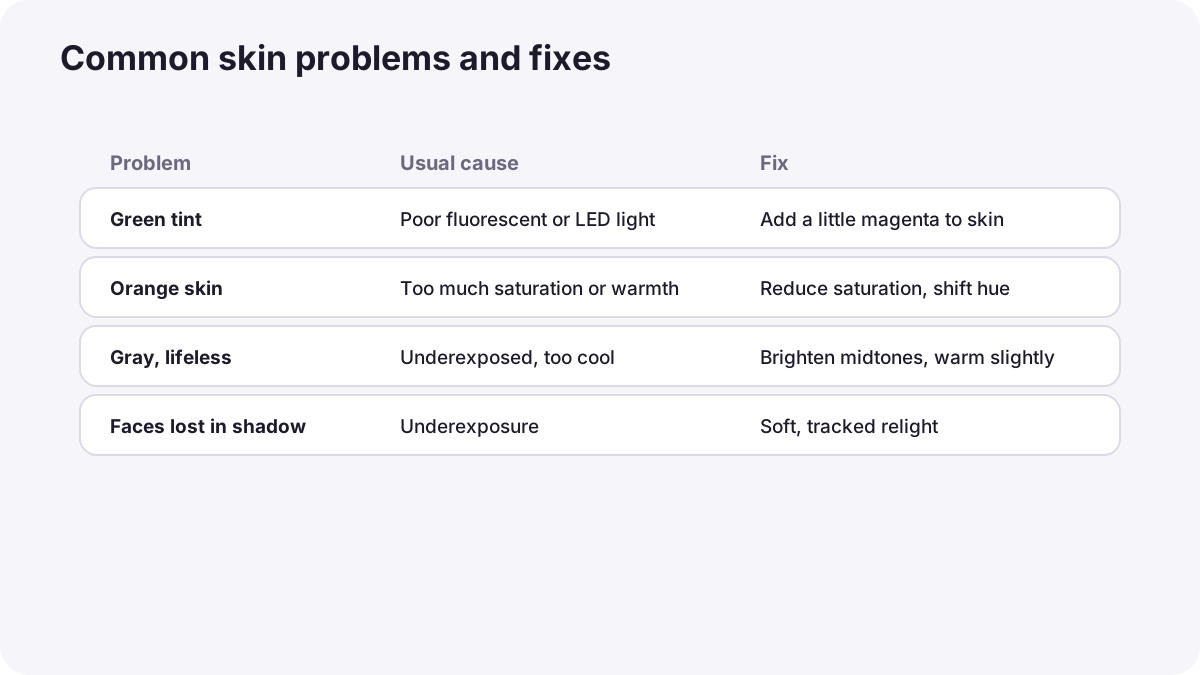
| Problem | Usual cause | Fix |
|---|---|---|
| Green or yellow-green skin | Fluorescent or poor LED light | Add a little magenta in the skin only |
| Orange skin | Too much saturation or warm looks | Reduce saturation or shift hue slightly toward the line |
| Gray, lifeless skin | Underexposure, cool balance, low saturation | Brighten midtones, warm slightly, add a little saturation |
| Shiny highlights | Hard light on oily skin | Lower highlights gently in the skin area |
| Faces lost in shadow | Underexposure or low contrast | Relight the face with a soft tracked shape |
Grading every skin tone with care
For decades, color film and photo printing were calibrated using reference cards, such as Kodak's 'Shirley' cards from the 1950s, which showed only light-skinned models. As a result, darker skin was often poorly rendered. Kodak introduced reference cards with several skin tones in the 1990s. Today, digital cameras and grading tools can render all skin beautifully, but only when lighting and grading are done with care.
- Expose for each person's face, not for a single brightness target, as in video exposure tools.
- Preserve detail and texture in darker skin: avoid crushing shadows; light gently and add soft fill or reflected light.
- Keep warmth and richness: darker skin often reflects light beautifully with a little highlight and natural saturation.
- Protect lighter skin from clipping: watch highlights on foreheads and cheeks.
- Never lighten or darken a person's skin to change who they are.
Tip:When several people with different skin tones share a frame, light and grade so every face shows detail, rather than exposing for one person and losing the other.
Skin smoothing
Video grading tools can soften skin texture, a process often called beauty work. Light smoothing can help in adverts and fashion, but too much makes faces look plastic and artificial, especially in motion. Keep pores and texture, avoid smoothing in documentaries, and respect the person's real appearance, as in truth, manipulation and image integrity.
Common mistakes
- Pushing the whole image look onto faces: teal-orange looks can make skin unnatural.
- Exposing everyone to the same level: darker skin loses detail, lighter skin clips.
- Reading skin from the whole frame: background colors mislead the vectorscope.
- Too much smoothing: plastic, unreal faces.
- Ignoring skin when matching shots: faces change color between angles.
How colorists treat skin
Colorists isolate and protect skin in almost every grade, so creative looks never make people look ill or unreal. They read skin on scopes, light and grade darker and lighter skin with equal care, match faces across all shots, keep texture natural, and discuss any appearance changes with the director and the person being filmed.
Practical examples
A green office interview
- Situation
- A speaker's skin looks greenish under office lights.
- What to do
- You isolate the skin with a qualifier and add a small amount of magenta.
- Why it works
- Correcting only the skin avoids changing the whole room.
- Result
- Healthy, natural skin.
Two friends in one frame
- Situation
- In a two-shot, the friend with darker skin is lost in shadow.
- What to do
- You add a soft tracked shape to brighten and gently lift that face.
- Why it works
- Every face in the frame should show expression and detail.
- Result
- Both friends look natural and clear.
Key points
- Viewers look at faces first and notice unnatural skin immediately.
- Isolate skin, then check hue on the vectorscope, brightness on the waveform and saturation.
- Fix green, orange, gray, shiny or shadowed skin with small, targeted adjustments.
- Light and grade every skin tone with care; expose for each person and preserve detail.
- Keep smoothing light, texture natural and respect people's real appearance.
Frequently asked questions
How do I get natural skin tones in video?
How should I grade darker skin tones?
Why does skin look green in my video?
Should I smooth skin in video?
Conclusion
Natural skin in video comes from isolating and reading skin carefully, correcting hue, brightness and saturation gently, and lighting and grading every skin tone with equal care and respect. Next, you will learn how to create a cinematic look.
Finished reading? Track your progress through Color grading.