Your eyes adapt quickly to color. After a few minutes, a slightly blue image starts to look normal, and a too-bright screen makes everything seem fine. That is why colorists rely on video scopes, graphs that measure brightness and color exactly, whatever the screen shows. With three scopes, the waveform, the RGB parade and the vectorscope, you can see whether blacks are crushed, highlights are clipped, colors are balanced and skin looks natural. This lesson explains how to read each scope and how to use them together.
Why scopes matter
Video scopes analyze the actual image data and display it as graphs. Unlike your eyes or an uncalibrated screen, they are not affected by adaptation, room light or screen settings. The waveform and false color for exposure on set were explained in video exposure tools; this lesson uses scopes for grading.
The waveform
- What it shows: brightness across the picture from left to right, from 0 (black) at the bottom to 100 (white) at the top.
- Blacks: the lowest part of the trace should touch near 0 if the image needs true blacks, without a large flat line at the bottom, which means crushed shadows.
- Highlights: the top should approach but not flatten at 100, which means clipped highlights.
- Contrast: the spread between the lowest and highest parts of the trace.
The RGB parade
The RGB parade shows three waveforms side by side, one each for red, green and blue. If something that should be neutral, such as a white wall, a gray card or black shadows, has the three channels at the same height, it is neutral. If one channel is higher, the image has a color cast toward that color.
| What you see in neutral areas | Cast | Common fix |
|---|---|---|
| Blue higher than red and green | Blue or cool | Warm the white balance or lower blue |
| Red higher | Red or warm | Cool slightly or lower red |
| Green higher | Green tint | Add magenta |
Channels in the parade are like the channel levels and curves used for photos in levels and channel levels.
The vectorscope
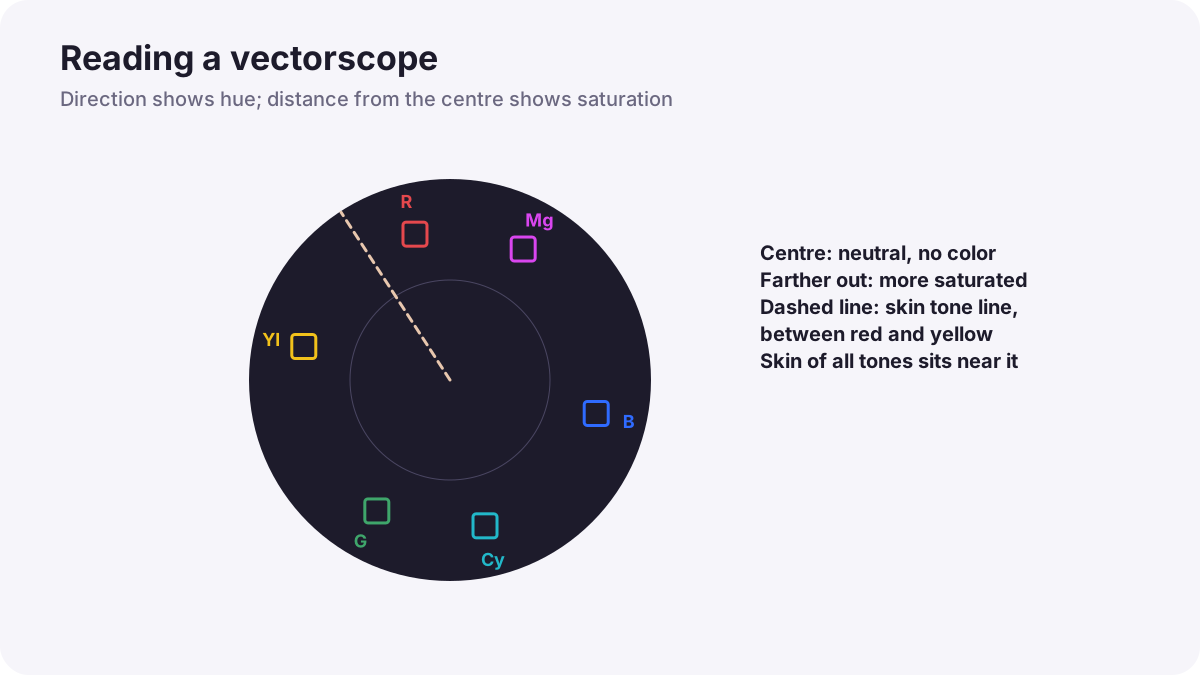
- What it shows: hue as the direction around a circle and saturation as the distance from the center.
- Center: neutral, uncolored areas sit in the center.
- Targets: boxes mark red, magenta, blue, cyan, green and yellow for the display standard; strong colors moving beyond them may be too saturated for some deliveries.
- Color casts: if the whole trace leans in one direction, the image has a cast.
The skin tone line
Most vectorscopes show a skin tone line between the red and yellow targets. Human skin of every skin tone tends to cluster near this same hue, because the color comes mainly from blood under the skin; what differs between people is mostly brightness and saturation. If skin moves noticeably toward green or magenta, it usually looks unhealthy.
Remember:The skin tone line is a helpful guide, not a strict rule. Lighting style, makeup and creative looks can move skin away from it on purpose. Isolate the face with a mask to read skin accurately, as in skin tones in video.
Using scopes together
- Waveform first: set black level, highlights and overall contrast.
- RGB parade next: balance neutral areas so channels line up.
- Vectorscope: check overall cast, saturation and skin tones.
- Then look at the picture on a calibrated monitor and adjust for feeling.
Tip:Scopes tell you what is technically there; your eyes decide what feels right. Use both.
Common mistakes
- Grading only by eye: casts and clipping go unnoticed.
- Forcing every image to perfect neutral: sunsets and warm interiors lose their mood.
- Treating the skin tone line as a strict law: creative looks become impossible.
- Reading skin on the whole frame: background colors confuse the vectorscope; isolate the face.
- Ignoring saturation limits: colors look harsh or distort on some screens.
How colorists use scopes
Colorists keep scopes visible at all times, check black and white levels on the waveform, balance neutrals with the parade, watch saturation and skin on the vectorscope, and confirm everything on calibrated reference monitors. They use scopes to stay consistent across hundreds of shots, while letting their eyes judge the creative result.
Practical examples
A blue interview
- Situation
- An interview looks slightly cold, but you are not sure.
- What to do
- You check a white shirt in the RGB parade: blue is higher than red and green.
- Why it works
- The parade shows a blue cast in a neutral area.
- Result
- You warm the balance until the channels match.
Greenish skin
- Situation
- A presenter's skin looks slightly sick under office lights.
- What to do
- You mask the face and see the vectorscope trace leaning toward green, then add a little magenta.
- Why it works
- Skin usually sits near the skin tone line between red and yellow.
- Result
- Healthy, natural skin.
Key points
- Scopes measure brightness and color objectively, unaffected by eye adaptation or screens.
- The waveform shows brightness: check blacks, highlights and contrast.
- The RGB parade shows color balance: neutral areas have equal channels.
- The vectorscope shows hue and saturation; skin of every tone clusters near the skin tone line.
- Use waveform, then parade, then vectorscope, then judge the picture with your eyes.
Frequently asked questions
What is an RGB parade?
How do I read a vectorscope?
What is the skin tone line?
Do professionals grade by eye or with scopes?
Conclusion
Waveform, RGB parade and vectorscope give you objective measures of brightness, balance, hue and saturation, including a guide for natural skin. Next, you will use them for primary correction of exposure, contrast and white balance.
Finished reading? Track your progress through Color grading.