Color is one of the most powerful tools in filmmaking. The same scene can feel warm and hopeful, cold and lonely, or tense and gritty depending on how it is colored. In video post-production, this work has two parts: color correction, which makes shots look natural and consistent, and color grading, which gives the film its creative look. This lesson explains the difference between them for video, the usual order of work, why grading video differs from editing photos, who does the work, and the main tools you will learn in this course.
Correction and grading
Color correction and color grading were introduced for photography in color correction versus creative color grading. The same two ideas apply to video:
| Color correction | Color grading | |
|---|---|---|
| Goal | Natural, accurate and consistent shots | A creative look that supports the story |
| Typical work | Exposure, contrast, white balance, matching shots | Mood, color palette, contrast style, film looks |
| Question asked | Does it look right? | Does it feel right? |
The usual order of work
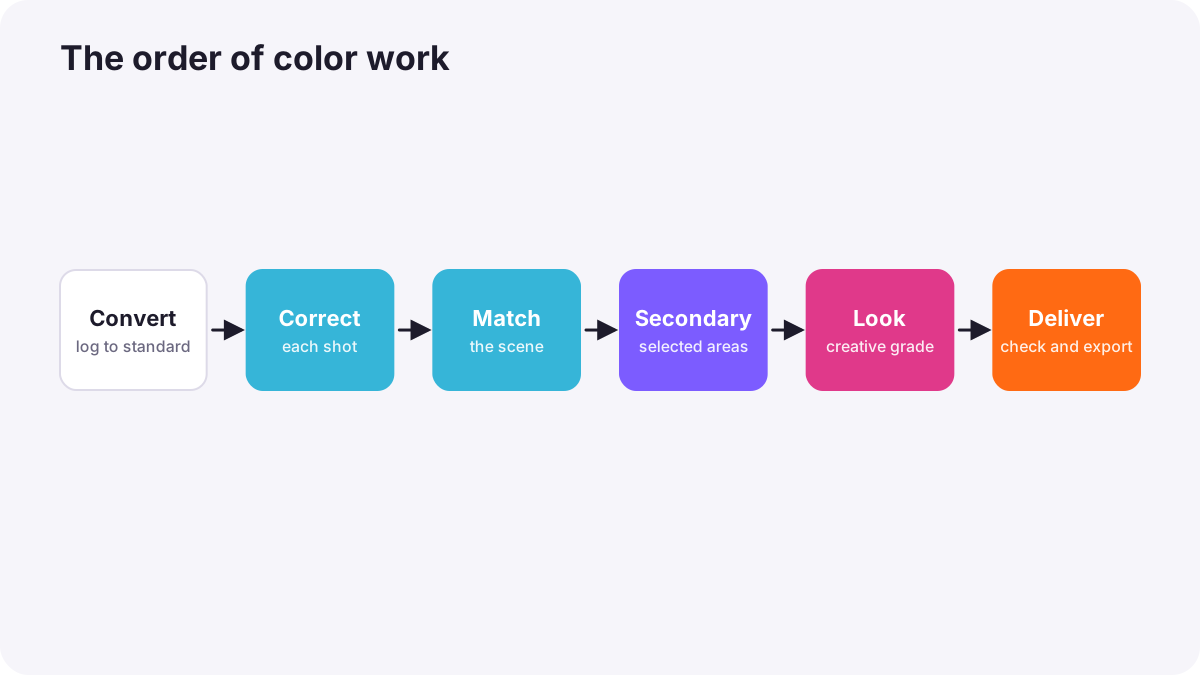
- Prepare and convert: set up color management and convert log footage, as in working with log footage and color-space transforms.
- Primary correction: fix exposure, contrast and white balance for each shot, as in primary correction.
- Matching: make shots in a scene look like they belong together, as in matching shots and cameras.
- Secondary correction: adjust specific areas or colors, as in secondary grading.
- Look: apply the creative grade across the film, as in creating a cinematic look.
- Check and deliver: verify on scopes and calibrated screens, then export, as in color grading workflow and export.
Why video grading is different
- Many shots must match: a scene may have dozens of shots from different angles, times and cameras.
- Movement and time: light can change during a shot, and corrections must work for every frame.
- Tracking: adjustments on a face or object must follow it as it moves.
- Display standards: video is graded for standards like Rec.709 or HDR, as in color for video.
- Picture lock: grading starts after the edit is final, as in reviewing and finishing an edit.
The colorist
A colorist is the specialist who grades films, series, adverts and music videos. They work with the director and cinematographer to create the planned look, often in a darkened grading suite with calibrated reference monitors. On small projects, the editor or filmmaker usually does the color work too.
The main grading tools
| Tool | What it does |
|---|---|
| Video scopes | Measure brightness and color objectively, as in video scopes |
| Color wheels (lift, gamma, gain) | Adjust shadows, midtones and highlights |
| Curves | Fine control of tone and color, like curves for photos in curves and tonal control |
| Qualifiers and masks | Select specific colors or areas |
| Tracking | Make adjustments follow moving subjects |
| LUTs and transforms | Convert between color spaces and apply looks |
A good grading environment
- Calibrated monitor: as in monitor calibration and consistent viewing.
- Controlled light: dim, neutral surroundings, without bright windows or colored walls near the screen.
- Rest your eyes: eyes adapt to color casts over time; take breaks and compare with reference images.
Common mistakes
- Applying a look before correcting: problems are hidden and shots do not match.
- Grading before picture lock: work is lost when the edit changes.
- Trusting an uncalibrated screen: colors look wrong elsewhere.
- Grading in a bright, colorful room: your eyes are misled.
- Over-grading: skin and natural colors look strange.
How colorists work
Professional colorists discuss the look with the director and cinematographer, prepare color management, correct and match every shot, then build the look in layers. They judge with scopes and calibrated monitors in controlled rooms, keep skin tones natural unless the story needs otherwise, and deliver versions for each display standard.
Practical examples
A documentary with mixed cameras
- Situation
- Shots from two cameras look different in color.
- What to do
- You first correct and match all shots, then add a gentle warm look.
- Why it works
- Correction and matching must come before the creative look.
- Result
- A consistent film with a pleasing mood.
A dark, colored editing room
- Situation
- Your grades look too blue when viewed elsewhere.
- What to do
- You move to a dim, neutral room and calibrate your monitor.
- Why it works
- The environment and screen affect how colors appear.
- Result
- Grades that look right on other screens.
Key points
- Color correction makes shots natural and consistent; color grading creates the creative look.
- Work in order: convert, correct, match, secondary adjustments, look, check and deliver.
- Video grading must match many shots, handle movement and target display standards.
- Colorists grade after picture lock with scopes and calibrated monitors.
- Grade in a dim, neutral room on a calibrated screen and rest your eyes.
Frequently asked questions
What is the difference between color correction and color grading?
What does a colorist do?
Should I correct before I grade?
When should color grading happen?
Conclusion
Video color work combines correction for natural, consistent shots and grading for creative mood, done in a clear order after picture lock with the right tools and environment. Next, you will learn the video scopes that measure color objectively.
Finished reading? Track your progress through Color grading.