Many creators want their videos to look cinematic, but a cinematic look is not one magic filter. It comes from many choices working together: lighting, lenses, framing, movement, frame rate and finally the color grade. The grade can unite all of these into a consistent mood, from warm nostalgia to cold tension. This lesson explains what really makes footage feel cinematic, how contrast and color palettes create mood, how film emulation works, how to build a look in layers, and why restraint is the mark of a professional grade.
What makes footage feel cinematic
A cinematic look is a combination of deliberate choices that make footage feel like a film rather than everyday video. The grade is only part of it:
- Light: motivated, shaped light with contrast and depth, as in continuous lighting for video.
- Lenses and depth of field: focal lengths and focus that guide the eye, as in lenses for video.
- Composition and movement: purposeful framing and motivated camera moves, as in camera movement.
- Motion: 24 fps with a 180-degree shutter, as in exposure for video.
- Color and contrast: a consistent palette and tonal style created in the grade.
Remember:A grade cannot add light that was never there. Good-looking footage is lit and filmed with the final look in mind.
Contrast and tone
- S-curve: gently darkening shadows and brightening highlights adds depth and punch, as in curves and tonal control.
- Soft blacks: slightly lifted, rich blacks can give a filmic, gentle feel.
- Highlight roll-off: highlights that fade smoothly to white, rather than clipping sharply, feel more like film.
- Low-key or high-key: overall darkness or brightness sets mood, as in backlight, silhouettes, high-key and low-key exposure.
Color palettes
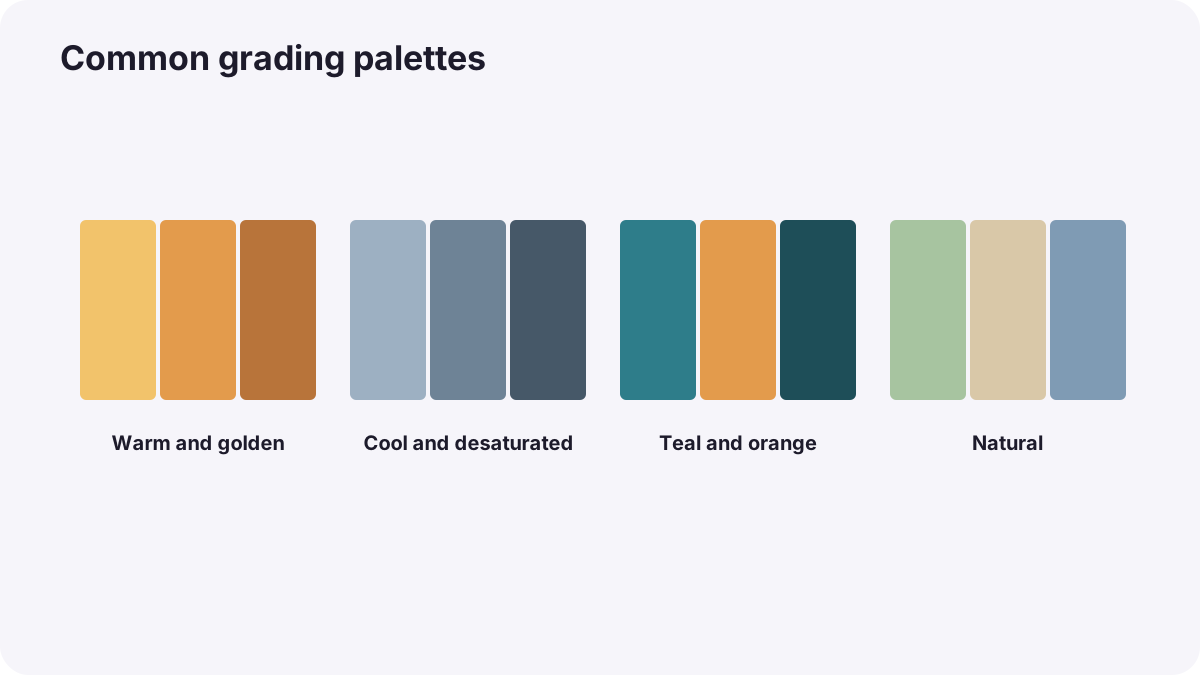
| Palette | Feeling | How it is often built |
|---|---|---|
| Warm and golden | Nostalgia, comfort, summer | Warm highlights and midtones, soft contrast |
| Cool and desaturated | Isolation, cold, tension | Cool shadows, lower saturation |
| Complementary (often teal and orange) | Energy, separation of people from background | Warm skin, cooler shadows and backgrounds |
| Monochromatic | Unity, strong style | One dominant hue across the image |
| Natural | Realism, documentary truth | Accurate color with gentle contrast |
Color harmony and color storytelling were introduced in color harmony, contrast and visual emphasis and color in composition and storytelling. A famous example is O Brother, Where Art Thou? (2000): cinematographer Roger Deakins and the Coen brothers turned green summer landscapes into a dusty, golden look to evoke the 1930s, and it became the first feature film to be color graded entirely digitally.
Film emulation
- Film print looks: tools that imitate how film stock and printing render color and contrast.
- Grain: fine, organic texture added on top of the image; keep it subtle.
- Halation: a soft red-orange glow around bright highlights, as on film.
- Gentle diffusion: softening highlights slightly, like a diffusion filter, as in diffusion and creative filters.
Building a look in layers
- Start from corrected, matched footage, as in matching shots and cameras.
- Collect reference images that show the intended mood.
- Set contrast with a gentle curve.
- Shape color: shadows, midtones and highlights with lift, gamma and gain.
- Protect skin with a qualifier, as in skin tones in video.
- Add texture last: grain, halation and subtle diffusion.
- Apply across the film and adjust per scene.
Tip:Build the look on a separate layer applied to the whole timeline, so you can adjust its strength for every shot at once.
Common mistakes
- Copying a popular look without a reason: the grade fights the story.
- Heavy teal-orange on everything: skin turns orange and shadows look muddy.
- Crushed blacks: detail and expression disappear.
- Too much grain or halation: the image looks fake.
- Expecting the grade to fix flat lighting: it cannot create real light.
How filmmakers create looks
Directors, cinematographers and colorists design the look before shooting, with references and test footage, then light and film for it. In the grade, the colorist builds the look in layers over corrected footage, protects skin, adds subtle texture and adjusts each scene. The best looks serve the story so naturally that viewers feel them rather than notice them.
Practical examples
A nostalgic family film
- Situation
- A family video should feel like a warm memory.
- What to do
- You add soft contrast, warm highlights, slightly lifted blacks and fine grain.
- Why it works
- Warmth and gentle film texture suggest nostalgia.
- Result
- A film that feels like a treasured memory.
An over-graded short film
- Situation
- A strong teal-orange look makes actors look orange.
- What to do
- You reduce the look to 50 percent and protect skin with a qualifier.
- Why it works
- Looks work best when skin stays natural.
- Result
- A stylish film with believable faces.
Key points
- A cinematic look combines light, lenses, composition, motion and the grade.
- Contrast curves, soft blacks and highlight roll-off create filmic tone.
- Color palettes set mood; O Brother, Where Art Thou? (2000) was the first feature graded entirely digitally.
- Film emulation adds print color, grain, halation and diffusion, subtly.
- Build looks in layers over corrected footage, protect skin and use restraint.
Frequently asked questions
How do I make my video look cinematic?
What is the teal and orange look?
Should I add film grain?
Can grading make bad footage cinematic?
Conclusion
A cinematic look grows from filming choices and is finished in the grade: purposeful contrast, a consistent palette, subtle film texture, protected skin and restraint. Next, you will learn how to grade for HDR and SDR delivery.
Finished reading? Track your progress through Color grading.