Even with a good microphone in the right place, a recording can be ruined by wrong settings: too quiet and hissy, too loud and distorted, or pumping up and down because the camera keeps changing the level by itself. Setting audio correctly is like setting exposure for sound. This lesson explains gain and levels, why automatic level control causes problems, how limiters and safety tracks protect recordings, which sample rate and bit depth to use for video, and what 32-bit float recording can and cannot do.
Gain and level
Gain is how much the recorder or camera boosts the signal coming from the microphone. Level is the result you see on the meter. Gain is set before recording, much like ISO for exposure, explained in ISO. The digital level scale, dBFS, and clipping were explained in how sound works.
- Too little gain: the voice is quiet and hiss becomes noticeable when you raise it later.
- Too much gain: loud moments go over 0 dBFS and clip with harsh distortion.
- Good gain: normal dialogue peaks around −12 to −6 dBFS, with room for laughter or shouting.
Setting levels
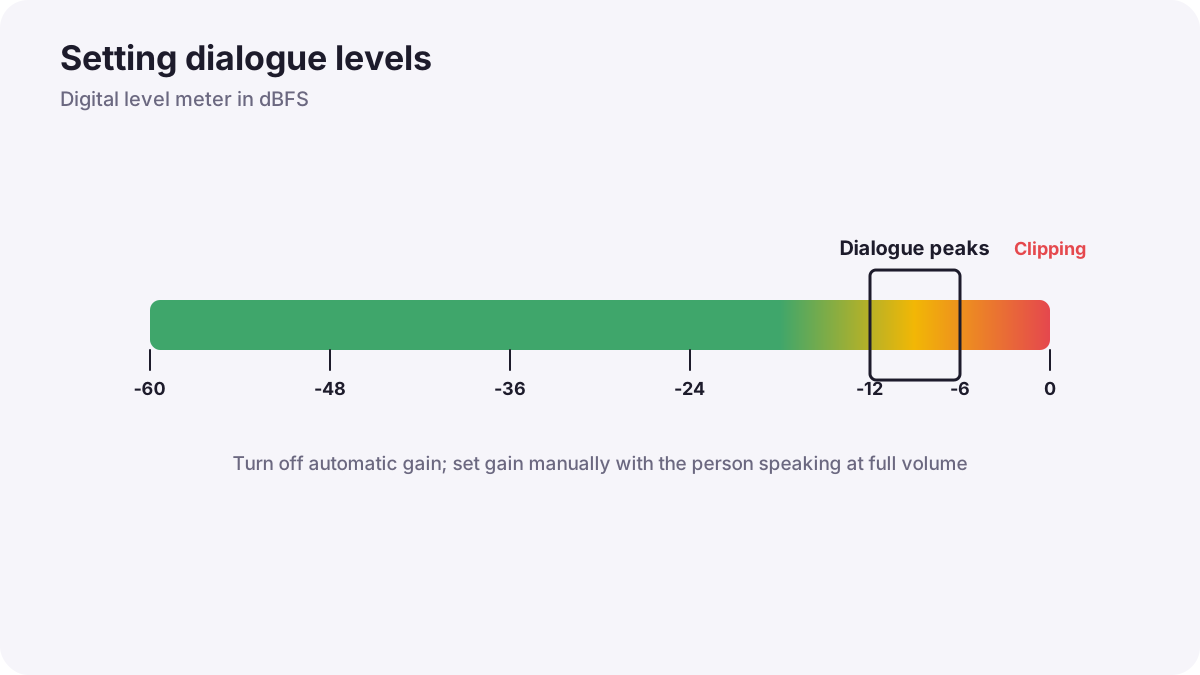
- Put on headphones and ask the person to speak at the volume they will use, including their loudest moments.
- Set gain manually so normal speech peaks around −12 dBFS.
- Check loud moments such as laughter or emphasis stay below about −6 dBFS.
- Set gain on one device only: if a microphone feeds a camera, keep one device's gain low and set the main gain on the other, to avoid adding noise twice.
- Record a short test and play it back.
Remember:This process, setting gain at each stage of the chain so the signal is strong but never overloaded, is called gain staging.
Automatic level control
Many cameras and phones have automatic gain control (AGC). It raises the level in quiet moments and lowers it in loud moments. This sounds helpful, but between sentences it boosts background noise, which then rises and falls in an obvious, pumping way. For video, turn automatic gain off and set levels manually whenever possible.
Limiters and safety tracks
- Limiter: a protection circuit that gently stops sudden peaks from clipping. Useful as a safety net, but not a replacement for correct gain.
- Safety track: a second copy of the same microphone recorded at a lower level, often 6 to 12 dB below the main track. If the main track clips during a sudden shout, the safety track is still clean.
- Dual recording: record sound in the camera and on a separate recorder, as in dual-system sound and syncing.
Sample rate and bit depth
| Setting | What it means | Recommended for video |
|---|---|---|
| Sample rate | How many times per second the sound is measured | 48 kHz, the standard for video and film |
| Bit depth | How precisely each measurement is stored, giving dynamic range | 24-bit (about 144 dB of range) |
| File format | How audio is saved | WAV (uncompressed) for recording |
Tip:Music is often produced at 44.1 kHz. Video and film normally use 48 kHz. Mixing the two in one project can cause small timing or pitch problems, so record at 48 kHz for video.
32-bit float recording
Many modern recorders and wireless transmitters offer 32-bit float recording. It stores audio in a way that keeps sound above 0 dBFS in the file, so if a recording looks clipped, you can usually lower it in editing and recover the clean waveform. It also keeps very quiet recordings clean when raised.
- It is a safety net, especially for unpredictable events and solo shooters.
- It cannot fix overloaded microphones or preamps: if the hardware itself distorts before recording, the distortion stays.
- Files are larger than 24-bit, and some older editing software cannot open them.
- Good practice still matters: set sensible gain and monitor on headphones.
Common mistakes
- Leaving automatic gain on: background noise pumps up and down.
- Setting levels with quiet test speech: real speech is louder and clips.
- High gain on both camera and microphone: extra hiss.
- Recording at 44.1 kHz for video: possible sync and pitch issues.
- Believing 32-bit float means no rules: overloaded hardware still distorts.
How sound recordists set levels
Professional recordists set gain manually with performers at full volume, keep peaks well below 0 dBFS, use limiters and safety tracks, record 48 kHz 24-bit or 32-bit float WAV files, and listen on closed headphones throughout. They write notes about problems so the editor knows which takes have the best sound.
Practical examples
Pumping background noise
- Situation
- Your interview background hiss rises every time the speaker pauses.
- What to do
- You turn off the camera's automatic gain and set the level manually.
- Why it works
- Automatic gain boosts noise during pauses.
- Result
- Steady, natural background sound.
A surprise shout
- Situation
- A presenter shouts unexpectedly during a take.
- What to do
- You use the safety track recorded 10 dB lower for that moment.
- Why it works
- The lower track stayed below clipping.
- Result
- The take is saved without distortion.
Key points
- Gain is the boost applied to the microphone; set it so dialogue peaks around −12 to −6 dBFS.
- Turn off automatic gain control for video and set levels manually with real speaking volume.
- Limiters and safety tracks protect against sudden loud sounds.
- Record WAV at 48 kHz and 24-bit for video.
- 32-bit float keeps files from clipping but cannot fix overloaded hardware.
Frequently asked questions
What audio level should I record dialogue at?
Should I use 48 kHz or 44.1 kHz for video?
Should I turn off auto gain?
Does 32-bit float mean I can't clip?
Conclusion
Clean recordings come from correct gain staging, manual levels, limiters and safety tracks, and 48 kHz 24-bit or 32-bit float files, always checked on headphones. Next, you will learn how to record clean dialogue on real locations.
Finished reading? Track your progress through Sound for video.