Many cameras have basic audio inputs and noisy preamps, and on a busy shoot the camera is not always near the speaker. That is why films, documentaries and professional videos often record sound on a separate recorder, a method called dual-system sound. The picture and sound are joined later in editing, a step called syncing. This lesson explains why dual-system sound is used, how slates, scratch audio and timecode keep picture and sound together, how to avoid drift, and how to label everything so the editor can sync quickly.
What dual-system sound is
Dual-system sound means recording picture in the camera and sound on a separate audio recorder or on wireless transmitters, then joining them in editing. Single-system sound means recording audio directly into the camera. Recording settings were explained in recording settings: levels, gain and sample rate.
| Single-system | Dual-system | |
|---|---|---|
| Where sound is recorded | In the camera | On a separate recorder |
| Quality | Depends on the camera's audio | Usually better preamps and more tracks |
| Freedom | Sound is tied to camera position | The recordist can work independently |
| Work in editing | No syncing needed | Picture and sound must be synced |
Scratch audio
Even with dual-system sound, the camera should record its own audio, called scratch audio or guide audio. It is not used in the final film, but editing software can match its waveform with the separate recording to sync clips automatically. Keep the camera microphone on and at a sensible level.
Slates and clapperboards
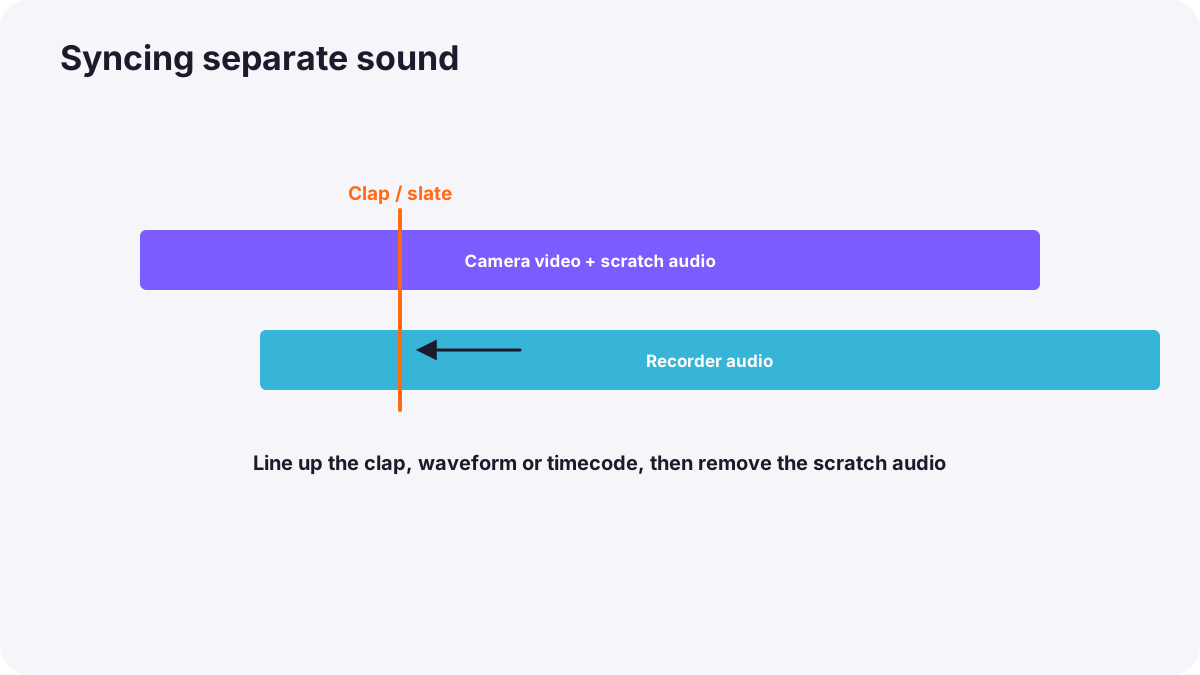
A slate or clapperboard is a board with information about the shot and a hinged clapper on top. At the start of a take, someone holds it in front of the camera, reads the shot information aloud, and snaps the clapper shut. The moment the clapper closes is visible in the picture and produces a sharp spike in the sound, so the editor can line them up exactly.
- Information on the slate: production name, scene, shot, take number, camera, date.
- Tail slate: if a slate is done at the end of a take, it is held upside down to show it is a tail slate.
- Simple alternative: a single clear hand clap in view of the camera.
Timecode
Timecode is a running clock stamped on every frame of video and every moment of audio, written as hours:minutes:seconds:frames, for example 14:32:05:12. When the camera and recorder use the same timecode, editing software can sync every clip automatically.
- Jam sync: setting all devices to the same timecode at the start of the day.
- Timecode boxes: small generators attached to cameras and recorders that keep them matched all day.
- Time of day timecode: matching the real time of day makes logging easier.
Drift
Even when two devices start together, their internal clocks can run at very slightly different speeds. Over a long take, such as a 40-minute speech, the sound can slowly move out of sync with the picture. This is called drift. Timecode generators, short takes and matching sample rates and frame rates reduce it. Editing software can also stretch audio slightly to correct small drift.
Tip:Use the same frame rate on every camera and 48 kHz on every recorder, as in frame rates and slow motion and recording settings.
A syncing workflow
- Record scratch audio on every camera.
- Use a slate, a clap or timecode for every take.
- Name recorder files with scene and take numbers, matching the slate.
- Keep a sound report: a short list of takes, tracks and any problems.
- In editing, sync clips by timecode, waveform or the clap, as in organizing footage and setting up a project.
- Check sync by watching lips and hard sounds such as claps or doors.
Common mistakes
- Turning off camera audio: automatic waveform syncing becomes impossible.
- Clapping out of the camera's view: the picture moment cannot be found.
- Not naming files: the editor cannot match sound to takes.
- Different sample rates or frame rates: sync problems and drift.
- Very long takes without timecode: sound slowly drifts out of sync.
How productions handle sync
Professional productions use dedicated sound recorders, jam-synced timecode on every device, slates for every take, and detailed sound reports. Assistant editors sync all footage before editing begins. Documentary and event crews rely on timecode boxes and waveform syncing, always keeping scratch audio on cameras.
Practical examples
A short film with a recorder
- Situation
- You record dialogue on a separate recorder for better quality.
- What to do
- You slate every take, keep scratch audio on, and name recorder files by scene and take.
- Why it works
- Slates and names let the editor sync quickly and accurately.
- Result
- All dialogue synced in minutes.
A drifting conference talk
- Situation
- A 45-minute talk slowly goes out of sync.
- What to do
- For the next event, you use timecode boxes on the camera and recorder.
- Why it works
- Shared timecode keeps devices locked together over long takes.
- Result
- Perfect sync from start to end.
Key points
- Dual-system sound records audio on a separate recorder and joins it with picture in editing.
- Always record scratch audio on cameras for waveform syncing.
- Slates and clapperboards give a visible and audible sync point and identify each take.
- Timecode stamps the same clock on picture and sound for automatic syncing.
- Prevent drift with timecode, matching frame and sample rates, and shorter takes.
Frequently asked questions
What is dual-system sound?
Why do films use clapperboards?
What is timecode?
Why does my audio drift out of sync?
Conclusion
Dual-system sound gives better audio and freedom on set, while scratch audio, slates, timecode and good naming make syncing fast and accurate. Next, you will learn how music and sound effects build the full soundtrack.
Finished reading? Track your progress through Sound for video.