A lavalier, or lav, is a tiny microphone clipped to a person's clothing, close to their mouth. It is the most common way to record clear voices for interviews, vlogs, presentations and weddings, because it stays the same distance from the speaker even as they move. Combined with a wireless transmitter, it frees people to walk and talk naturally. But a badly placed lav can rustle, scratch and thump. This lesson explains where to place a lav, how to hide it, how to prevent noise, how wireless systems work and how to record a safe backup.
What a lavalier microphone is
A lavalier is a very small microphone, usually omnidirectional, worn on or under clothing. Because it sits close to the mouth, it records a strong voice compared with background noise, as explained in how sound works. Microphone patterns and types were explained in microphone types and pickup patterns.
- Wired lav: connected by cable to a camera, recorder or phone; reliable and simple, but limits movement.
- Wireless lav: connected to a small transmitter worn by the person, which sends the sound to a receiver on the camera or recorder.
Where to place a lav
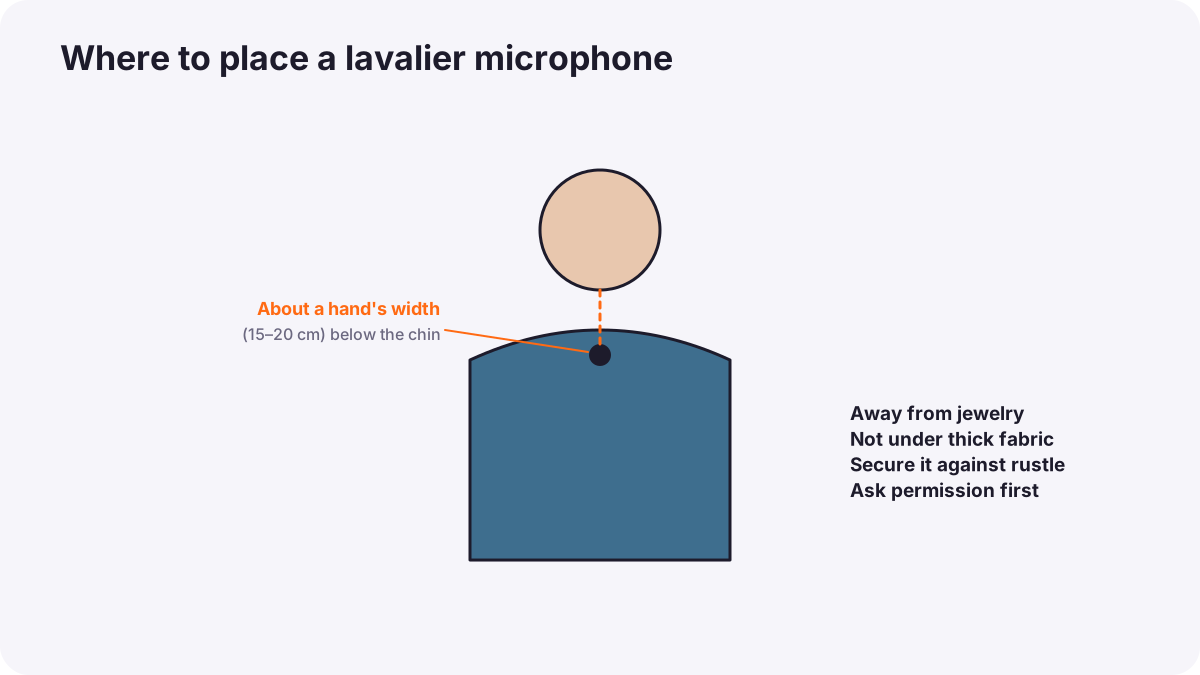
- On the chest, about a hand's width (around 15 to 20 cm) below the chin, near the center of the body.
- On the side the person will turn toward if they will look one way during an interview.
- Away from jewelry, buttons and zips that can knock against it.
- Not covered by thick fabric, which muffles the sound.
Tip:Before recording, ask the person to speak and move as they will during the shoot, and listen carefully on headphones for rustle or thumps.
Visible or hidden
- Visible: clipped neatly on a collar, tie or button line; common in interviews, presentations and online videos.
- Hidden: under clothing for films and adverts where the microphone must not be seen. Use special tape, small fabric mounts or soft covers so the microphone does not rub against clothes.
- Cable management: run the cable under the clothes to the transmitter, with a small loop to absorb movement.
Warning:Fitting a microphone involves touching someone's clothing. Always explain what you are doing, ask permission, and let the person attach it themselves if they prefer, as in professional conduct.
Stopping rustle and wind
| Problem | Cause | Fix |
|---|---|---|
| Rustle and scratching | Clothes rubbing against the microphone | Tape or mount the mic so it cannot move; avoid stiff, noisy fabrics |
| Thumps | Hand movements hitting the chest | Move the mic, or ask the person to be careful |
| Wind noise | Air hitting the microphone outdoors | Use a small furry windscreen, or hide the mic under a light layer |
| Muffled sound | Thick fabric over the microphone | Place it under a thinner layer or on the outside |
| Interference or dropouts | Wireless signal problems | Keep receiver and transmitter in view of each other; avoid crowded frequencies |
Wireless systems
- Digital systems: many compact modern systems use digital transmission and are easy to pair.
- Analog UHF systems: common in professional broadcast and film; frequency choices are important.
- Frequencies are regulated: which radio frequencies are legal differs between countries; use equipment approved for the country where you film.
- Range and obstacles: bodies, walls and crowds weaken signals; keep the receiver as close as practical.
- Internal recording: many modern transmitters can also record a backup inside the transmitter, sometimes in 32-bit float, which protects against both dropouts and clipping.
32-bit float recording is explained in recording settings: levels, gain and sample rate.
A lav routine for interviews
- Charge transmitters and receivers and bring spares.
- Ask permission and fit the microphone carefully.
- Pair the system and check for interference.
- Set levels with the person speaking at normal volume.
- Turn on internal backup recording if your transmitter has it.
- Listen throughout recording on headphones.
Common mistakes
- Lav placed too low or covered by thick fabric: muffled voice.
- Loose microphone under clothes: constant rustle.
- Flat batteries: silent recordings.
- No headphones: dropouts and rustle discovered only in editing.
- Using illegal frequencies: interference with other users and possible fines.
How sound recordists use lavs
Professional sound recordists hide lavs skillfully with tape, mounts and fabric tricks, check every placement on headphones, use reliable wireless systems legal for the country, and often record lavs and a boom microphone together so the editor has two sources. They respect performers' comfort and privacy every time they fit a microphone.
Practical examples
A rustling interview
- Situation
- A guest's silk shirt rustles against the hidden lav.
- What to do
- You move the lav to the outside of the collar and clip it neatly.
- Why it works
- Visible placement removes fabric rubbing; neat placement still looks professional.
- Result
- Clean, clear speech.
A wedding speech
- Situation
- The best speaker's wireless signal drops out once during the speech.
- What to do
- You use the backup recorded inside the transmitter for that moment.
- Why it works
- Internal recording protects against wireless dropouts.
- Result
- The full speech is preserved.
Key points
- A lavalier is a tiny microphone worn close to the mouth, giving clear voices in interviews and events.
- Place it about a hand's width below the chin, away from jewelry and thick fabric.
- Secure hidden lavs with tape or mounts to stop rustle; use windscreens outdoors.
- Wireless frequencies are regulated by country; keep receivers close and use internal backup recording.
- Ask permission before fitting a microphone and always monitor on headphones.
Frequently asked questions
Where should a lavalier microphone be placed?
How do I stop lav mic rustling?
Are wireless microphones legal everywhere?
Should I record a backup?
Conclusion
Lavalier and wireless microphones record clear voices when they are placed well, secured against rustle and wind, used on legal frequencies and backed up. Next, you will learn the classic film approach: shotgun and boom microphones.
Finished reading? Track your progress through Sound for video.