Even careful recordists meet audio problems: a hiss under every word, a low electrical hum, wind gusts, echo, distortion from a sudden shout, popping 'p' sounds or a clothing rustle. Modern editing tools, including AI-based ones, can repair many of them, but every repair has limits and can damage the voice if pushed too far. This lesson explains how to recognize the most common problems, how to fix them, what can and cannot be repaired, and how to prevent each one next time.
Prevention first
The best fix is a clean recording: close microphones, quiet locations and correct levels, as explained in recording clean dialogue on location and recording settings. Repairs are for small problems you could not avoid. Always keep the original recording untouched and work on a copy.
Problems and fixes
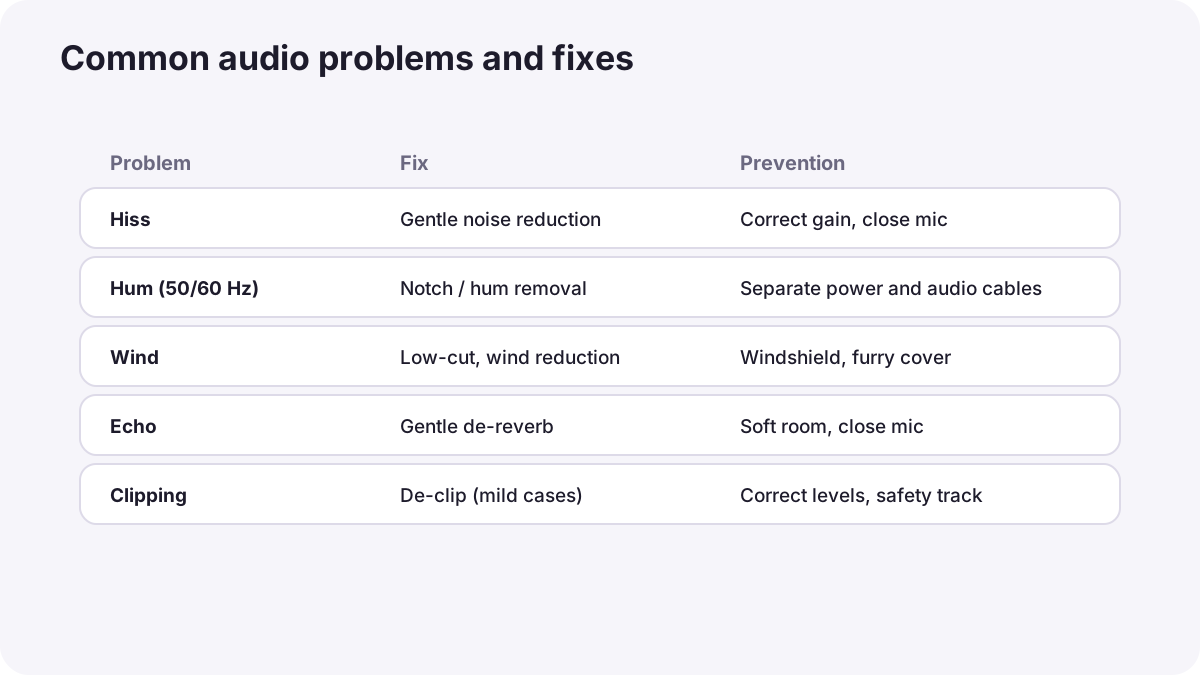
| Problem | Sounds like | Fix | Prevention |
|---|---|---|---|
| Hiss | Constant soft 'shhh' | Noise reduction using a sample of room tone | Correct gain, quiet equipment, close microphones |
| Hum | Low steady tone | Notch filters at 50 or 60 Hz and their multiples, or hum-removal tools | Separate audio and power cables, balanced connections |
| Rumble | Low traffic or air-conditioning noise | Low-cut filter, as in how sound works | Turn off machines, choose quieter rooms |
| Wind | Bursts of low, rough noise | Low-cut and wind-reduction tools | Windshields and furry covers |
| Echo (reverb) | Hollow, distant voice | De-reverb tools, gently | Close microphones, soft rooms |
| Clipping | Harsh crackling on loud parts | De-clip tools for mild cases; use a safety track | Correct levels, limiters, 32-bit float |
| Plosives | Popping on 'p' and 'b' | Lower or filter the pop | Pop filters, microphone slightly off to the side |
| Sibilance | Sharp 's' and 'sh' sounds | De-esser | Microphone angle, gentle EQ |
| Clothing rustle | Scratching and rubbing | Edit around it or use the other microphone | Secure lav placement, as in lavalier and wireless microphones |
| Dropouts | Short gaps or crackles | Replace with backup recording or another take | Strong wireless signal, internal backup |
Remember:Hum follows the frequency of the local electricity supply, 50 Hz in some regions and 60 Hz in others, plus multiples such as 100 or 120 Hz.
Using noise reduction well
- Find a section with only the noise, such as room tone.
- Let the tool learn the noise from that section.
- Apply a small amount first and listen to the voice.
- Stop before the voice sounds watery or robotic; a little natural background is better than damaged speech.
- Compare before and after on headphones.
Warning:AI-based voice tools can now separate voices from noise remarkably well, but they can also change the character of a voice or invent artifacts. Use them carefully and check every result, as in AI in video creation and editing.
Sync and phase problems
- Out of sync: lips and sound do not match; re-sync using the slate, waveform or timecode, as in dual-system sound and syncing.
- Phase problems: when two microphones record the same voice from slightly different distances, mixing them can make the voice thin or hollow. Use one microphone at a time, or align them carefully.
When to re-record
- Heavy distortion from overloaded equipment usually cannot be fixed.
- Speech completely covered by noise cannot be recovered cleanly.
- Very strong echo can only be reduced, not removed.
In these cases, use another take, wild lines or ADR, as in recording clean dialogue on location, or re-record narration in a quiet room.
Common mistakes
- Too much noise reduction: voices sound underwater or robotic.
- Fixing on the original file: no way back if the repair goes wrong.
- Applying repairs before listening carefully: new problems are created.
- Mixing two microphones carelessly: thin, hollow voice from phase problems.
- Hoping post-production will save bad recording: many problems are permanent.
How dialogue editors repair audio
Dialogue editors and mixers use specialist repair tools for noise, hum, clicks, clipping and echo, always gently and step by step, comparing results on good monitors. They prefer replacing a damaged word from another take over heavy processing, keep original files untouched, and report recurring problems so the production can prevent them next time.
Practical examples
A humming interview
- Situation
- A low hum runs under a whole interview recorded near power cables.
- What to do
- You apply a hum-removal filter at the local mains frequency and its multiples.
- Why it works
- Hum sits at predictable frequencies that can be removed narrowly.
- Result
- Clean speech without the hum.
An echoey voiceover
- Situation
- A narration recorded in an empty room sounds distant.
- What to do
- Gentle de-reverb helps a little, so you re-record it in a furnished room with the microphone closer.
- Why it works
- Strong echo can be reduced but not removed; re-recording is better.
- Result
- A warm, close narration.
Key points
- Prevention is the best fix; repair tools are for small, unavoidable problems.
- Common problems include hiss, hum, rumble, wind, echo, clipping, plosives, sibilance, rustle and dropouts.
- Hum follows the local mains frequency (50 or 60 Hz) and can be filtered narrowly.
- Use noise reduction gently and keep originals untouched; AI tools need careful checking.
- Re-record or use another take when distortion, noise or echo are too strong.
Frequently asked questions
How do I remove background noise from audio?
How do I remove hum from audio?
Can clipped audio be fixed?
What is a de-esser?
Conclusion
Most audio problems can be prevented, and many small ones can be repaired with careful, gentle tools. Know when to re-record instead. You have now completed the sound for video course: you can plan, record, edit and mix clear, rich sound for any video.
Finished reading? Track your progress through Sound for video.