The last stage of editing is where a good edit becomes a professional one. After the story works, the editor refines every cut, gathers feedback, locks the picture, sends it for sound and color finishing, and then checks every frame and sound before delivery. Small mistakes at this stage, a misspelled name, a flash of black, a loud pop, a missing music licence, can undo weeks of good work. This lesson explains the fine cut, handling review notes, picture lock, finishing steps, a final checklist, approval and archiving.
From rough cut to finished video
The stages of an edit, from assembly to picture lock and finishing, were introduced in what video editing is and why it matters, and the rough cut in building the rough cut. Finishing turns the approved structure into a polished final product.
The fine cut
- Refine every cut: frame by frame, for timing and rhythm, as in pacing and rhythm.
- Tighten pauses and entries: remove anything that does not help.
- Polish transitions and B-roll: as in B-roll and cutaways.
- Add final titles and graphics: as in titles, text and graphics.
- Place final licensed music: as in music licensing for video.
Handling review notes
- Send a review copy with timecode or comments enabled, so notes refer to exact moments.
- Collect all notes in one place from everyone who must approve.
- Group notes into must-fix, nice-to-have and questions.
- Discuss conflicting notes with the client before changing anything.
- Make the changes and send a new numbered version.
Tip:Agree the number of revision rounds before starting, as in client expectations and revisions. It keeps projects on schedule.
Picture lock and finishing
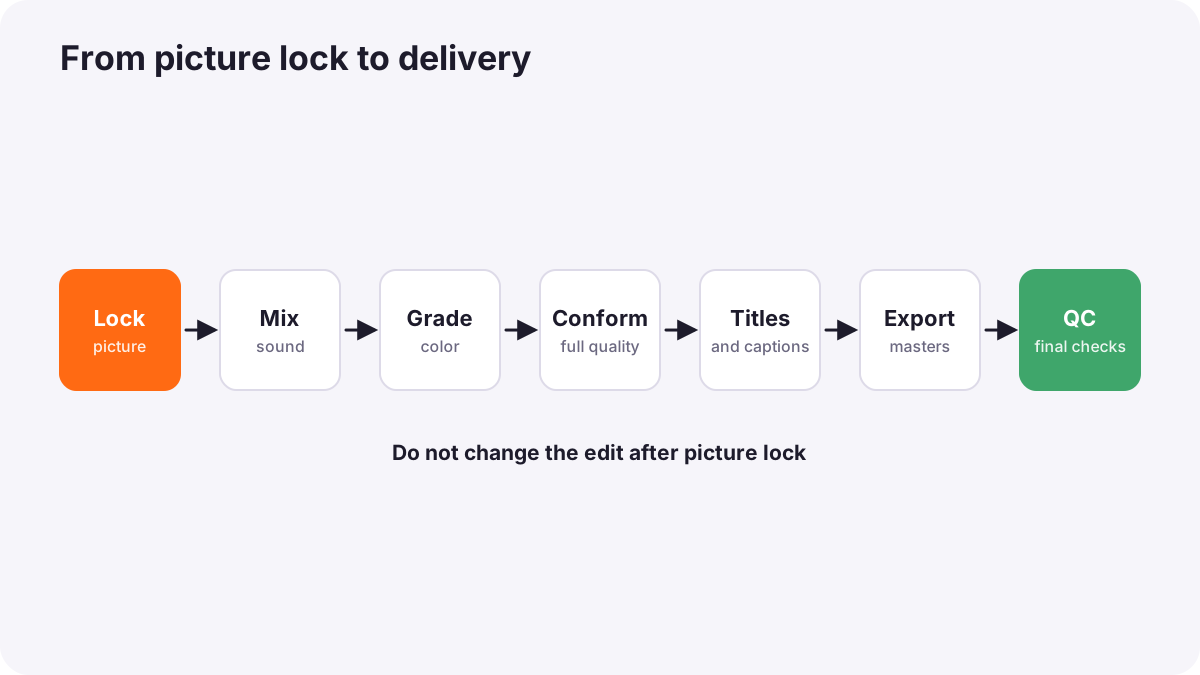
When the client approves the picture, the edit is locked. Then finishing begins:
| Step | What happens |
|---|---|
| Sound mix | Dialogue, music and effects balanced to the delivery loudness, as in basic audio editing and mixing |
| Color grading | Shots corrected and given a consistent look, as in color correction and color grading in video |
| Online or conform | If proxies were used, the edit is reconnected to full-quality media, as in proxies and video delivery formats |
| Final graphics and captions | Titles, credits and caption files completed |
| Export | Masters and deliverables created, as in exporting and delivery settings |
A final quality checklist
- Picture: no black frames, flash frames, missing media or offline clips; focus and exposure acceptable.
- Sound: in sync, no clicks or pops, levels consistent, correct loudness.
- Text: names, titles and facts spelled correctly; inside safe areas.
- Rights: music, stock footage, fonts, releases and permissions confirmed, as in filming people and places.
- Deliverables: every requested version, length, ratio and caption file present and named correctly.
- Playback: watched fully on more than one device.
Warning:Watch the final export at least once without stopping, with good headphones, as a viewer would. Many errors only appear in the finished file.
Approval, delivery and archive
- Get final approval in writing before delivering the last files or publishing.
- Deliver files as agreed, as in client delivery and file packaging.
- Archive the project: footage, project files, music licences, releases, graphics, masters and deliverables together, as in archiving and long-term preservation.
- Reflect: note what worked and what to improve next time, as in sequencing and final presentation.
Common mistakes
- Changing the edit after sound and color are finished: costly rework.
- Scattered notes from many people: changes are missed or contradict each other.
- Spelling mistakes in names: very visible and embarrassing.
- Not checking rights: a finished video cannot be published.
- Not watching the final export fully: errors reach the audience.
- Poor archiving: future changes become impossible.
How post-production teams finish
Professional teams manage reviews with timecoded notes, lock picture before finishing, hand over to sound mixers and colorists with organized files, conform to full-quality media, run quality-control checks against a delivery checklist, get written approval and archive everything. This discipline is what makes work reliable for clients.
Practical examples
A spelling mistake
- Situation
- A client notices their CEO's name misspelled in the final video.
- What to do
- You now check every name against a written list from the client before finishing.
- Why it works
- Names must be confirmed, not guessed.
- Result
- No more spelling errors in delivered work.
Changes after color
- Situation
- A client asks to re-edit after the grade is finished.
- What to do
- You explain picture lock and that changes now require extra grading and mixing time at a cost.
- Why it works
- Finishing work depends on locked timing.
- Result
- Clients review more carefully before lock.
Key points
- The fine cut refines timing, B-roll, titles and music after the structure works.
- Collect timecoded notes in one place, group them and confirm conflicting notes.
- Lock picture before sound mixing, color grading and conforming.
- Check picture, sound, text, rights and deliverables before delivery, and watch the final export fully.
- Get written approval, deliver as agreed and archive everything.
Frequently asked questions
What happens after picture lock?
How should I collect client feedback on a video?
What should I check before delivering a video?
Why is archiving important?
Conclusion
Finishing turns an approved edit into a professional delivery: fine cut, organized reviews, picture lock, sound and color, careful quality checks, approval and archiving. You have now completed the video editing and post-production course.
Finished reading? Track your progress through Video editing.