Your phone probably has two, three or more cameras, each with a different view. Choosing the right one is the phone version of choosing a lens. This lesson explains how to pick between ultrawide, main and telephoto, why pinch-zoom can ruin detail, and which accessories are actually worth buying, from a simple tripod to microphones and storage.
Choosing the right phone camera
| Module | Typical label | Use for | Watch out for |
|---|---|---|---|
| Ultrawide | 0.5x or 0.6x | Rooms, architecture, dramatic landscapes | Stretched edges, softer in low light |
| Main (wide) | 1x | Most photos and video, low light | Usually the best quality |
| Telephoto | 2x to 5x or more | Portraits, details, distant subjects | Needs more light |
The labels show magnification compared with the main camera. Their real focal lengths and how phones switch between them are explained in smartphone multi-camera systems. The look of each focal length follows the same rules as camera lenses, in focal length and angle of view.
Optical zoom versus digital zoom
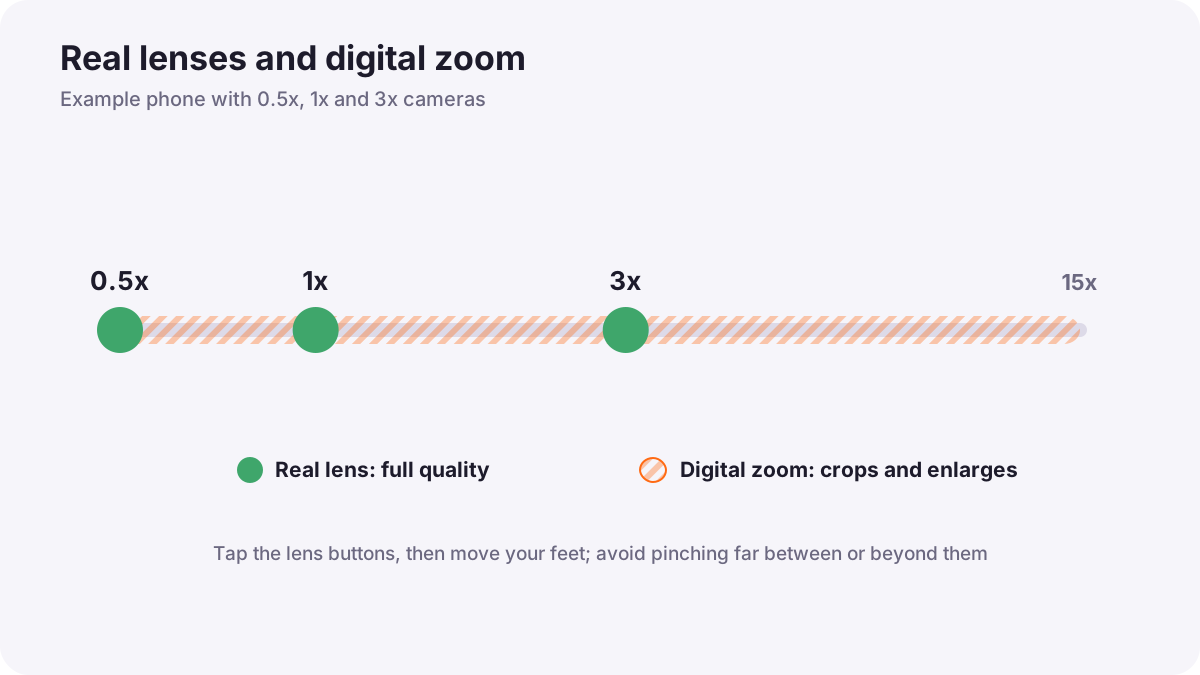
Tapping the 2x or 5x button usually switches to a real lens, which gives full quality. Pinching to zoom between or beyond those steps crops and enlarges the image digitally, which loses detail. Some phones crop their high-resolution main sensor for a clean 2x, which works well in good light.
Tip:For the best quality, use the lens buttons, then move your feet to frame the shot.
Accessories that really help
| Accessory | What it does | Priority |
|---|---|---|
| Lens cloth | Removes fingerprints and haze | Essential |
| Phone clamp and small tripod | Steady night photos, timelapses, selfies, video | Essential |
| Remote or timer | Avoids shake from pressing | High |
| External microphone | Clear voice for video | High for video |
| Small LED light | Light for video and products | Medium |
| Gimbal | Smooth walking video | Medium for video |
| Power bank and storage | Long shoots without running out | High |
| Clip-on lenses | Macro or wider views | Low; quality varies |
| ND filter | Slower shutter for smooth video in sun | For pro video only |
Remember:Buy accessories one at a time, when a real problem appears. A tripod and a microphone usually make the biggest difference.
Common mistakes
- Pinch-zooming far: smeared, painterly detail.
- Using the ultrawide for portraits: stretched faces near the edges.
- Buying cheap clip-on lenses: soft edges and flare.
- Ignoring storage: video fills phones quickly; back up often, as in backup, redundancy and data protection.
How professionals kit out a phone
Mobile professionals carry a light kit: lens cloth, clamp and mini tripod, a wireless microphone, a small LED and a power bank. They switch lenses deliberately and avoid digital zoom for paid work.
Practical examples
A portrait at a party
- Situation
- Close-up photos with the main camera make noses look large.
- What to do
- You step back and use the 2x or 3x lens.
- Why it works
- A longer focal length from farther away gives a flatter, more flattering perspective.
- Result
- Natural-looking faces.
A small room
- Situation
- You need to show a whole small bedroom for a rental listing.
- What to do
- You use the ultrawide, hold the phone level at chest height and keep walls straight.
- Why it works
- The ultrawide shows the space; keeping it level avoids leaning walls.
- Result
- A clear, honest room photo.
Key points
- Choose between ultrawide, main and telephoto like choosing a lens; the main camera is usually best quality.
- Use lens buttons, not pinch zoom, and move your feet.
- A lens cloth, clamp, tripod, microphone and power bank help the most.
- Buy accessories only when they solve a real problem.
Frequently asked questions
Which phone camera is best quality?
Is digital zoom bad?
Are clip-on lenses worth it?
What is the first accessory to buy?
Conclusion
Choosing the right lens and a few smart accessories make a phone far more capable. Next, you will learn light and composition tricks that make phone photos stand out.
Finished reading? Track your progress through Smartphone photo and film.