Viewers forgive slightly soft video, but they quickly stop watching when they cannot hear clearly. Phone microphones are designed to hear everything around you, which is great for calls and terrible for interviews in a busy street. This lesson shows how to get the best from the built-in microphone, which external microphones work with phones, how to deal with wind, and how to check your sound before it is too late.
Getting the most from the built-in microphone
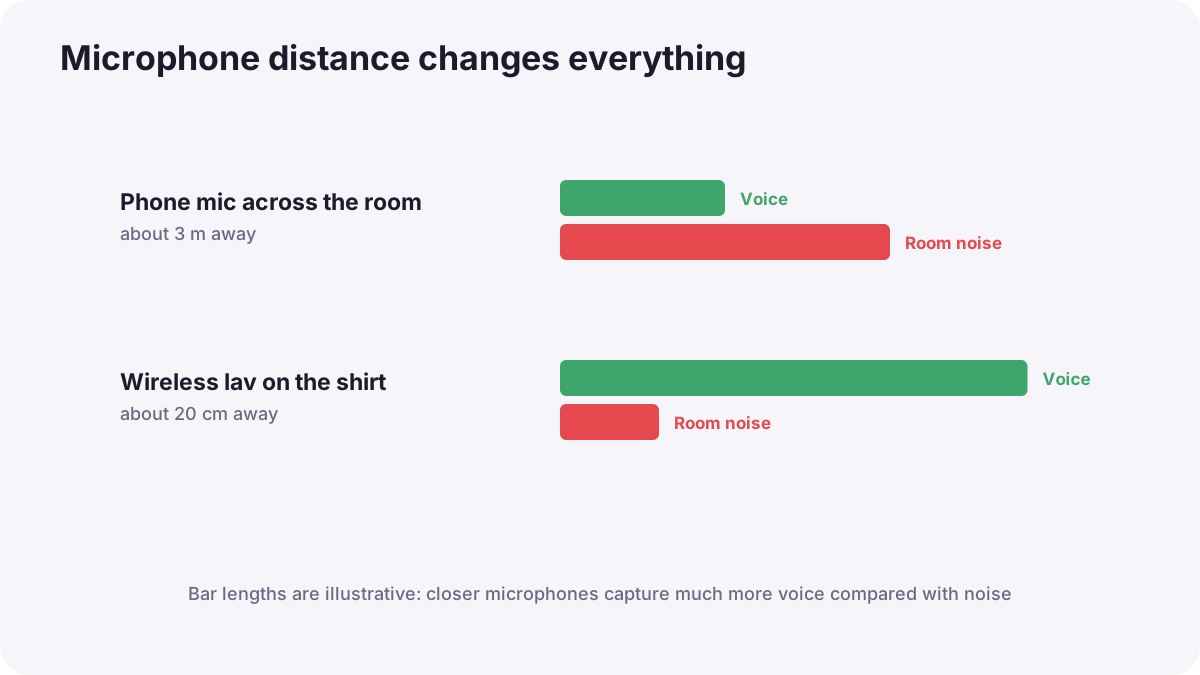
- Get close: sound quality drops quickly with distance, as in how sound works.
- Find a quiet place: turn off fans and move away from traffic.
- Use soft rooms: curtains and furniture reduce echo.
- Do not cover the microphone holes with your fingers or a case.
- Use a second phone as a recorder near the speaker if you have no microphone.
Tip:A second phone's voice recorder app placed near the speaker, out of shot, can sound far better than the filming phone across the room. Clap once at the start to sync the files later.
External microphones for phones
| Type | Best for | Notes |
|---|---|---|
| Wireless lavalier kit | Interviews, vlogs, talking to camera | Receiver plugs into USB-C or Lightning; most popular choice |
| Wired lavalier | Budget interviews | Cable limits movement |
| Plug-in or shotgun mic | Run-and-gun, ambience | Points where the phone points |
| Separate recorder | Highest quality, backups | Sync in editing |
Remember:Lavalier placement and wireless systems are explained in lavalier and wireless microphones. Many wireless kits can also record a backup on the transmitter.
Wind, levels and checking
- Fit the furry windshield outdoors, as in shotgun and boom microphones.
- Check that the phone uses the external microphone: record a test and listen.
- Watch levels in a pro video app if possible; avoid clipping.
- Listen with headphones when you can.
- Record 30 seconds of room tone for editing, as in room tone, ambience and wild sound.
Common mistakes
- Filming interviews from across the room: echoey, thin voices.
- No windshield outdoors: rumbling, unusable audio.
- Assuming the external mic is working: the phone may still use its own.
- Background music playing while filming: impossible to edit and often a copyright problem.
How professionals record phone sound
Mobile journalists and creators use wireless lavalier kits for speech, test sound before every recording, listen with headphones, enable backup recording and capture room tone. They choose quiet locations as carefully as good light.
Practical examples
A street interview
- Situation
- Traffic noise drowns out your interviewee.
- What to do
- You clip a wireless lavalier on their shirt and move to a quieter side street.
- Why it works
- A close microphone and a quieter place improve the voice-to-noise ratio.
- Result
- Clear, usable dialogue.
No microphone available
- Situation
- You must film a short talk with no external mic.
- What to do
- You place a second phone recording audio just out of frame near the speaker and clap at the start.
- Why it works
- A close recorder captures cleaner sound; the clap makes syncing easy.
- Result
- Much clearer audio than the filming phone alone.
Key points
- Clear sound matters more than perfect picture for keeping viewers.
- Get the microphone close, find quiet places and avoid echo.
- Wireless lavalier kits are the most useful phone microphones.
- Use windshields outdoors, test that the external mic is working and record room tone.
Frequently asked questions
What is the best microphone for phone video?
How can I improve phone audio without a microphone?
Why is my outdoor phone audio rumbling?
How do I know my external mic is working?
Conclusion
Close microphones, quiet places and a quick test give phone videos clear, professional sound. Next, you will light phone videos simply and cheaply.
Finished reading? Track your progress through Smartphone photo and film.