Two people with the same phone can take very different photos. The difference is almost never the phone; it is light, position and timing. This lesson collects practical tricks for phone photographers: where to find flattering light, how to use your phone's small size for unusual angles, how to simplify busy scenes, and how to keep photos sharp. Each trick links to the full explanation elsewhere in the Academy.
Find the light first
- Window light: place people or objects beside a window for soft, shaped light, as in window light.
- Open shade: on sunny days, move into shade for even skin tones, as in sunlight, open shade and overcast conditions.
- Golden hour: the hour after sunrise and before sunset gives warm, flattering light, as in golden hour, blue hour and changing daylight.
- Backlight: put the sun behind the subject for glowing hair, then tap the face and raise brightness.
- Avoid harsh overhead sun on faces when you can.
Use the phone's small size
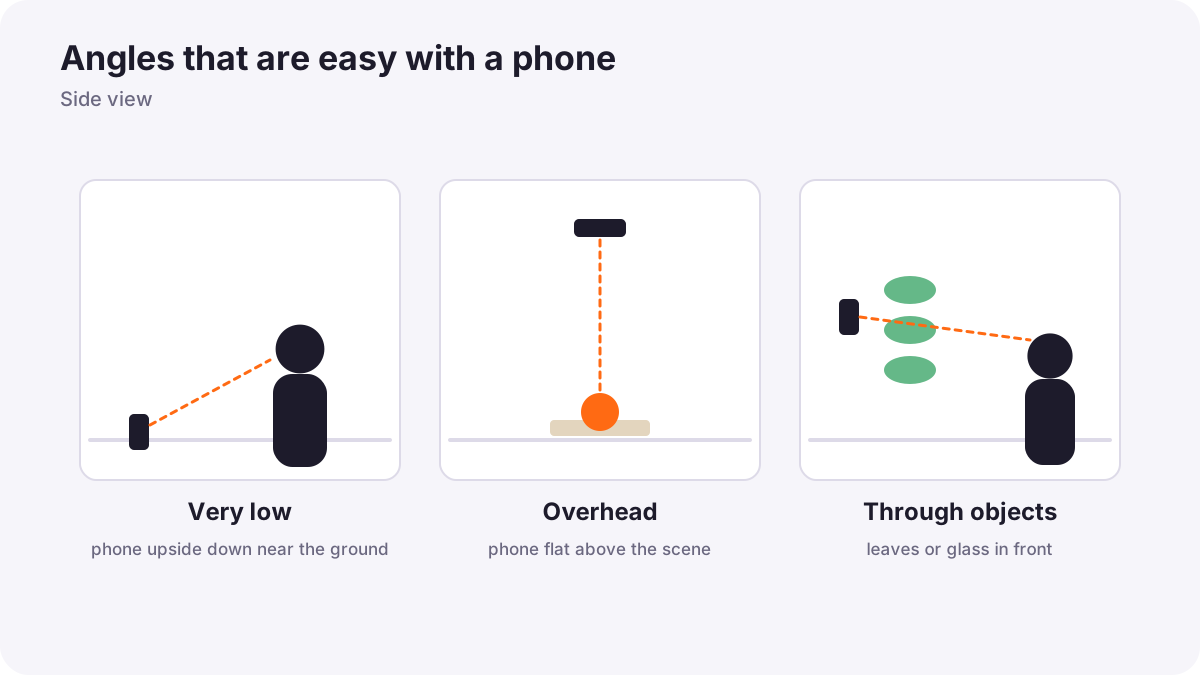
| Angle | How | Effect |
|---|---|---|
| Very low | Hold the phone upside down near the ground | Dramatic, powerful subjects; foreground interest |
| Overhead | Hold the phone flat above the scene | Clean flat lays of food and products |
| Through objects | Shoot through leaves, glass or a gap | Natural frames and depth |
| Reflections | Lower the phone to a puddle | Mirror images |
Tip:Holding the phone upside down puts the lens closer to the ground for even lower angles.
Simplify the frame
- Choose one subject and decide why it matters.
- Check the edges and background for clutter.
- Move, not zoom: take a step left, right, closer or lower to clean the background.
- Use space: leave room in the direction your subject looks or moves.
- Add a foreground for depth, as in foreground, middle ground and background.
Keep photos sharp
- Hold with two hands, elbows against your body.
- Press gently or use the volume button, timer or a remote.
- Lean on something or use a mini tripod in low light.
- Use burst mode for moving subjects and choose the sharpest frame.
Common mistakes
- Shooting everything from standing eye level: ordinary-looking photos.
- Ignoring the background: poles and clutter behind people.
- Using flash for everything: flat, harsh results; find window light instead.
- Tilted horizons: turn on the grid and level.
How professionals work with phones
Professional phone photographers move constantly. They look for light first, try several angles of every subject, check edges before shooting, and take many frames to choose the best one later.
Practical examples
A plain coffee cup
- Situation
- Your coffee photos look flat and boring.
- What to do
- You move to a window, shoot from above at a slight angle and include a book in the corner.
- Why it works
- Side light gives shape, and a foreground object adds a story.
- Result
- An inviting, magazine-style photo.
A child's football game
- Situation
- Photos from standing height look distant.
- What to do
- You crouch low, use burst mode and shoot as the child kicks.
- Why it works
- A low angle adds drama and burst catches the peak moment.
- Result
- An exciting, sharp action shot.
Key points
- Find good light first: windows, open shade, golden hour and backlight.
- Use the phone's size for very low, overhead and through-object angles.
- Simplify the frame by moving, not zooming, and check the edges.
- Keep photos sharp with a steady grip, gentle press, support and burst mode.
Frequently asked questions
How can I make my phone photos look professional?
What is the best light for phone photos?
Should I use the flash on my phone?
How do I get sharp phone photos in low light?
Conclusion
Light, angle and simplicity make ordinary phone photos special. Next, you will learn when and how to use portrait, night and other special phone modes.
Finished reading? Track your progress through Smartphone photo and film.