Good product photos help things sell, and many small businesses and online sellers need them every week. With a phone, a window and a few sheets of paper you can produce clean, professional product images at home. This lesson shows a simple setup, the angles buyers need, how to light shiny and matte products, and how to edit honestly so photos match the real item. It is also a skill you can offer to local businesses for paid work.
A simple window-light setup
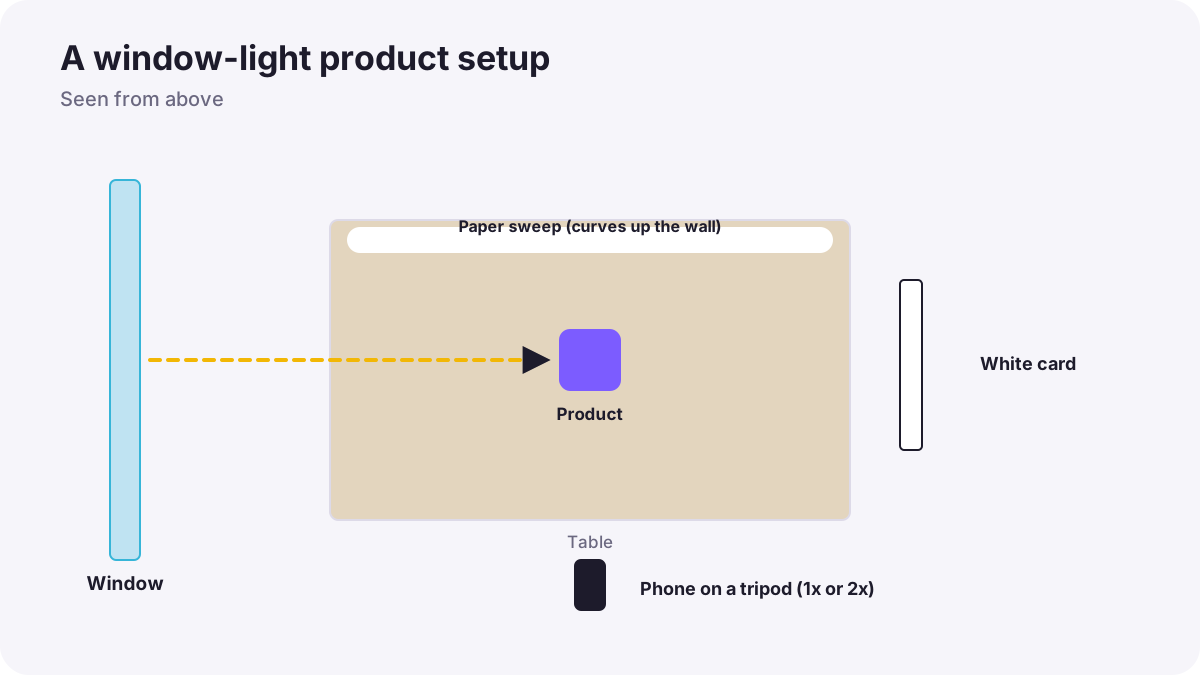
- Choose a table beside a large window with soft daylight, not direct sun.
- Make a paper sweep: curve a large sheet of white or colored paper from the wall down onto the table, so there is no horizon line.
- Place the product a little away from the paper's back edge.
- Add a white card on the side opposite the window to soften shadows.
- Fix the phone on a small tripod or stack of books, using the main or 2x lens.
- Tap the product, lock exposure and adjust brightness until the background looks clean but not burned out.
Remember:This is the same idea as studio product lighting in lighting products and still life, using a window as the light.
The shots buyers need
| Shot | Why buyers need it |
|---|---|
| Main photo on a plain background | Clear first impression |
| Front, back and sides | See the whole item |
| Close-up details | Materials, quality, labels |
| Scale (in a hand or next to a known object) | Understand the real size |
| In use or styled | Imagine owning it |
| Any flaws (for used items) | Honesty builds trust |
Tip:Marketplaces often have rules for the main photo, such as a plain white background and the product filling most of the frame, explained in product, commercial and e-commerce photography. Always check the current rules of the marketplace you use.
Shiny, matte and transparent products
- Matte items (fabric, wood): side window light shows texture.
- Shiny items (metal, phones, cosmetics): large white cards around the product create clean reflections; black cards add contrast.
- Glass and bottles: place the light behind the item with white paper for glowing edges.
- Jewelry: use the telephoto lens or macro mode from a little distance, and clean every fingerprint.
Honest editing
- Correct white balance so colors match the real product.
- Brighten the background evenly, without changing the product's color.
- Remove dust and specks, but never hide real flaws or change the shape.
- Crop consistently so all products sit the same way in a shop.
Remember:Photos that misrepresent a product lead to returns, complaints and lost trust. Accurate color matters as much as beauty.
Common mistakes
- Direct sun on the product: hard shadows and burned highlights.
- Wide-angle close-ups: distorted product shapes; use 1x or 2x from farther back.
- Mixed light from lamps and windows: strange color casts.
- Messy backgrounds: buyers notice clutter first.
- Changing product color in editing: returns and complaints.
How professionals do it
Professional product photographers use consistent setups so every image in a shop matches, follow each marketplace's rules, keep accurate color with a gray or white reference, and deliver files named and sized for the client's website.
Practical examples
Handmade candles
- Situation
- A small business needs photos of twelve candles for an online shop.
- What to do
- You build a window-light paper sweep, use the 2x lens on a tripod, and keep the same position for every candle.
- Why it works
- A fixed setup makes every image consistent.
- Result
- A clean, matching shop gallery.
Selling a used phone
- Situation
- Buyers ask for proof of condition.
- What to do
- You photograph all sides, the screen on and off, and close-ups of every scratch.
- Why it works
- Honest, complete photos build trust.
- Result
- A faster sale with fewer questions.
Key points
- A window, a paper sweep and a white card make a complete product setup.
- Shoot a main photo plus all sides, details, scale and in-use images.
- Light shiny items with large white and black cards, and glass from behind.
- Edit honestly: accurate color, clean background, no hidden flaws.
- Check each marketplace's current image rules.
Frequently asked questions
Can I take professional product photos with a phone?
How do I get a white background with a phone?
Which phone lens is best for products?
Can I earn money taking product photos?
Conclusion
With a window, paper and your phone, you can make product photos that help people sell. Next, you will move to video and learn the phone video settings that matter most.
Finished reading? Track your progress through Smartphone photo and film.