Phone cameras love light. With more light, their small sensors make cleaner, sharper and more colorful video. You do not need expensive equipment: a window, a white sheet and one small LED can transform talking-head videos, tutorials and interviews. This lesson shows budget lighting setups that work, the strengths and limits of ring lights, and how to avoid common lighting problems.
Start with a window
- Face the window at an angle of about 45 degrees, not straight on.
- Place the phone between you and the window, slightly to one side.
- Bounce light into the shadow side with a white board, sheet or wall.
- Turn off ceiling lights that mix colors or light from above.
- Film at the same time of day for videos in a series.
Tip:This is the classic window setup from window light, and it is free.
Budget lights compared
| Light | Strength | Limit |
|---|---|---|
| Small LED panel | Adjustable brightness and color temperature | Small and hard unless diffused |
| LED with softbox or umbrella | Soft, flattering key light | Needs space |
| Ring light | Even, shadowless front light; easy setup | Flat look; ring-shaped reflections in eyes and glasses |
| Practical lamps | Warm background mood | Too weak as a main light |
Remember:Ring lights are popular for makeup and close talking videos. For a more three-dimensional look, place a softened LED to one side instead.
A simple one-light setup
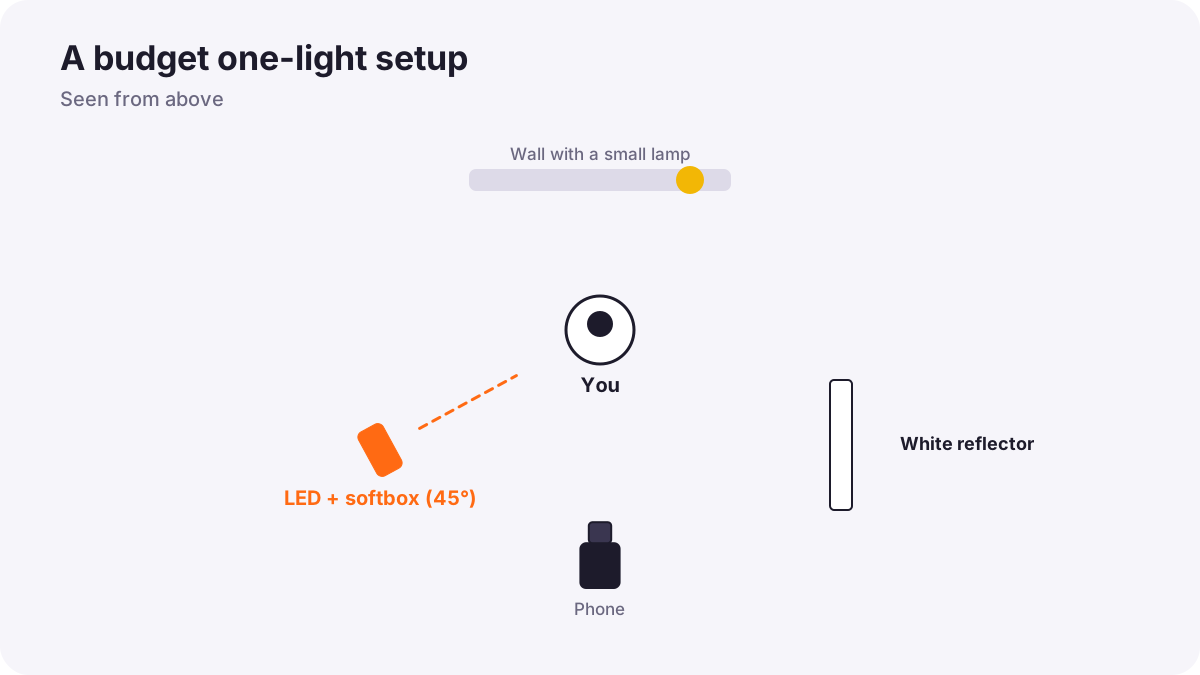
- Key light: one diffused LED at about 45 degrees, slightly above eye level.
- Fill: a white surface on the other side.
- Background: a lamp or small light to separate you from the wall.
Remember:This is a small version of interview lighting. Lights and color quality scores are explained in continuous lighting for video.
Color and flicker
- Match color temperatures: set LEDs to match daylight or your room lights, as in mixed lighting and difficult color.
- Watch for flicker: some cheap LEDs and room lights flicker on camera; test before recording.
- Choose lights with good color quality for natural skin tones.
Common mistakes
- Sitting with a window behind you: a dark face.
- Ceiling lights only: dark eye sockets.
- Mixing warm lamps and cool daylight: patchy colors.
- A bare LED close to the face: harsh shadows and glare.
How professionals light on a budget
Experienced creators use window light whenever possible, add one diffused LED for consistency, light the background separately and test for flicker. Small, soft and consistent light is their goal.
Practical examples
A tutorial channel
- Situation
- Your tutorial videos look dark and gray in the evening.
- What to do
- You add one LED with a small softbox at 45 degrees and a desk lamp behind you.
- Why it works
- A soft key light and background light give shape and separation.
- Result
- Bright, consistent videos at any time of day.
Glare on glasses
- Situation
- A ring light creates circles in an interviewee's glasses.
- What to do
- You move the light higher and to the side and soften it.
- Why it works
- Changing the light angle moves the reflection out of the lenses.
- Result
- Clear eyes without glare.
Key points
- More light gives phone video cleaner, sharper, more colorful results.
- A window at 45 degrees plus a white reflector is a free, excellent setup.
- One diffused LED, a fill reflector and a background lamp make a professional small setup.
- Ring lights are easy but flat and reflect in eyes and glasses.
- Match color temperatures and test for flicker.
Frequently asked questions
What is the cheapest way to light a phone video?
Is a ring light good for video?
Why does my video flicker?
How many lights do I need?
Conclusion
Good light is the cheapest upgrade for phone video. Next, you will edit your phone footage into a finished video.
Finished reading? Track your progress through Smartphone photo and film.