Two edits can use exactly the same shots and still feel completely different: one tense and exciting, the other calm and thoughtful. The difference is pacing and rhythm, how long each shot lasts and how the cuts fall in time. Good pacing keeps viewers engaged without exhausting them; bad pacing makes a video drag or feel frantic. This lesson explains how shot length shapes energy, how long to hold a shot, how to cut to music, how to vary pace through a video, and how to judge pacing with fresh eyes.
Pacing and rhythm
Pacing is how fast the story feels like it is moving. Rhythm is the pattern of cuts and moments in time, like the beat in music. Pacing in photo sequences was introduced in sequences and photo essays; in video, the editor controls it precisely, frame by frame. Rhythm is also the third priority in Walter Murch's rule of six, as in what video editing is and why it matters.
Shot length and energy
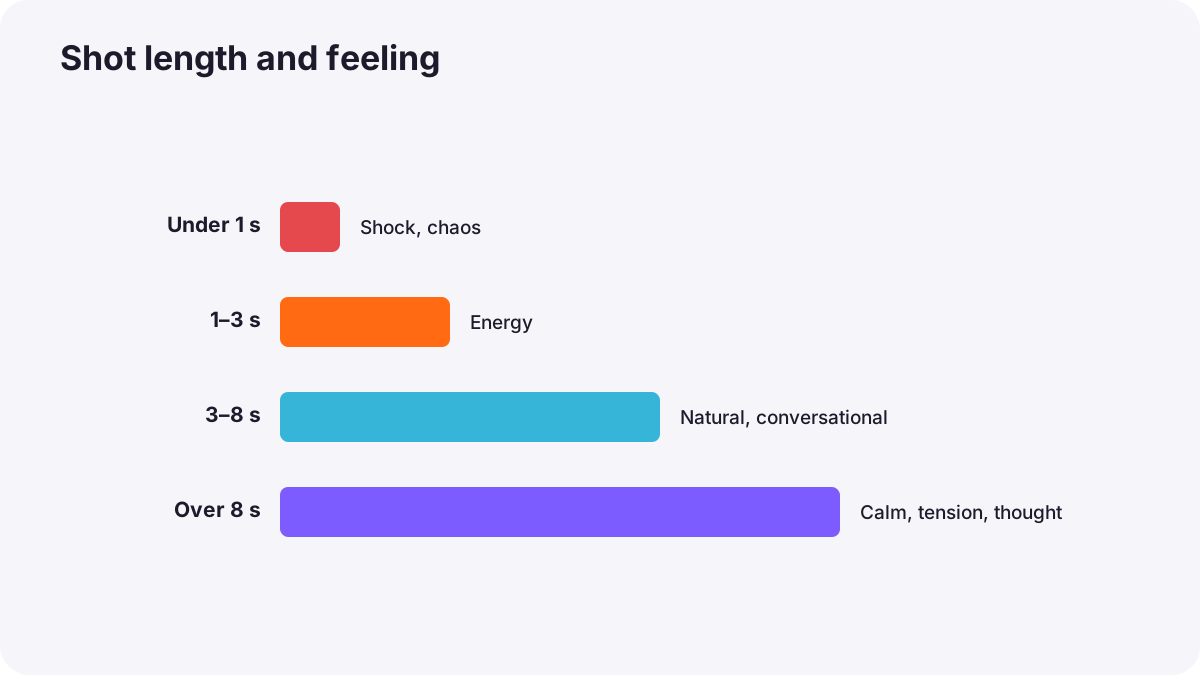
| Shot length | Feeling | Common use |
|---|---|---|
| Very short (under 1 second) | Shock, chaos, excitement | Action peaks, music videos, fast montages |
| Short (1 to 3 seconds) | Energy, momentum | Social videos, trailers, action |
| Medium (3 to 8 seconds) | Natural, conversational | Most documentaries, interviews and stories |
| Long (over 8 seconds) | Calm, tension, thought | Emotional moments, landscapes, slow scenes |
Remember:Film scholars measuring thousands of films have found that the average shot length of English-language films has dropped from about 12 seconds in the 1930s to about 2.5 seconds in recent decades. Faster cutting is common today, but it is a choice, not a rule.
How long to hold a shot
- Long enough to understand: viewers need time to read a new shot; wide and detailed shots need longer than simple close-ups.
- Cut when the information is delivered: once the viewer has understood the shot, it starts to lose energy.
- Hold emotional moments: a reaction or silence often needs more time than you expect.
- Cut on action or on a look: movement and eye direction give natural cut points, as in continuity editing and match cuts.
Cutting to music
- Cut on the beat for energy; cut on strong beats for impact.
- Not every beat: cutting on every single beat becomes predictable; vary it.
- Follow the music's structure: change pace when the music changes, for example at a chorus.
- Let visuals land on musical accents: a jump, a door or a reveal timed with a drum hit feels satisfying.
Tip:Mark the beats on your music track with markers before editing, then snap cuts to them. It makes cutting to music much faster.
Choosing music was explained in music, sound effects and the soundtrack.
Varying the pace
Good films breathe. Fast sections feel faster after slow ones, and quiet moments feel stronger after busy ones. Plan changes in pace: an energetic opening, a calmer middle for understanding, a build toward the peak, and space for the ending. Structure was explained in building the rough cut.
Trimming pauses and repetition
- Remove empty pauses and repeated information, especially in interviews and talking videos.
- Keep natural breaths and pauses where they carry feeling.
- Tighten entries and exits: start shots just before action begins and leave just after it ends.
Judging pace
- Watch the whole video without stopping.
- Notice when you feel bored or rushed, and mark those places.
- Watch again the next day with fresh eyes.
- Show it to someone else and watch where their attention drops.
Common mistakes
- Every shot the same length: the edit feels mechanical.
- Cutting too fast to understand: viewers feel confused.
- Holding shots too long: attention drifts.
- Cutting on every beat: predictable and tiring.
- Cutting emotional moments short: feelings have no time to land.
How editors control pace
Professional editors feel rhythm as much as they plan it. They hold shots until the information or emotion lands, cut on action and looks, use music structure without following every beat, vary pace across the film, and judge timing by watching full sequences repeatedly and observing real viewers.
Practical examples
A slow travel video
- Situation
- Your 5-minute travel video feels slow.
- What to do
- You shorten repeated landscape shots and cut the middle section to the beat of a livelier track.
- Why it works
- Shorter shots and musical rhythm add energy.
- Result
- The same story feels lively and engaging.
A rushed emotional moment
- Situation
- A daughter's reaction to a surprise gift lasts only half a second.
- What to do
- You hold the reaction for three seconds before cutting.
- Why it works
- Emotional moments need time to land.
- Result
- The moment feels genuinely moving.
Key points
- Pacing is how fast the story feels; rhythm is the timing pattern of cuts.
- Short shots create energy; long shots create calm, tension or thought.
- Hold a shot until its information or emotion lands, then cut, often on action or a look.
- Cut to music structure and strong beats, without cutting on every beat.
- Vary pace through the video and judge it by watching whole sequences with fresh eyes.
Frequently asked questions
How long should a shot be in a video?
How do I make my edit feel faster?
Should I cut on every beat of the music?
What is pacing in film editing?
Conclusion
Pacing and rhythm come from shot length and the timing of cuts: hold shots until they land, cut on action and music, vary the pace and judge it with fresh eyes. Next, you will learn the continuity editing techniques that make cuts invisible.
Finished reading? Track your progress through Video editing.