Watch any documentary, news report or company video, and you will see people speaking, but also many shots of what they are talking about: their hands at work, their city, the product, the people around them. These extra shots are called B-roll. They illustrate the story, keep viewers interested, and let editors shorten interviews smoothly. This lesson explains what B-roll and cutaways are, what to film, how to place them in an edit, and how to avoid the empty, generic B-roll that makes videos feel like advertisements.
A-roll, B-roll and cutaways
| Term | What it is | Example |
|---|---|---|
| A-roll | The main footage that carries the story, usually people speaking | An interview or presenter |
| B-roll | Supporting footage shown over or between the main footage | A baker kneading dough while she talks about her work |
| Cutaway | A short shot that cuts away from the main action and back again | A listener nodding, a clock on the wall |
| Insert | A close shot of a detail within the scene | A hand signing a document, as in shot sizes and camera angles for video |
Remember:The terms A-roll and B-roll come from early film and television editing, when footage was literally on separate rolls of film or tape that were mixed together.
Why B-roll matters
- Show, don't tell: B-roll shows what people describe, as in visual storytelling in film.
- Hide edits: covering a cut in an interview makes it invisible, as in editing dialogue and interviews.
- Control pace: B-roll lets the editor add rhythm and variety, as in pacing and rhythm.
- Add emotion and context: the place, the people and small details make a story feel real.
What B-roll to film
- Action: the person doing what they talk about.
- Sequences: wide, medium, close and detail shots of each activity, using the five-shot idea from your first video clips.
- Place: establishing shots of the building, street or landscape.
- Details: hands, tools, textures, signs and objects that carry meaning.
- People: colleagues, customers, family, with their consent.
- Movement: a few slow camera moves for smooth transitions.
Tip:Film more B-roll than you think you need, and hold each shot for at least 10 seconds. Editors almost always run out of B-roll before they run out of interview.
Placing B-roll in the edit
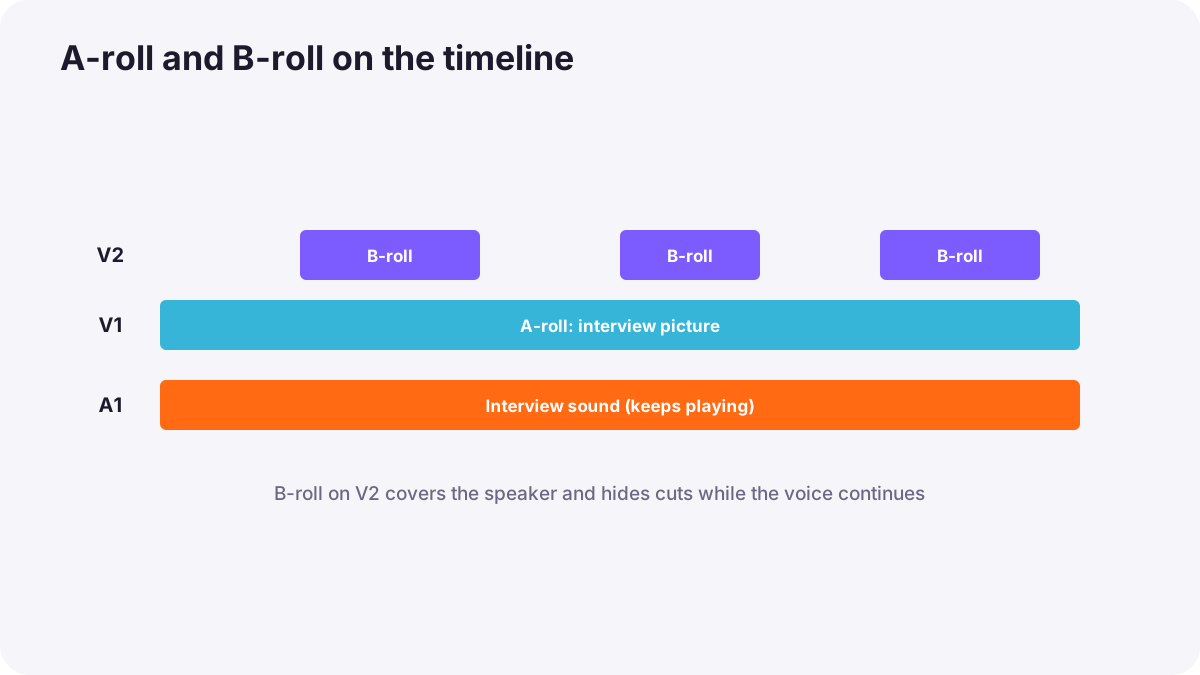
- Lay down the A-roll first, the main story spine, as in building the rough cut.
- Place B-roll on an upper video track so it covers the A-roll picture while its sound continues.
- Match B-roll to the words: show what is being said, or what helps viewers understand it.
- Start B-roll on a natural moment, such as the start of a sentence or a key word.
- Return to the speaker for emotional or important moments, so viewers can see their face.
- Add the B-roll's own sound quietly under the voice for realism.
Cutaways in scenes
Cutaways are used in conversations and events to show reactions, the surroundings, or a related detail. They can also hide continuity errors and jumps, as in continuity editing and match cuts. A good cutaway feels like part of the story, not just a patch.
Avoiding generic B-roll
- Be specific: real footage of the actual person and place is more powerful than generic shots.
- Avoid literal clichés: not every mention of 'growth' needs a plant growing.
- Use stock footage carefully: check licences and avoid overused clips, as in licensing and usage rights.
- Be honest: in documentaries, do not present unrelated footage as if it shows the real event.
Common mistakes
- Not filming enough B-roll: interviews cannot be shortened smoothly.
- B-roll shots too short: editors have no usable length.
- Covering every second of the speaker: viewers lose connection with the person.
- Random B-roll: pictures that do not relate to the words.
- Silent B-roll: scenes feel artificial.
How documentary editors use B-roll
Documentary and corporate editors build the story from interviews, then weave in specific, well-shot B-roll that illustrates, hides cuts and controls rhythm. They return to faces for emotion, keep B-roll natural sound underneath, use stock footage sparingly and honestly, and ask the camera team for more B-roll whenever they can.
Practical examples
A bakery owner's story
- Situation
- Your interview with a baker has several obvious cuts.
- What to do
- You cover each cut with B-roll of her kneading dough, the oven and customers, with soft natural sound.
- Why it works
- B-roll hides the cuts and shows her work.
- Result
- A smooth, warm story that feels real.
A company video full of stock clips
- Situation
- A brand video uses generic stock footage of handshakes and city skylines.
- What to do
- You replace them with real footage of the team at work.
- Why it works
- Specific B-roll is more believable than generic stock.
- Result
- The company feels authentic and trustworthy.
Key points
- A-roll carries the story; B-roll shows and supports it; cutaways step away briefly and return.
- B-roll illustrates, hides edits, controls pace and adds context.
- Film plenty of specific B-roll in sequences, holding shots for at least 10 seconds.
- Place B-roll on upper tracks over A-roll sound, matched to the words, returning to faces for key moments.
- Avoid generic stock clichés and present B-roll honestly.
Frequently asked questions
What is B-roll?
What is the difference between B-roll and a cutaway?
How much B-roll should I film?
Can I use stock footage as B-roll?
Conclusion
B-roll and cutaways turn talking into storytelling: they show, hide edits, add rhythm and give context. Film plenty of specific footage and use it honestly. Next, you will learn how to add titles, text and graphics.
Finished reading? Track your progress through Video editing.