Conversations and interviews are the backbone of many videos, from documentaries and testimonials to films and online channels. Editing them well means keeping speech clear and natural, choosing when to show the speaker and when to show the listener, shortening long answers without making them sound chopped, and doing all this honestly. The most important tools are J and L cuts, where sound and picture change at slightly different moments. This lesson explains J and L cuts, editing conversations, interview cutting, removing filler words, and the ethics of editing speech.
Split edits: J and L cuts
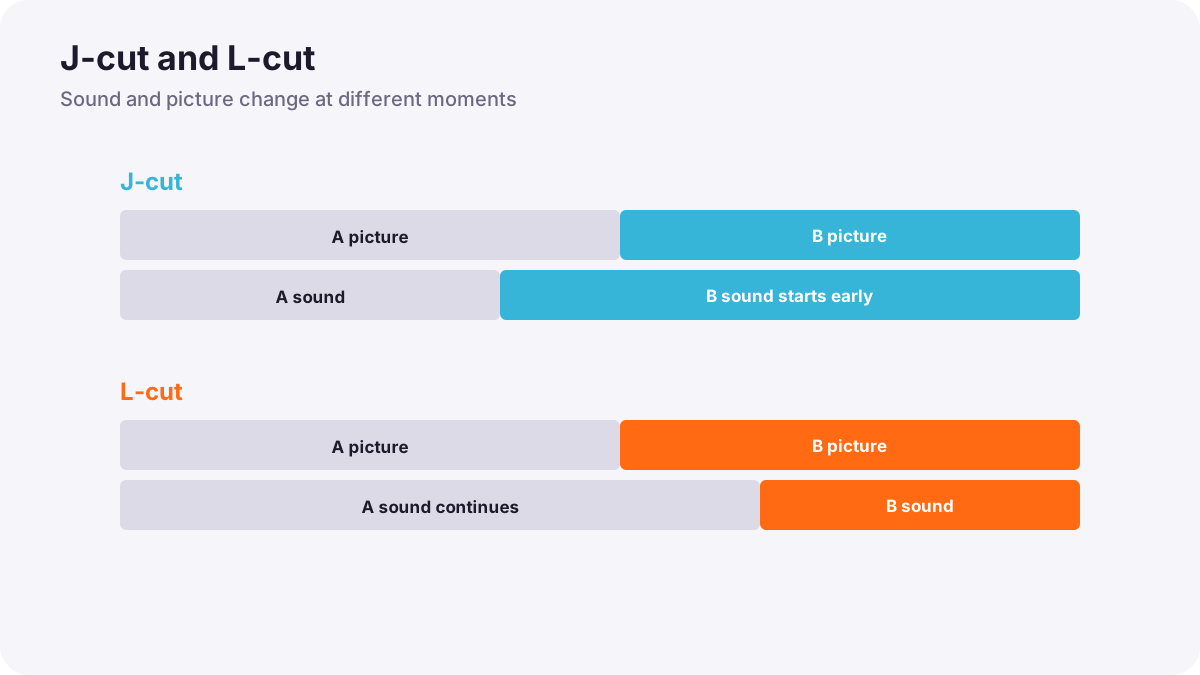
In a straight cut, the picture and sound change at the same moment. In a split edit, they change at different moments. Split edits make conversations feel natural, because in real life we often hear something before we look at it, or keep looking at someone after they stop speaking.
| J-cut | L-cut | |
|---|---|---|
| What happens | The sound of the next shot starts before its picture | The sound of the current shot continues after the picture changes |
| Name comes from | The J shape the audio and video make on the timeline | The L shape on the timeline |
| Common use | Hearing someone before we see them; leading into a new scene | Showing a listener's reaction while the speaker continues |
Editing conversations
- Do not always show the speaker: cutting to the listener's reaction often says more, as in visual storytelling in film.
- Use L cuts for reactions: let a line finish over the listener's face.
- Use J cuts to lead in: hear the next speaker just before cutting to them.
- Cut on natural moments: a breath, a look or the start of a thought.
- Keep coverage consistent: use the over-the-shoulder pairs filmed on set, as in shot sizes and camera angles for video.
Cutting interviews
- Choose the strongest answers from transcripts and selects, as in organizing footage and setting up a project.
- Shorten answers by removing repetition and side-stories.
- Hide cuts: cover a jump in the speaker's face with B-roll, a second camera angle, or a slow push in, as in B-roll and cutaways.
- Use jump cuts openly in casual online videos, where they are an accepted style.
- Keep natural sound: breaths and small pauses make speech sound human.
Removing filler words
Removing 'um', 'uh' and long hesitations makes speakers sound confident and saves time. Cut carefully between words so breathing and tone still sound natural, and add room tone to fill any gap, as in room tone, ambience and wild sound. Text-based editing tools can find and remove filler words quickly, but always listen to the result, as in AI in video creation and editing.
Tip:Do not remove every pause. A pause before an emotional answer is often the most powerful moment in an interview.
Editing speech honestly
Editing changes what people appear to say. It is acceptable to shorten and clarify, but never to join words or sentences in a way that changes someone's meaning, puts answers to different questions together as if they were connected, or makes a person appear to say something they did not. In documentary and news work, this honesty is essential, as in ethics in documentary and candid photography.
Common mistakes
- Only straight cuts in conversations: the scene feels mechanical.
- Always showing the speaker: reactions are lost.
- Visible jump cuts in serious interviews: the edit looks careless.
- Cutting mid-breath or mid-word: speech sounds chopped.
- Changing meaning by editing: dishonest and damaging to trust.
How editors cut dialogue
Professional editors build conversations with constant J and L cuts, choose reactions as carefully as lines, cut on breaths and looks, and hide interview edits with B-roll and second angles. They shorten speech for clarity while protecting meaning, and documentary editors check that every edited statement still represents what the speaker intended.
Practical examples
A family dinner scene
- Situation
- A conversation edit feels stiff, with every cut on the speaker.
- What to do
- You add L cuts so each line finishes over the listener's reaction, and J cuts so the next speaker is heard first.
- Why it works
- Split edits feel like natural conversation.
- Result
- A warm, flowing dinner scene.
A long interview answer
- Situation
- A three-minute answer needs to fit in 40 seconds.
- What to do
- You keep the key sentences, remove repetition and fillers, and cover the cuts with B-roll of the speaker's workshop.
- Why it works
- B-roll hides the edits and illustrates the story.
- Result
- A clear, honest 40-second answer.
Key points
- Split edits change sound and picture at different moments; J-cuts lead with sound, L-cuts let sound continue.
- In conversations, show reactions and cut on breaths and looks.
- Shorten interviews by removing repetition, and hide cuts with B-roll or second angles.
- Remove filler words carefully, keep meaningful pauses and fill gaps with room tone.
- Never edit speech in a way that changes the speaker's meaning.
Frequently asked questions
What is a J-cut?
What is an L-cut?
How do I hide cuts in an interview?
Is it okay to remove filler words?
Conclusion
Natural dialogue editing uses J and L cuts, reactions, careful trimming and honest shortening. Next, you will learn how B-roll and cutaways illustrate stories and hide edits.
Finished reading? Track your progress through Video editing.